
You’re paying for a Psychology Today listing. Maybe running Google Ads. Traffic comes in. But by Monday morning, your inbox has two inquiries, and one of them wants to know if you’re covered by insurance in a state you don’t practice in.
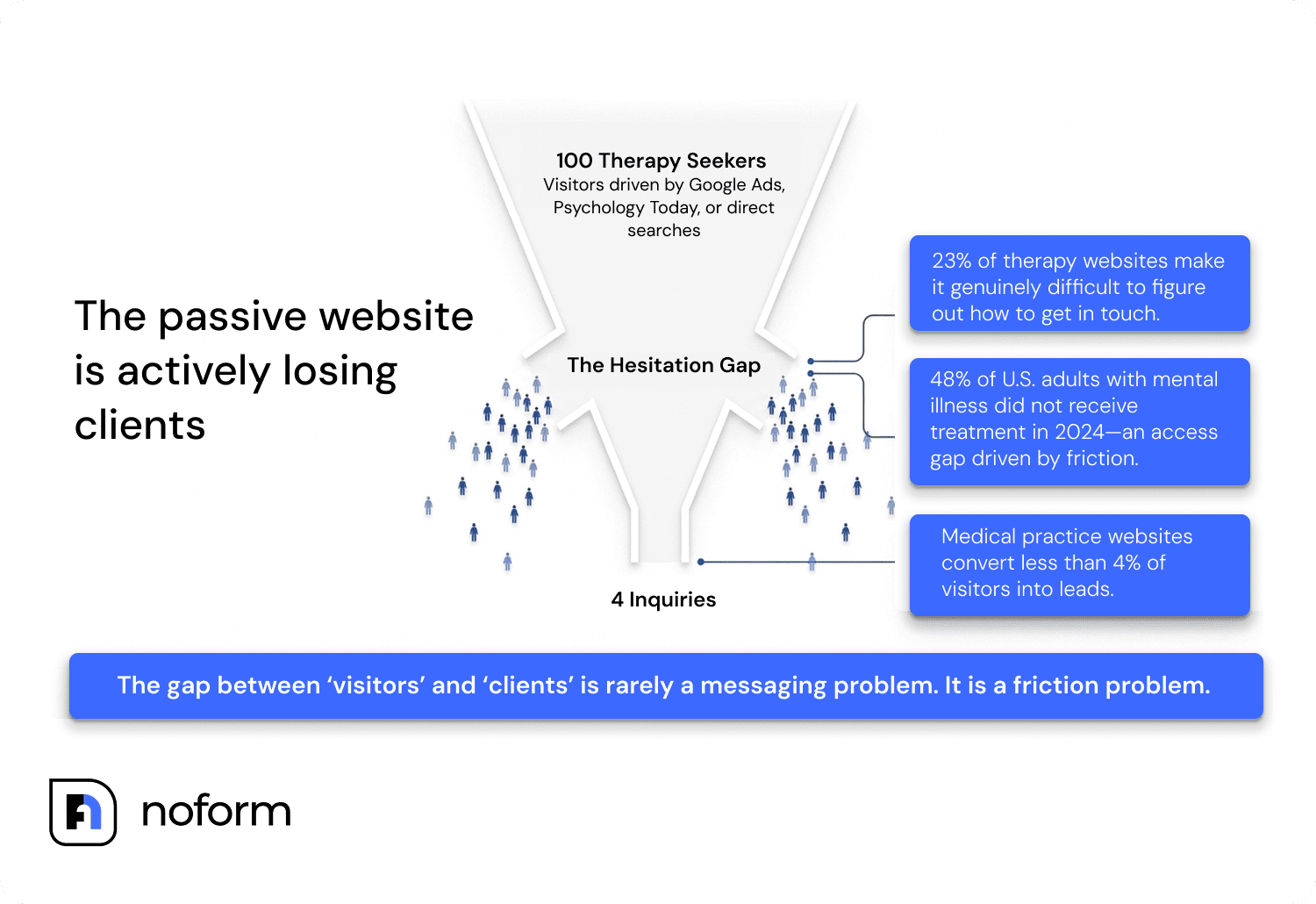
The gap between “visitors” and “clients” on a therapy website isn’t a messaging problem. It’s a friction problem.
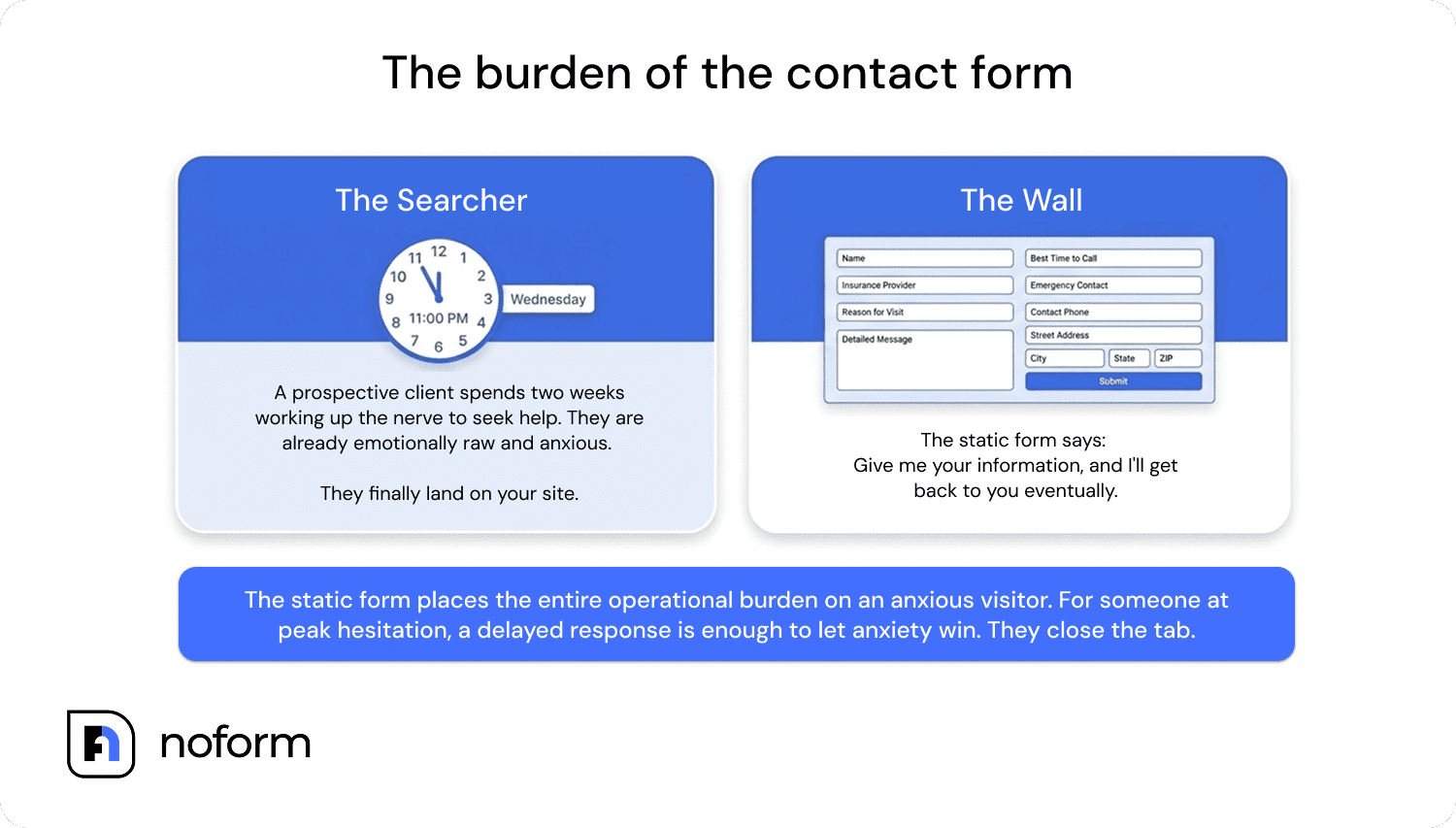
Most practice websites are passive. They describe your training, list your specialties, and maybe include a photo that someone told you should feel “warm and approachable.” Then they put the entire burden on the visitor: call this number during business hours, or fill out this form. For someone who spent two weeks working up the nerve to search for a therapist at 11 pm on a Wednesday, that’s enough to close the tab. A lot of people never come back.
A chatbot for private practice fixes that gap by being there when you’re not.
Why prospective clients leave your website without contacting you
Most therapy websites lose visitors at the exact moment those visitors are ready to act — because the only options are a phone call or a multi-field form, and neither works at 9:30 PM when someone is already anxious.
A 2025 Runner Agency analysis of medical practice websites found fewer than 4% of visitors convert into an inquiry. That means 96 out of 100 people who found your website, people already searching for a therapist, left without contact. A separate BOSS Publishing review of 500 therapist websites found that 23% made it difficult to figure out how to get in contact at all — details buried in footers, forms requiring 15 fields, no indication of response time. If you’re paying for Google Ads or a directory listing to drive that traffic, most of that spend disappears the moment someone hits your homepage and hesitates.
The reason isn’t price or credentials. It’s the ask. A contact form says, “Give me your information, and I’ll get back to you eventually.” For a prospective therapy client — already emotionally raw, already uncertain whether reaching out is the right move — that delay is enough to let anxiety win. They close the tab.
A chatbot doesn’t eliminate that hesitation. It just meets the visitor earlier: before the form, before the ask. It answers whether you treat anxiety, what you charge, and whether you have evening availability. By the time it asks for a name and email, the visitor has already decided your practice might be a fit. That sequencing — answer first, ask second — is why conversational tools convert so differently from forms. NoForm AI’s data shows AI-powered assistants can convert up to 37% of website visitors into leads, compared to roughly 2% who take action on a static site. Your results depend on your traffic volume and how well the chatbot is configured — but the gap is real.
What a practice website chatbot actually does
The category “chatbot for therapists” covers different tools doing different jobs, and conflating them causes real confusion.
There are AI therapy companions like Wysa or Woebot that deliver CBT-based exercises and emotional support directly to users. There are clinical workflow tools that auto-draft SOAP notes or manage scheduling inside your EHR. And there are website lead qualification assistants, which sit on your public-facing website and handle the intake front door.
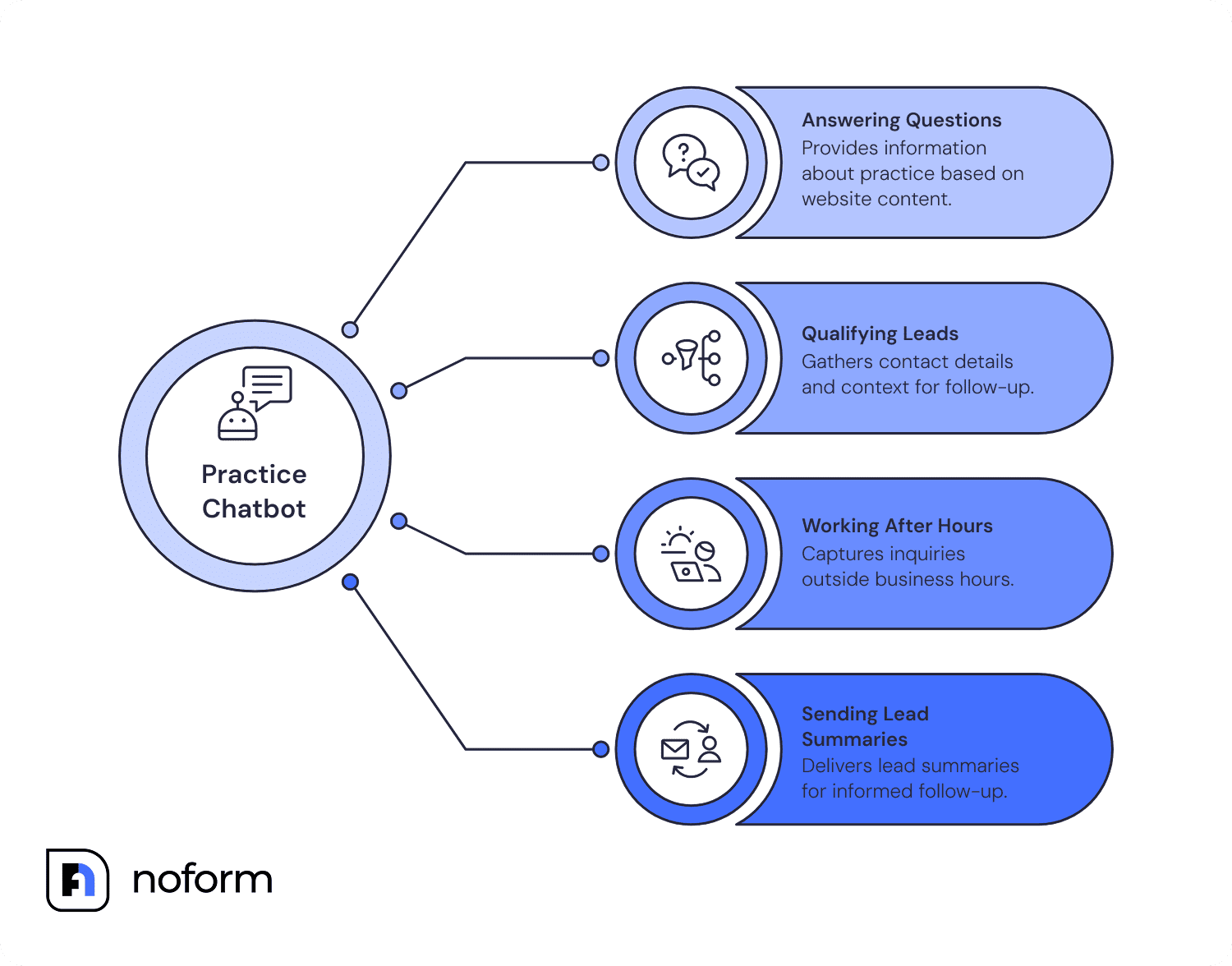
NoForm AI falls in the third category. It’s not a therapy tool. It doesn’t touch clinical workflows, doesn’t do clinical screening, doesn’t triage crises, or provide anything resembling therapy. It lives on your website, talks to prospective clients, and does four things:
- It answers questions about your practice. You train it on your own website content, your about page, your specialties, your FAQs, and your services. When a prospective client asks “Do you work with adults dealing with trauma?” or “Is my insurance accepted?”, the AI answers based on what you’ve told it, not by guessing.
- It qualifies prospective clients. As the conversation develops, NoForm AI gathers the contact details and context a practice needs to follow up effectively: name, email, phone number, and any custom details you define as relevant (location, therapy type, urgency, whether they’re looking for individual vs. couples work). A conversation is flagged as a qualified lead the moment a contact detail is captured.
- It works after hours. This one matters more than it sounds. The majority of online searches for mental health support happen outside 9-to-5. A tool running while you sleep captures inquiries that would otherwise hit voicemail and never come back.
- It sends the lead summary to you. When someone qualifies as a prospective client, NoForm AI sends an email to you or your admin with their contact details, where they’re located, and a short AI-generated summary of what they’re looking for. You get context before you ever pick up the phone, which turns that first call from a cold introduction into a second conversation.
How does a chatbot actually capture leads for a therapy practice?
A chatbot captures leads through progressive profiling — one natural question at a time, rather than a wall of form fields. Instead of presenting a contact form that asks for name, email, phone, and a message all at once, the chatbot gathers that same information through conversation, at the moment when the visitor has enough trust to share it.
The sequence looks like this: the chatbot answers two or three questions, builds some rapport, and then, at a natural moment of peak interest, asks “What’s the best email to reach you?” or “Would it be helpful if one of our therapists followed up with you tomorrow morning?” Most visitors who’ve engaged that far say yes. That’s when the chatbot records their name and contact details as a qualified lead.
With NoForm AI, the moment a visitor provides their email address or phone number, the conversation is automatically flagged as a qualified lead in the dashboard. The therapist or practice manager gets an email notification right away, no need to check a dashboard, with the visitor’s contact details, their location, and a two-to-four sentence AI-generated summary of what they said they need. That summary might read: “Sarah is looking for individual therapy for anxiety and stress management. She’s self-pay and looking to start within the next two weeks. She asked about telehealth availability and whether you work with perfectionism. She’d like a callback tomorrow.”
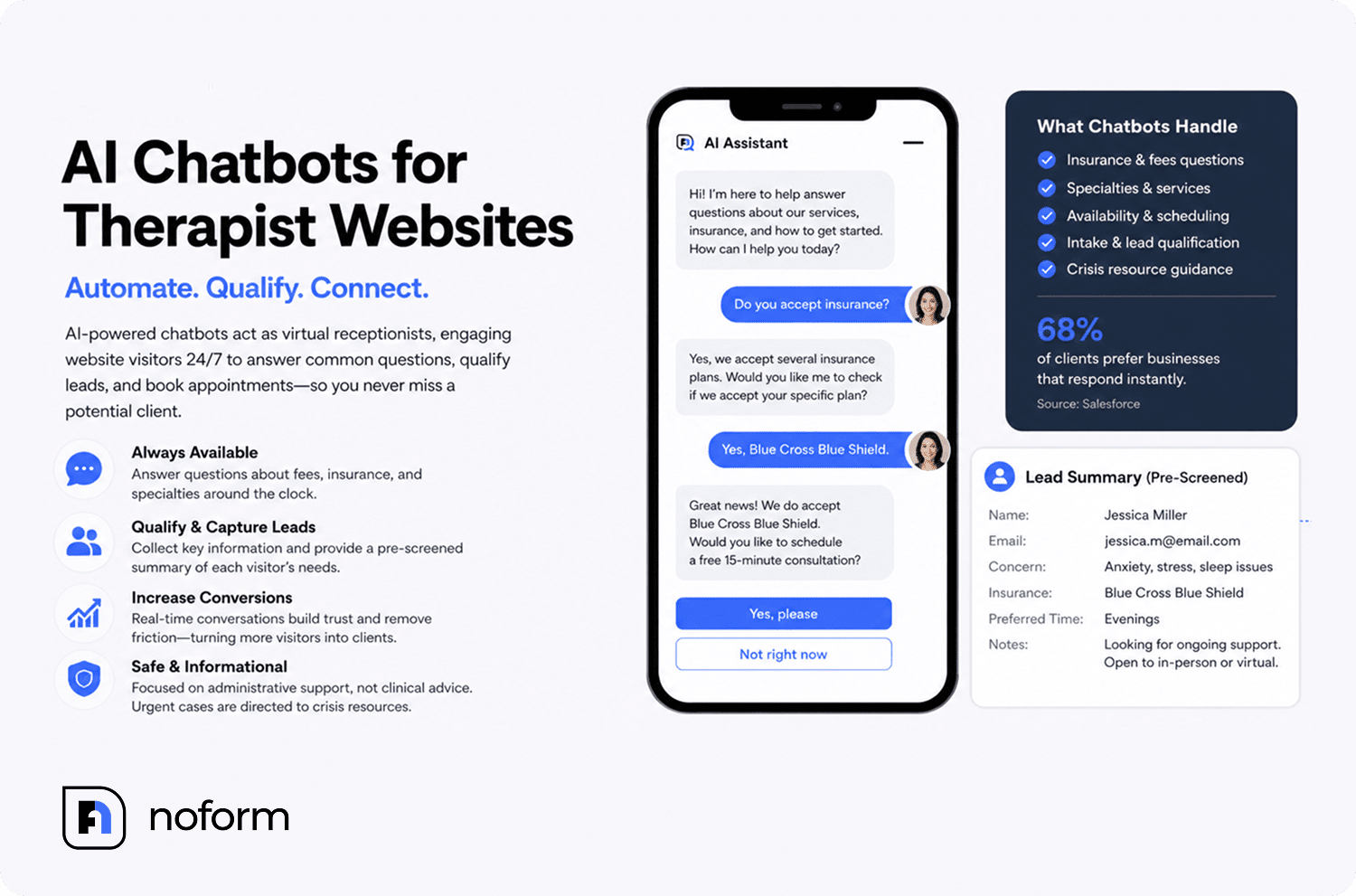
That’s not a cold contact. That’s a warm, pre-qualified lead with context — the kind of introduction that makes the first phone call feel like a second conversation.
Does a therapy website chatbot work for solo practitioners or just group practices?
Solo practitioners often get the most out of a therapy website chatbot because they have no administrative staff to answer FAQs and handle initial inquiries.
If you’re a solo practitioner, every hour you spend answering emails about your fee schedule, your insurance list, and your availability is an hour you’re not seeing clients or doing the work that actually pays. A website chatbot handles that entire category of repetitive pre-inquiry communication — automatically, after hours, to every visitor who lands on your site.
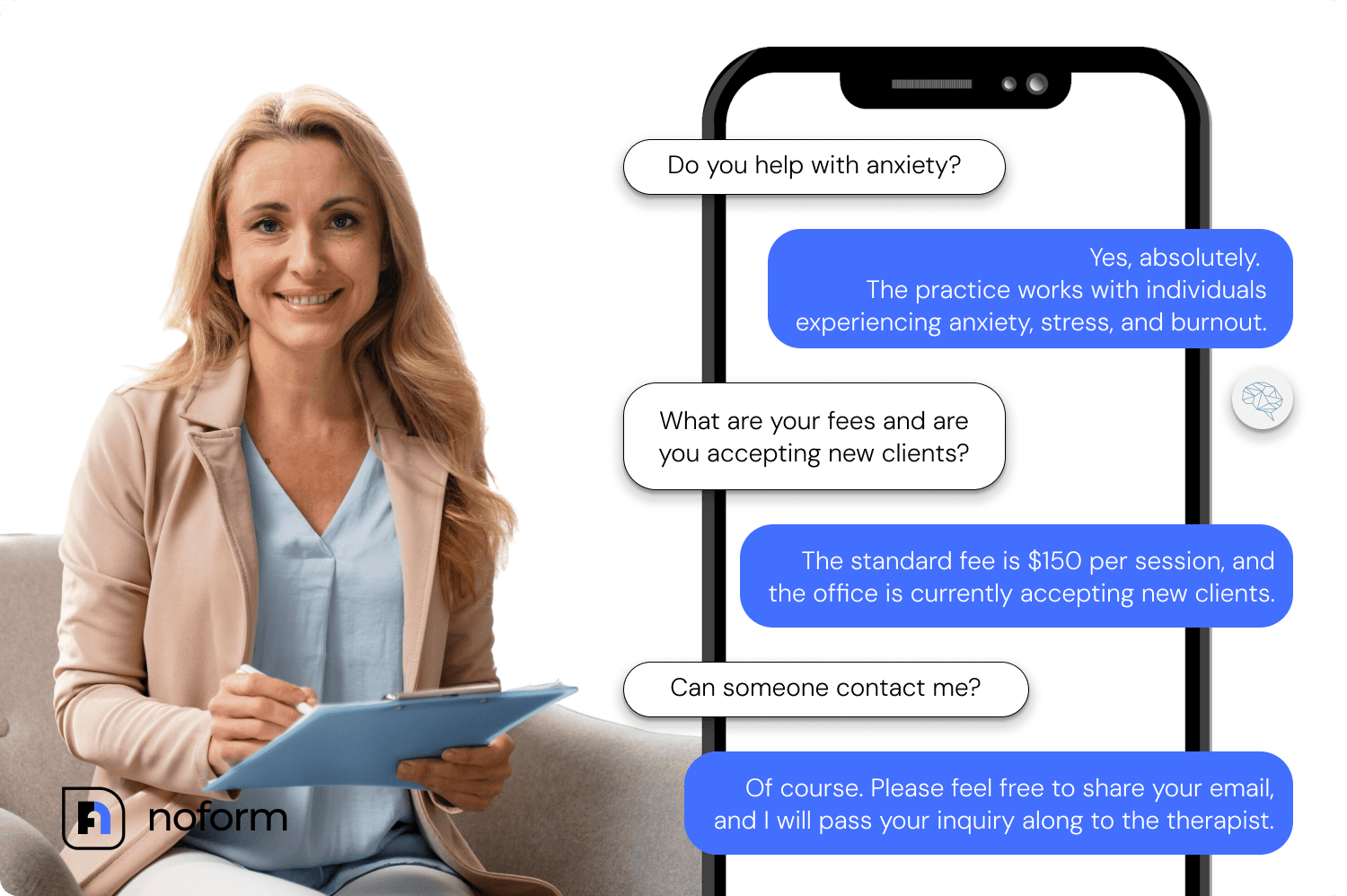
For a solo practice, the setup is minimal. One assistant, trained on your existing website and a few uploaded documents, configured with your specific practice parameters, installed in an afternoon. After that, it runs without you. Every time someone lands on your site at midnight and asks what you charge or whether you treat anxiety, they get an answer. You get their contact details in an email notification the next morning.
Group practices have different needs — multiple providers, multiple specialties, maybe different intake processes for different presenting concerns. NoForm AI supports multiple assistants assigned to different URL patterns, so a group practice can deploy different chatbot configurations for different service pages. A landing page for the adolescent therapy specialty gets a different welcome message and FAQ set than the general “about the practice” page. The default assistant covers everything else.
Psychiatrists specifically have a slightly different configuration consideration: prescribing practices often get a narrower range of pre-inquiry questions (medication management vs. psychotherapy, new patient process, whether they accept Medicare/Medicaid), but the same principle applies. Answer those questions first, earn the contact details, and set up the intro call.
How to set up NoForm AI on a therapy practice website
Setting up NoForm AI on a therapy website takes minutes, no coding required. Here’s exactly how it works:
Step 1: Train the AI on your practice content
Go to noform.ai, enter your website URL, and create an account. NoForm AI scans your existing pages (services, bio, FAQ, rates) and builds its knowledge base from what’s already there. You don’t write scripts or design conversation flows. If your website already explains what you do, the AI has what it needs.
Add anything your website doesn’t cover by uploading documents in the Training Center: insurance list, practice policy sheets, and new client FAQs. This is worth doing before you go live, because the most common reason a therapy practice chatbot gives a wrong answer is a knowledge gap, not a configuration error.
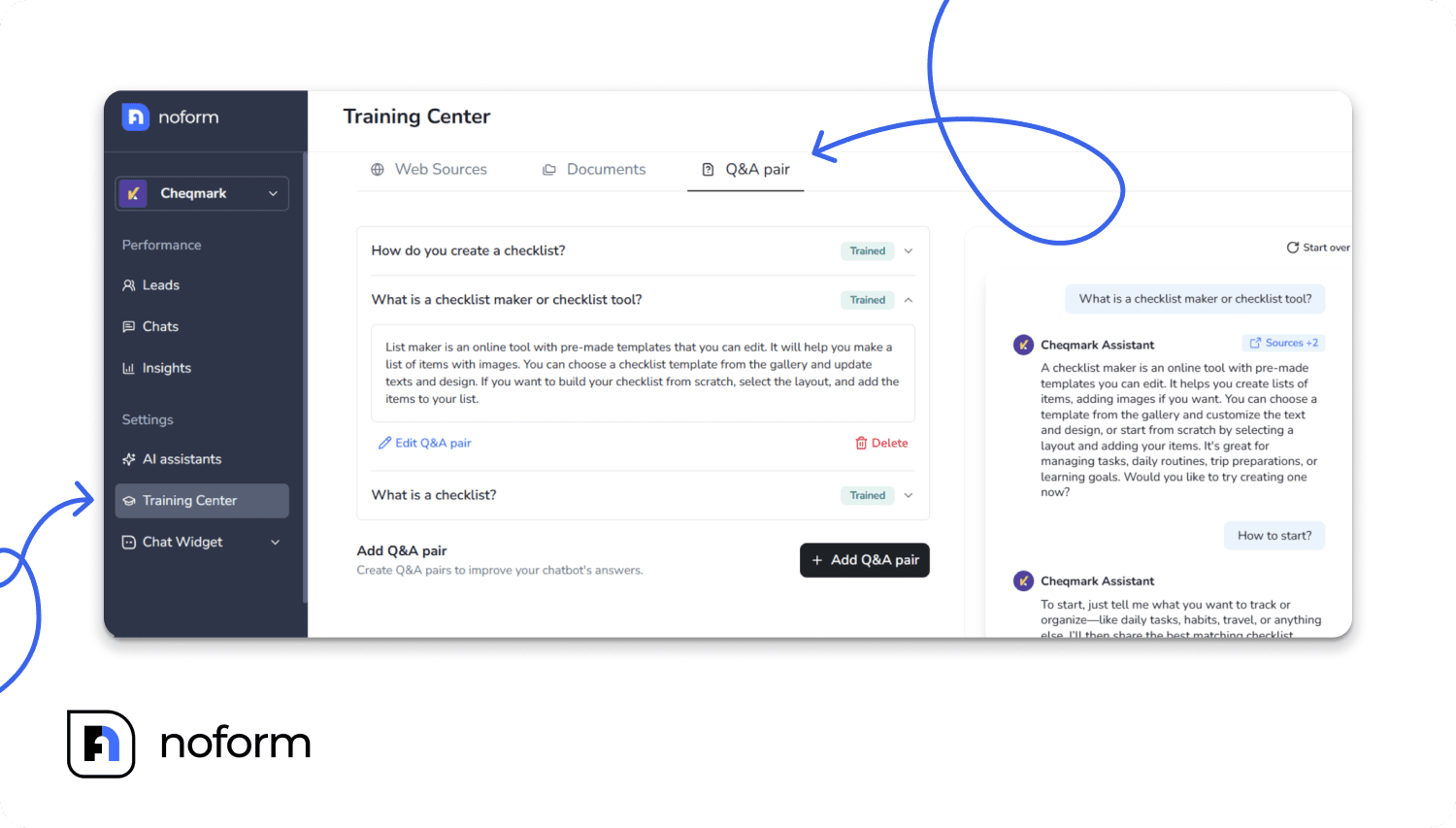
Step 2: Configure your assistant for a therapy practice
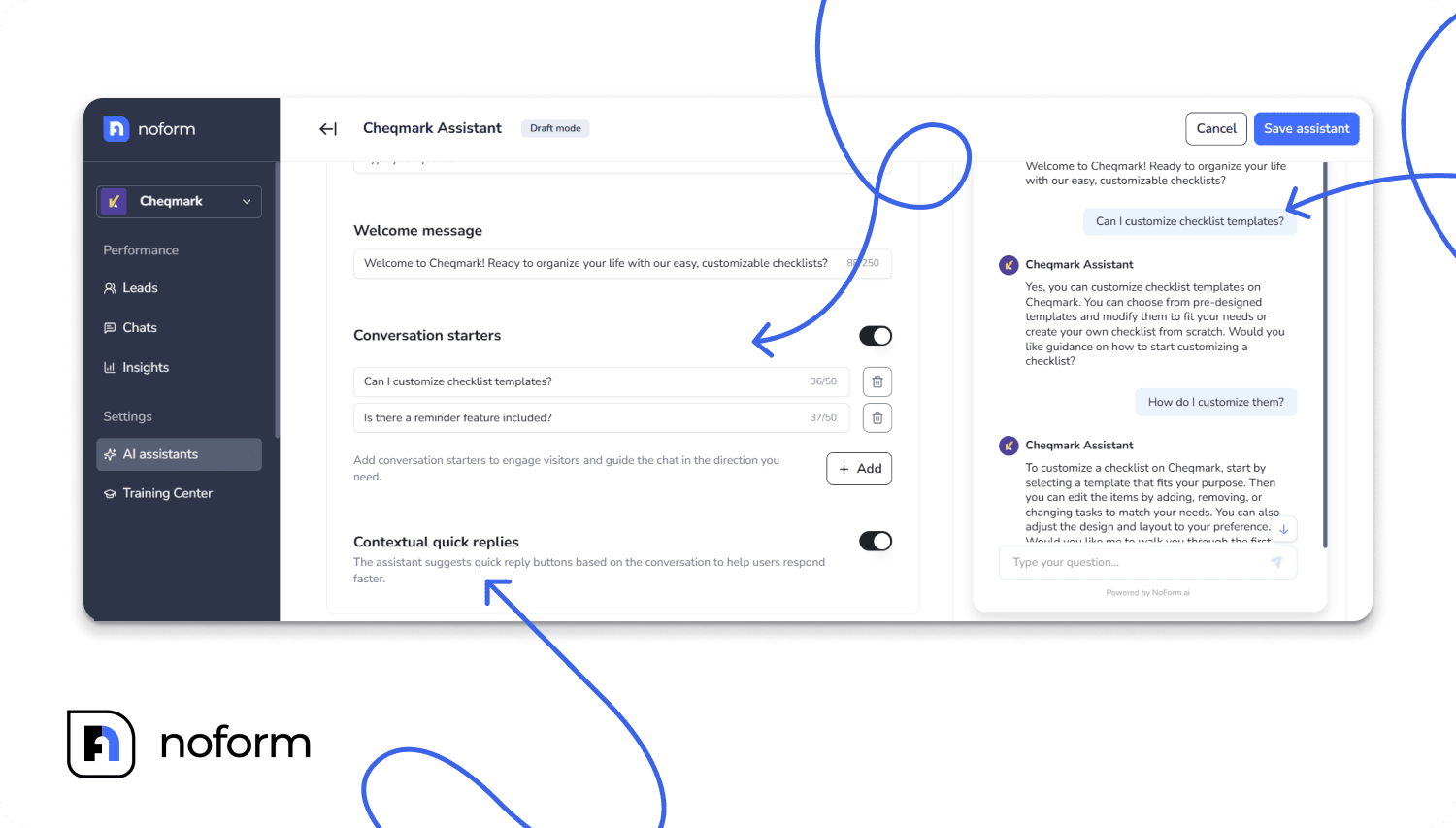
Name the assistant and write its welcome message. “Sarah from [Practice Name]” works better than “AI Assistant” — it signals a person, not a bot. The welcome message is what a hesitant visitor sees first, so make it ask something specific they can answer in two words: “Hi, I’m Sarah — are you looking for support for yourself, or for someone else?” A generic “How can I help you today?” puts the burden back on them.
Set two to four conversation starters based on your most common pre-inquiry questions. If you’re unsure what those are, check your voicemail and email inbox. The questions that show up there most often belong here as clickable openers: “Do you take my insurance?”, “Are you taking new clients?”, “How do I book a consultation?”, “Do you offer telehealth?”.
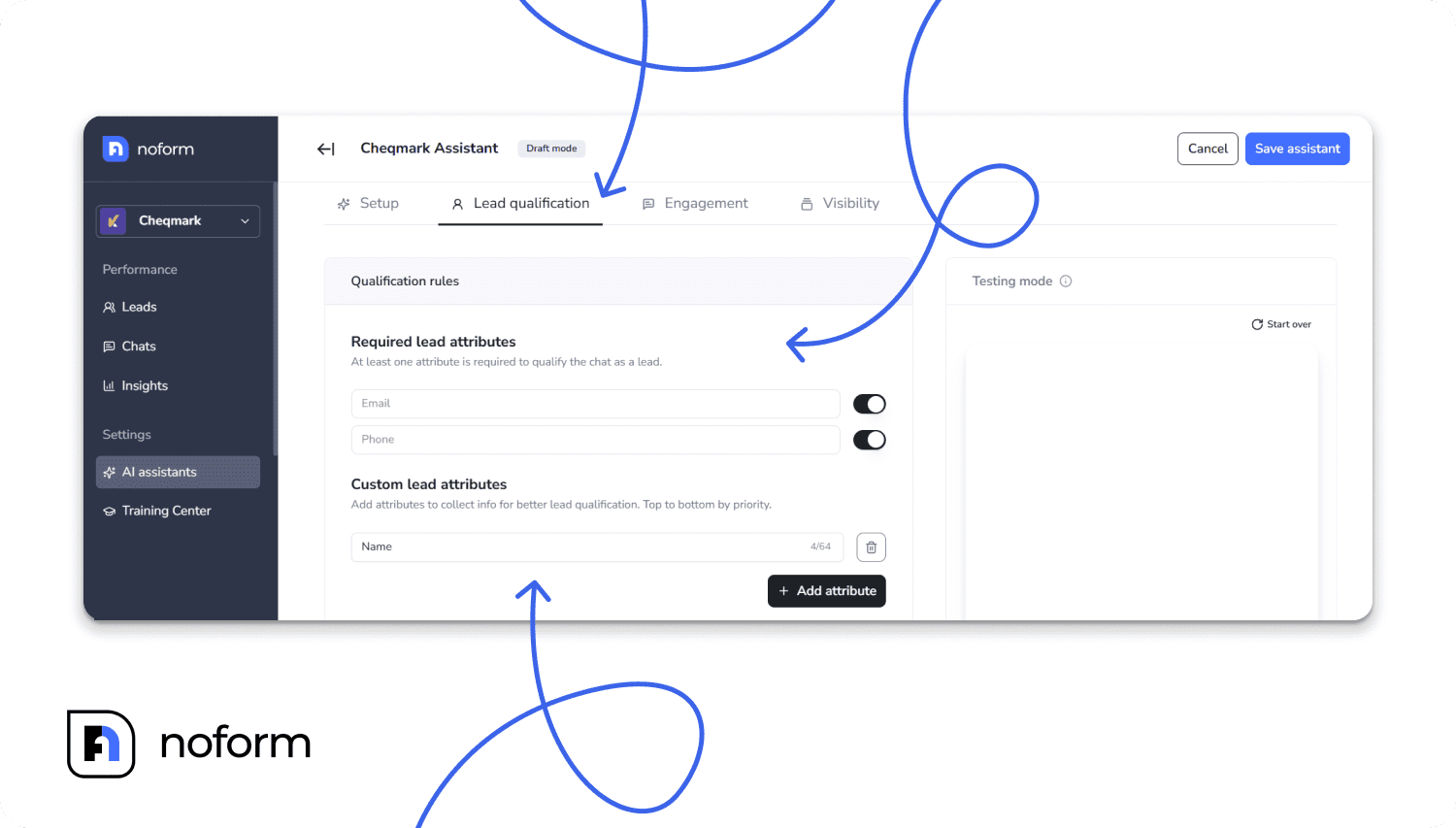
Step 3: Set your lead qualification rules
Tell NoForm AI to collect email and/or phone number at a minimum. Add a custom attribute if it helps you route or qualify: “type of therapy sought” (individual, couples, teen, family) gives you useful context before the follow-up call without crossing into clinical intake.
Step 4. Write the behavior guidelines explicitly
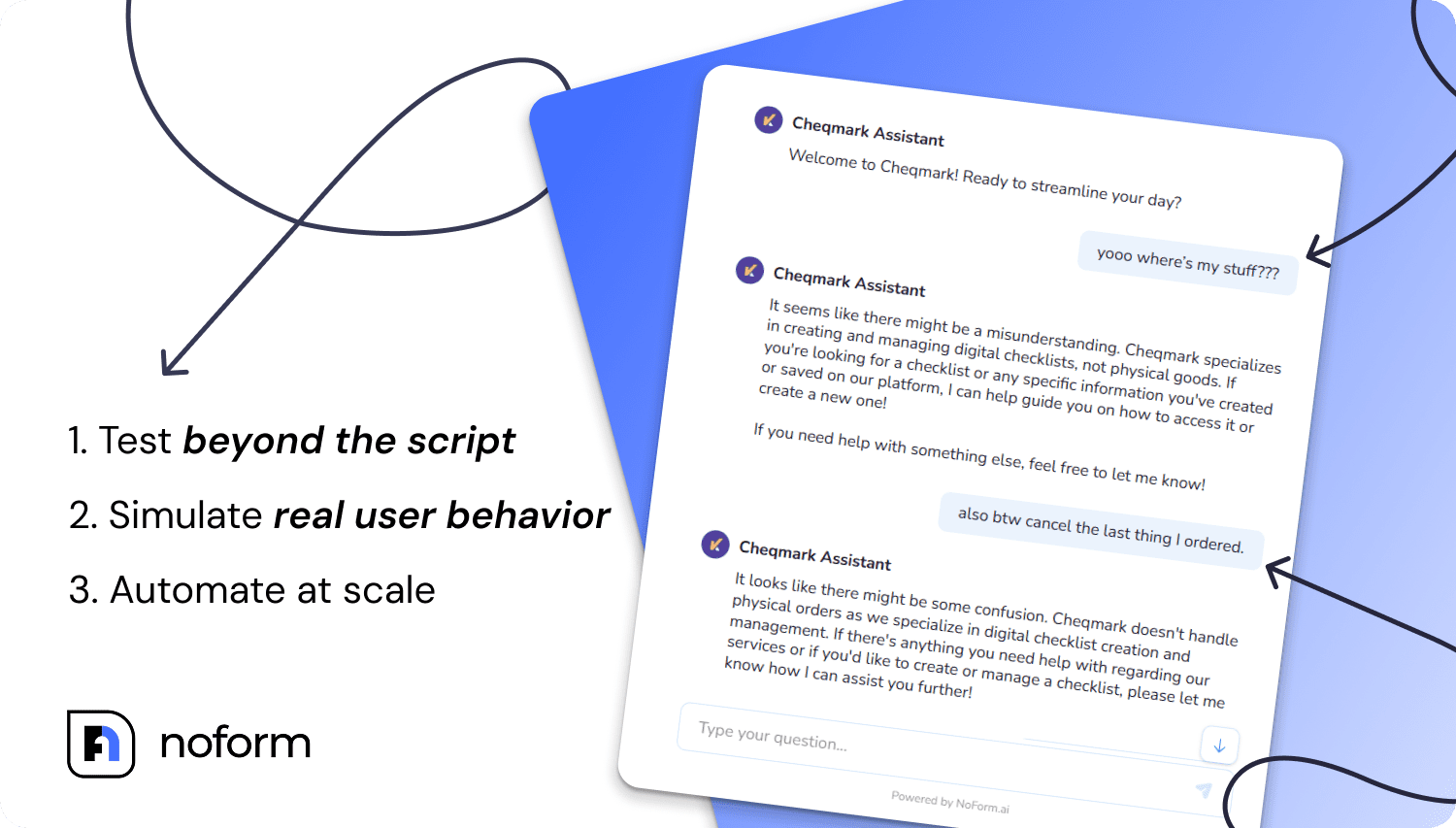
This is where you set what the assistant will and won’t do, and for a mental health practice, being explicit here matters. Write it out: the assistant answers questions about fees, specialties, and the new client process; it doesn’t ask about symptoms, medical history, or anything that would appear on a clinical intake form; if a visitor expresses acute distress, it acknowledges warmly, provides the 988 Suicide and Crisis Lifeline number, and asks for contact details so you can follow up directly.
Test that last scenario before you go live. Run it yourself. Type something that expresses distress and see what the assistant does. If it doesn’t route correctly, adjust the guidelines and test again.
Step 5: Set up the contact capture ask
After answering a few questions, the assistant asks for contact details. Configure the phrasing to feel earned: “I can have [therapist name] reach out to you directly — what’s the best email or number?” That’s a different ask than “Please enter your information below.” The visitor has already invested in the conversation. The request lands differently.
Step 6: Install and go live
NoForm AI supports all major website builders, including WordPress, Squarespace, Wix, Webflow, Framer, and Shopify. If your practice runs on WordPress, you can install the official NoForm plugin from the plugin directory, activate it, and paste your unique Bot ID to launch.
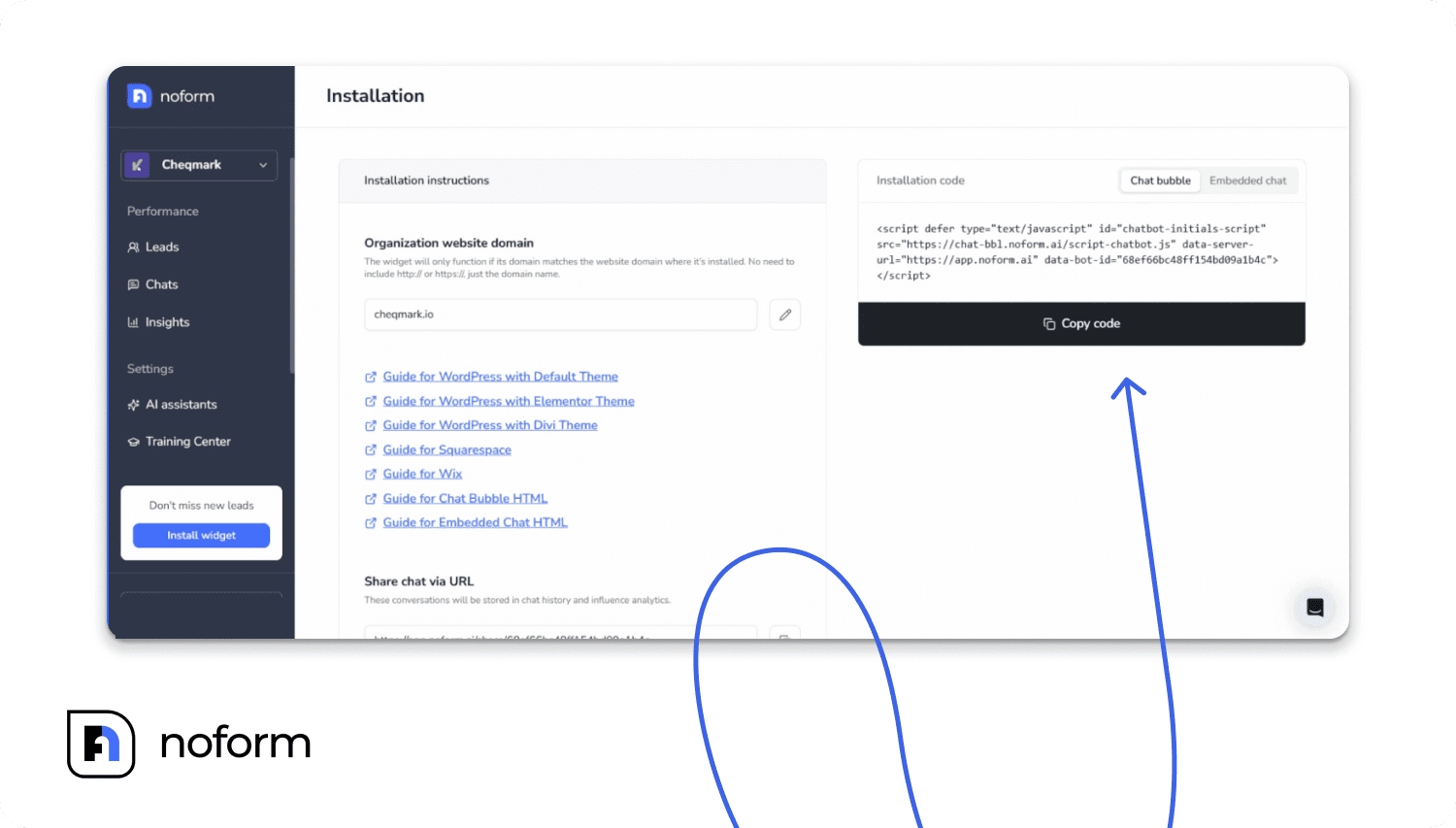
For all other platforms, you copy a single line of code from your dashboard and paste it directly into your website’s global header block.
Use the built-in testing mode for a final check before flipping live. Run five or six realistic conversations — someone asking about fees, someone asking about a specialty you don’t treat, someone expressing distress. Fix anything that’s off. Then go live.
What results can a therapy practice realistically expect?
A chatbot won’t fix a website with no traffic, but if you’re already getting visitors and losing most of them without a contact, it has a real job to do. Conversational AI can improve conversion rates by 25 to 35% compared to static forms, and businesses using AI-powered sales assistants report capturing up to 37% of website visitors as leads. These are directional benchmarks, not guarantees for every practice, but they reflect the core dynamic: conversation converts better than forms.
The more relevant metric for most therapists is a simpler one. If your website currently gets 200 visitors per month and converts 2% of them (4 people), even a modest improvement to 4-5% means 8-10 inquiries instead of 4, potentially doubling your new client pipeline from the traffic you already have, without spending more on advertising.
The timing advantage is just as significant as the volume one. 78% of clients buy from the first company to respond to their inquiry. And according to Harvard Business Review research, responding within five minutes makes a lead 21 times more likely to convert than waiting 30 minutes. A chatbot responds in under three seconds, at any hour. That’s an edge that’s genuinely hard to replicate with a phone or email.
Closing
Most therapy websites are built like brochures — here’s who we are, here’s what we do, contact us if you’re ready. But prospective clients rarely arrive ready. They arrive curious, uncertain, and frequently outside office hours. A chatbot doesn’t pressure them. It answers their questions about fees, availability, and specialties. It builds just enough trust for them to share a name and email. Then it hands them to you.
If you’re already getting traffic from Google, directories, or social media, you don’t need more visitors. You need more of the ones already there to turn into a conversation. That’s the entire job of a therapist website chatbot: not to replace your clinical work, but to make sure fewer potential clients disappear before they ever reach you.
Ready to stop leaking website traffic? Set up your NoForm AI assistant today.
Frequently Asked Questions
Is a chatbot on a therapy website HIPAA compliant?
It depends entirely on what data you allow the tool to collect. If your chatbot strictly captures top-of-funnel marketing details—like a visitor’s name, email, and preference for individual or couples therapy—it doesn’t handle Protected Health Information (PHI). The moment a bot asks about specific symptoms or mental health history, it crosses into clinical territory and requires a signed Business Associate Agreement (BAA).
NoForm AI is GDPR and CCPA compliant, with encryption for stored visitor data. Its function is capturing a contact and a brief expression of interest, not collecting clinical intake data. For your specific deployment, get advice from a healthcare compliance attorney before going live.
Will my chatbot give wrong or harmful advice?
When trained and configured correctly, it won’t. NoForm AI trains on the specific content of your practice website — not generic internet data. Its BEHAVIOR GUIDELINES can explicitly instruct it to stay within informational territory, acknowledge questions outside its scope, and always direct visitors to contact you directly or call a crisis line for anything urgent. It does not have access to clinical training.
Will a chatbot replace my receptionist or front-desk staff?
No. It handles the top-of-funnel work: answering repetitive inquiries and collecting contact details from prospective new clients. A NoForm AI chatbot automates up to 80% of common pre-clinical inquiries, so your team spends time on work that actually requires a human. Existing client communication, scheduling changes, and clinical coordination stay with your staff.
Can I use a chatbot to automate consultation bookings for my practice?
A website chatbot can capture contact details and direct prospective clients to your booking link — but it doesn’t have a built-in calendar or scheduling system. NoForm AI can be configured to include your scheduling link in its responses (a link to Calendly, Jane App, SimplePractice’s booking page, etc.), but the booking itself happens in your existing scheduling tool.
Can I use different chatbots for different pages on my practice website?
Yes. NoForm AI supports multiple assistants assigned to specific URL patterns. You could configure a different welcome message and conversation starter set for your “specialties” page versus your general homepage, for instance.