
Manual lead qualification drains time and slows down sales. Teams waste hours chasing incomplete forms, sorting through vague replies, and guessing which leads are worth their attention — all while better opportunities slip through the cracks.
That’s why more businesses are shifting to automation. 36% add AI chatbots to their websites to capture more leads, and 62.5% use them specifically for lead qualification.
If you’re wondering, “How do chatbots qualify leads?”, the answer is simple: faster, smarter, and without the chaos.
Let’s break down exactly how it works — and why your sales team can’t afford to keep doing it the old way.
What is lead qualification?
Lead qualification is the process of deciding whether someone who shows interest in your product or service is likely to buy.
It helps teams stop wasting time on the wrong potential customers and focus on the ones with real potential for conversion — people who need what you offer, can afford it, have the authority to say yes, and are ready to make a move soon.
Despite how crucial the qualification process is, many teams still skip it. In fact, around 61% of B2B marketers pass every lead to sales, even though only 27% of those leads are actually qualified. That clogs pipelines and wastes time. Even worse, 67% of lost deals happen because sales reps chase leads that were never a good fit to begin with.
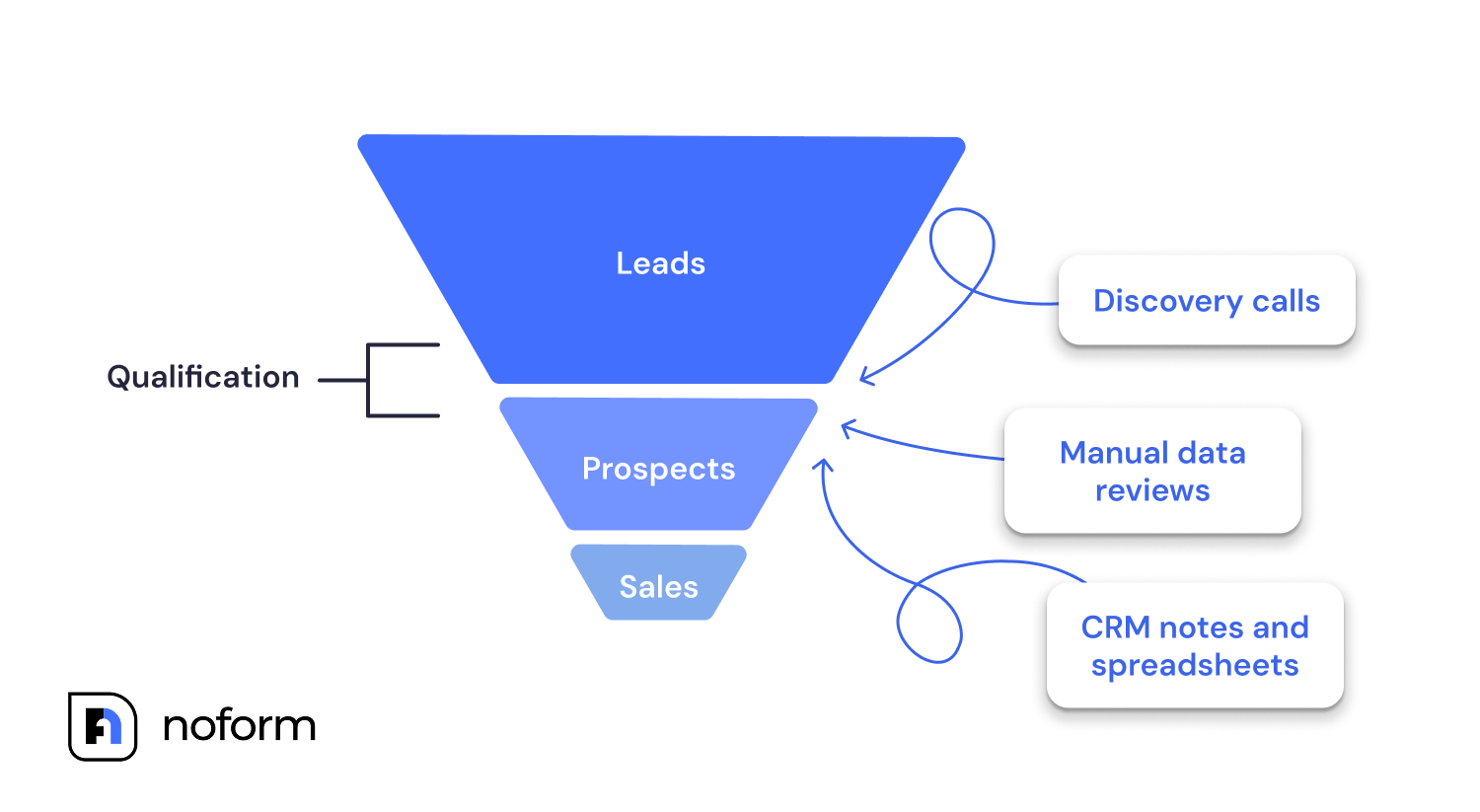
Even when marketing teams don’t skip this part of the lead capture process, many still rely on outdated methods that no longer hold up and stall business growth:
- Discovery calls: A sales agent manually calls each lead to ask qualifying questions. The process is slow, depends on the rep’s consistency, and doesn’t scale when you’re dealing with high volumes of website visitors.
- Manual data reviews: Leads fill out static forms, and someone sifts through each one to assess fit. Without standardized criteria, decisions are based on vague or incomplete lead information, making it easy to overlook qualified prospects.
- CRM notes and spreadsheets: Lead data is entered by hand, spread across disconnected tools, and shared informally. This often causes delays and misalignment between teams.
These methods slow teams down and don’t scale. As website visitors grow, manual reviews drain resources, introduce human error, and produce inconsistent lead data. Response times lag, and by the time someone follows up, high-intent leads have often moved on.
Automation for tasks like lead qualification solves this. With clear rules and consistent logic, automated systems evaluate leads instantly. The qualification process becomes streamlined, giving your marketing team and sales reps the data they need to move fast.
What is a lead qualification chatbot?
A lead qualification chatbot is an automated assistant that interacts with website visitors in real time to identify who’s a serious lead and who isn’t. It replaces static forms and delayed follow-ups with instant, relevant conversations — guiding potential buyers through the sales funnel while collecting the information your team actually needs.
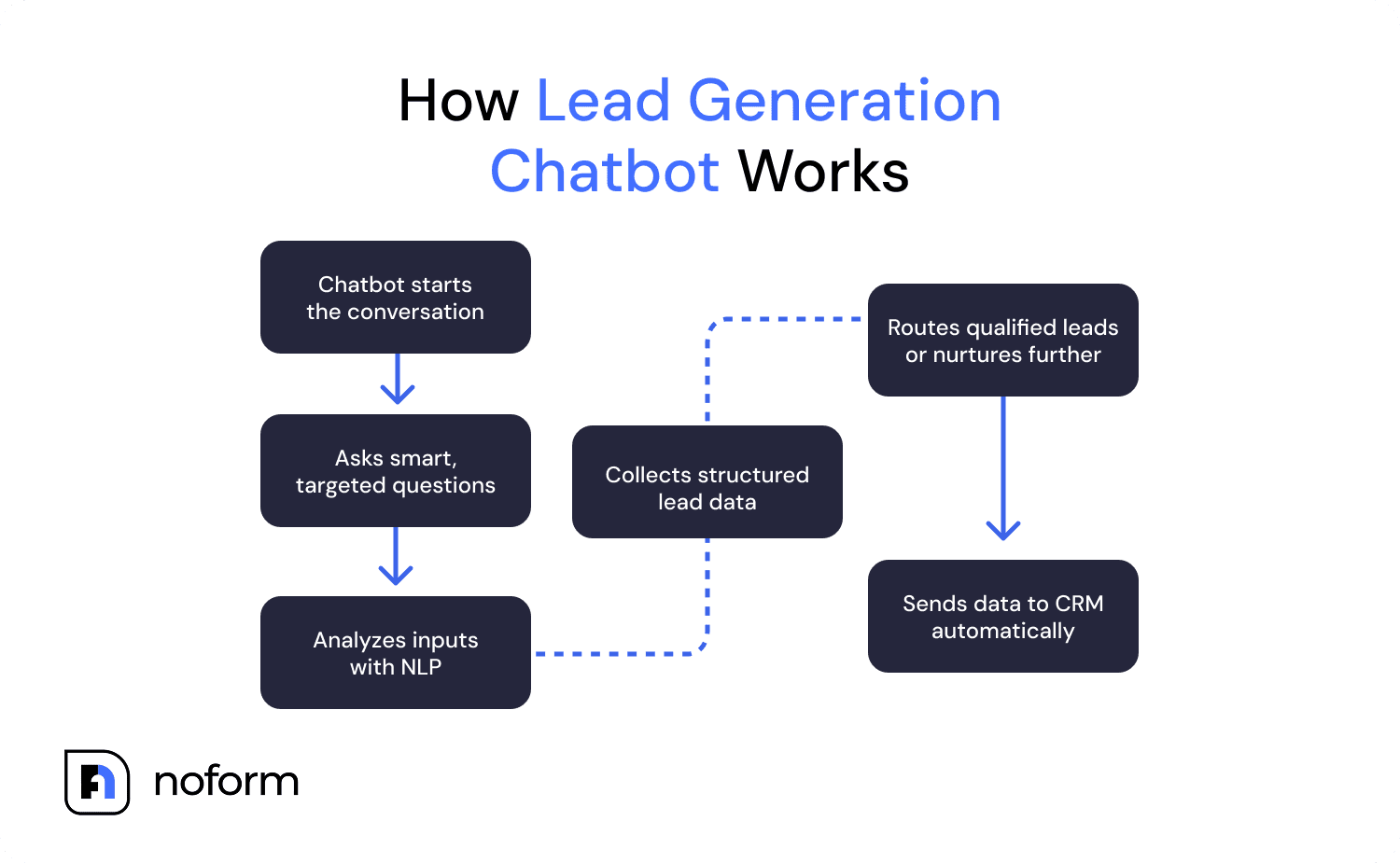
Here’s how it works:
- It starts a chat the moment someone lands on your site
- It asks targeted questions based on visitor responses
- It collects and stores lead information automatically
- It routes qualified leads to your team or continues nurturing
Unlike traditional bots, AI chatbots use natural language processing to hold natural conversations that feel human, not robotic. This improves the customer experience from the first interaction and keeps more visitors engaged.
NoForm AI, for example, is built specifically for this. As a qualification chatbot tool, it automates the filtering process, personalizes each interaction, and scales effortlessly across campaigns — no extra headcount needed.
And the impact is real: AI-powered sales assistants can convert up to 28% of website visitors into leads. That kind of performance comes down to three key capabilities that make qualification chatbots so effective:
- Real-time engagement: They connect with visitors the moment they land on your site, capturing attention while interest is fresh.
- Smart questioning: Instead of running through a fixed script, AI chatbots use logic-based flows to ask relevant, response-driven questions — qualifying leads with accurate input.
- Automated data collection: As they chat, bots gather structured lead information (contact details, company size, industry, needs, and budget) and send it straight into your systems via CRM integration, reducing the risk of data gaps and errors.
What features should a lead qualification chatbot have?
Not every chatbot is built for lead qualification. A general-purpose support bot and a lead qualification bot are very different tools — and choosing the wrong one means collecting chat transcripts instead of qualified contacts.
Here are the core features to look for in an AI chatbot built specifically for lead qualification:
BANT-based questioning logic. The bot should ask questions that map to Budget, Authority, Need, and Timeline — not just “How can I help you today?” BANT is the qualification framework most B2B sales teams already use, and a good chatbot operationalizes it conversationally without it feeling like an interrogation.
Custom lead attributes. Every business qualifies leads differently. A SaaS company cares about company size and tech stack. A local contractor cares about location and project timeline. Look for a chatbot that lets you define custom data points — beyond just name and email — so the bot collects what actually matters to your sales team.
Automatic lead flagging. The moment a visitor provides an email or phone number, the conversation should be marked as a qualified lead and trigger a notification. That’s the signal your team needs. It shouldn’t require someone to manually review every transcript.
CRM sync. Qualified leads are useless if they sit in a separate dashboard nobody checks. The chatbot should push lead data — including a summary of what the visitor said — directly into your CRM via integration tools like Zapier or Make.
AI-generated conversation summaries. A lead qualification bot that just stores raw transcripts doesn’t save your team much time. The best ones auto-generate a 2–4 sentence summary of each conversation: what the visitor needed, what they said their budget was, and what the agreed next step is. Your sales rep picks up the phone already knowing the context.
Multi-page targeting. A pricing page visitor and a blog reader are at very different stages. Look for a chatbot that lets you assign different assistants — with different opening messages and qualification criteria — to different pages or URL patterns.
NoForm AI includes all of these out of the box. You can configure lead attributes, write custom qualification logic, set page-specific welcome messages, and connect to your CRM without touching a line of code.
How AI chatbots qualify leads, step-by-step
Now that we’ve covered what qualification chatbots are, let’s walk through how they qualify leads step by step. From the first interaction to passing detailed lead data to your sales team, AI chatbots handle the key parts of the lead generation process efficiently.
Here’s how chatbot software features help businesses streamline lead qualification.
Instant engagement, 24/7 availability
Traditional qualification methods depend on timing: reps being available, leads filling out forms during office hours, and follow-ups happening when someone’s free. And even if you’ve got a full team on standby, those small gaps — seconds of hesitation, delayed replies — add up quickly. Before you know it, the lead’s gone.
According to HubSpot research, businesses that contact new leads within five minutes are nine times more likely to convert them into qualified opportunities.
AI chatbots remove that dependency entirely. They automate lead qualification flows around the clock — NoForm AI chats initiate conversations with website visitors the moment they arrive, no matter the time zone or hour.
This always-on approach eliminates wait times and drastically reduces the chances of leads slipping through the cracks.
Asking predefined, strategic questions
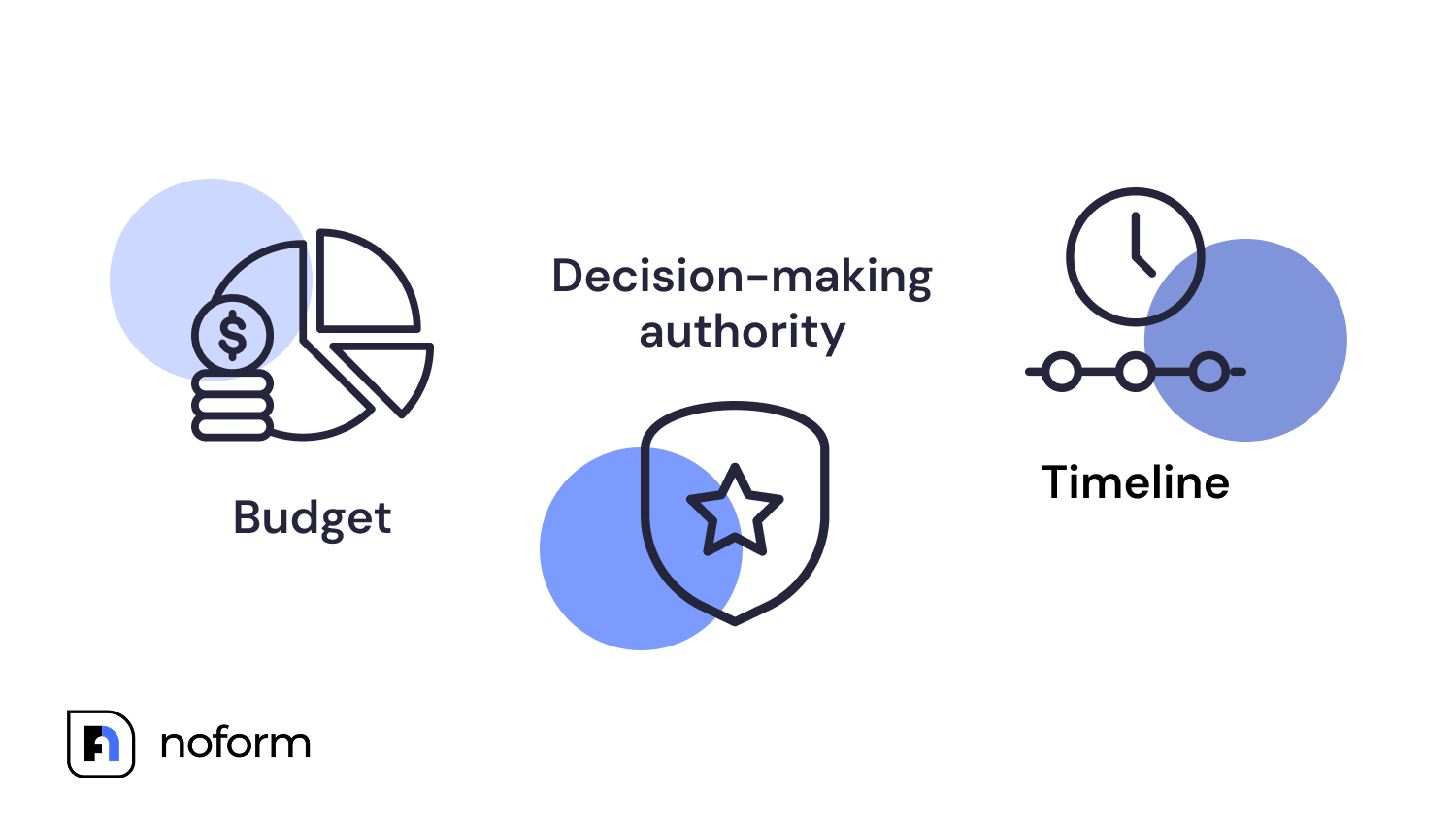
Once a visitor engages, the chatbot shifts into qualification mode. Using a custom list of questions, it focuses on the criteria that matter: Budget, Authority, Need, and Timeline — the classic BANT framework.
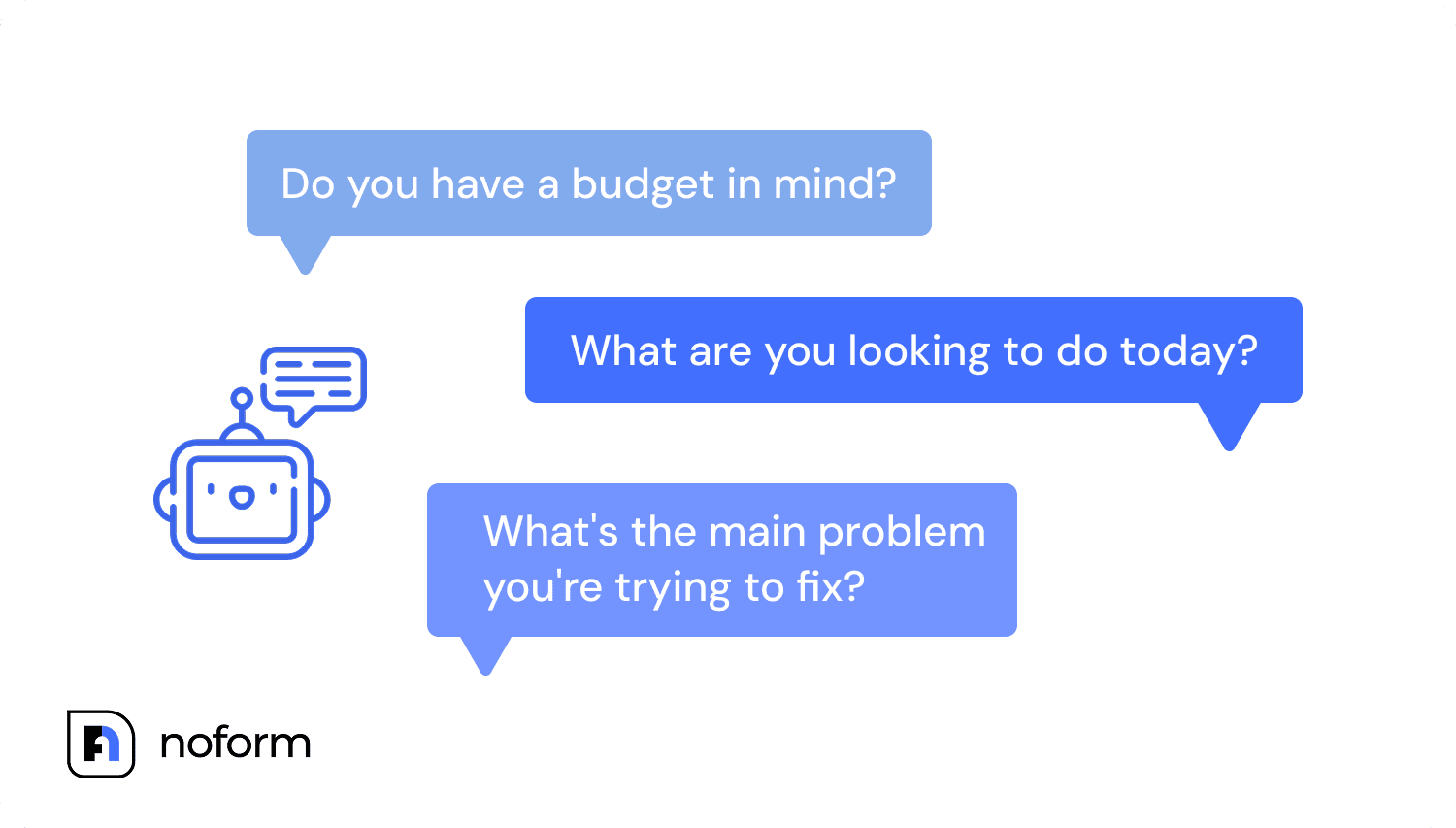
It can also ask about location, goals, pain points, or product preferences, depending on your setup.
Here are some common questions you can configure your chatbot to ask:
- What are you looking to do today?
- Are you currently checking out options like this?
- Do you have a budget in mind?
- Will you be making the final decision?
- What’s the main problem you’re trying to fix?
- When would you like to get started?
Validation and clarification
Even the best-designed list of questions can’t guarantee a correct answer. Visitors often type in half-thoughts, vague timelines, or use casual language that static systems can’t interpret. That’s where Natural Language Processing (NLP) becomes essential.
Chatbots built with NLP and machine learning go beyond keywords — they analyze phrasing, context, and tone to understand what the lead really means.
If someone types, “Maybe next quarter if things go well,” the bot doesn’t stall. It recognizes the intent, identifies the uncertainty, and follows up with a clarifying question, just like a skilled human agent would.
Analysis and intent recognition
Beyond simply processing responses, AI chatbots also evaluate what those responses mean in context.
As the conversation progresses, chatbots help assess how well a potential lead aligns with what you offer. It looks at signals like urgency, specific needs, budget indicators, and even interest in additional products to determine whether the lead is ready to engage or needs more time.
As a result, you know who’s ready to move forward, so your team can focus on the hottest leads.
Scoring leads based on key criteria (e.g., Budget, Authority, Need, Timeline)
Not every lead is worth the same conversion effort, and qualification chatbots are designed to recognize that. As they collect responses, they score each lead against set criteria (like budget, timeline, decision-making authority, and specific needs), turning vague input into a clear, numerical value.
Yes, company size, including the number of employees, is a standard qualifying criterion you can configure. If your product targets teams of 50 or more, for example, the bot can factor in that data point and score down leads that don’t meet the threshold.
That score becomes the foundation for segmentation. A high score signals someone who’s ready to buy. A lower one might indicate a basic prospect who still needs nurturing. Anything below your threshold? Low priority for now.
By making scoring part of the base process, chatbots deliver a ranked list and sort leads into segments for targeted follow-up.
Data storage and handoff
Once the conversation ends, the chatbot doesn’t just disappear. It logs all key details — questions, responses, and lead data — and sends them to your CRM or connected customer service platform.
Tip: Configure a notification message to alert your team in real time when a qualified lead comes through, offering smooth round-the-clock service.
For instance, NoForm AI integrates with thousands of popular tools through connectors like Zapier and Make, keeping lead data synced across your software stack and ensuring nothing slips through the cracks.
With this setup, sales reps can pick up right where the chatbot left off, avoiding repeated questions and keeping the handoff smooth.
Personalized experience based on past interactions
With full chat history carried over, the lead generation chatbot does more than transfer information; it maintains continuity. When a lead returns or progresses, the bot can reference past exchanges to adjust its approach. It skips repeated steps, adapts questions, and keeps the interaction moving forward.
That same data is available to chat operators and sales agents, too. They can tap into contextual data to personalize emails, calls, or demos and make every touchpoint more relevant and effective.
How do chatbots qualify b2b leads?
B2B lead qualification has its own set of challenges. The buying cycle is longer, the decision involves multiple stakeholders, and the wrong lead can tie up a sales rep for weeks before going nowhere. Chatbots handle this differently from generic consumer qualification — and the difference matters.
The typical B2B qualification flow through a chatbot looks like this:
- Identify the company fit first.
The bot asks about company size, industry, and current tools before it asks for contact details. If a visitor is a solo freelancer and your product only serves teams of 10+, that’s surfaced in the first two exchanges before any sales rep time is spent.
- Qualify the decision-maker.
One of the most time-consuming parts of B2B sales is discovering, two calls in, that the person you’ve been talking to can’t actually sign off on a purchase. A well-configured chatbot asks “Will you be the one making the final decision?” early and routes responses accordingly.
- Collect BANT before the first call.
By the time a B2B lead reaches your sales team through NoForm AI, you already have their budget range, their timeline, their primary use case, and their contact details in a 2–4 sentence summary. The first sales call becomes a second conversation, not a cold introduction.
For B2B companies using conversational AI for lead qualification, the result is a cleaner pipeline. Salespeople spend their time on the leads most likely to convert, and the chatbot handles the initial filtering at scale without adding headcount.
How to use NoForm AI for lead qualification: Setting up a lead qualification chatbot
You don’t need to be a developer, a chatbot expert, or someone with 14 browser tabs open just to get started. With NoForm AI, creating a chatbot for lead qualification is quick, painless, and entirely code-free. Here’s how to go from zero to qualified leads in just a few steps.
1. Define what makes a lead qualified
Before building your chatbot, you need to decide what a “qualified” lead actually looks like. This step sets the foundation for everything that follows.
Start by creating an Ideal Customer Profile (ICP) that includes:
- Key pain points your product solves
- Budget range that aligns with your pricing
- Decision-making authority (who signs the deal?)
- Realistic purchase timeline
Next, rank these criteria based on their impact on purchase readiness. For example, budget and authority might take priority over company size or timeline. This helps your bot focus on leads most likely to convert and avoid wasting time on low-value signals.
Finally, create a variable list of the data you want to collect. This helps shape the conversation flow and ensures your CRM gets the info it needs. Typical data points might include:
- First and last name
- Email address
- Phone number
- Company name
- Job title
- Industry
- Estimated budget
- Timeline to purchase
2. Train your AI chatbot for lead qualification
Once you know what a qualified lead looks like, it’s time to train your chatbot to speak in your tone and understand your solution product.
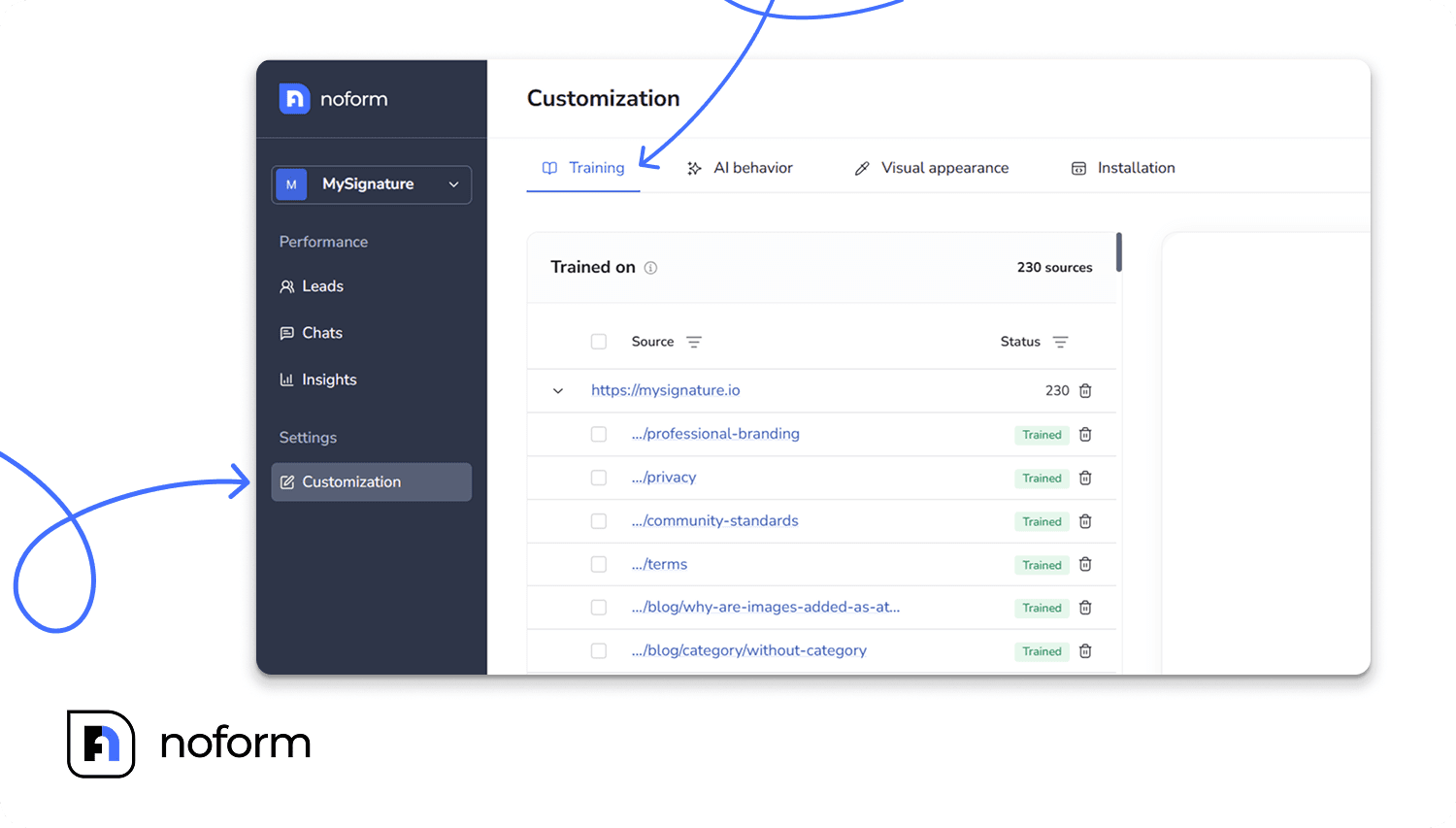
NoForm AI automatically scrapes your website based on the link you provide, and you can also upload additional sources like web pages or documents to give it more context. Feed it the right content, starting with:
- Product and pricing docs
- FAQs
- Support guides
- Any internal instructions or messaging docs
This gives your chatbot the context to answer accurately and stay on-brand. Whether it’s features, use cases, or pricing, it should respond like it knows your business — not like it’s guessing.
3. Set up lead criteria in the dashboard
This is where you define how NoForm AI qualifies leads. In the dashboard, use the AI Behavior tab to tell the chatbot what to look for and how to classify responses.
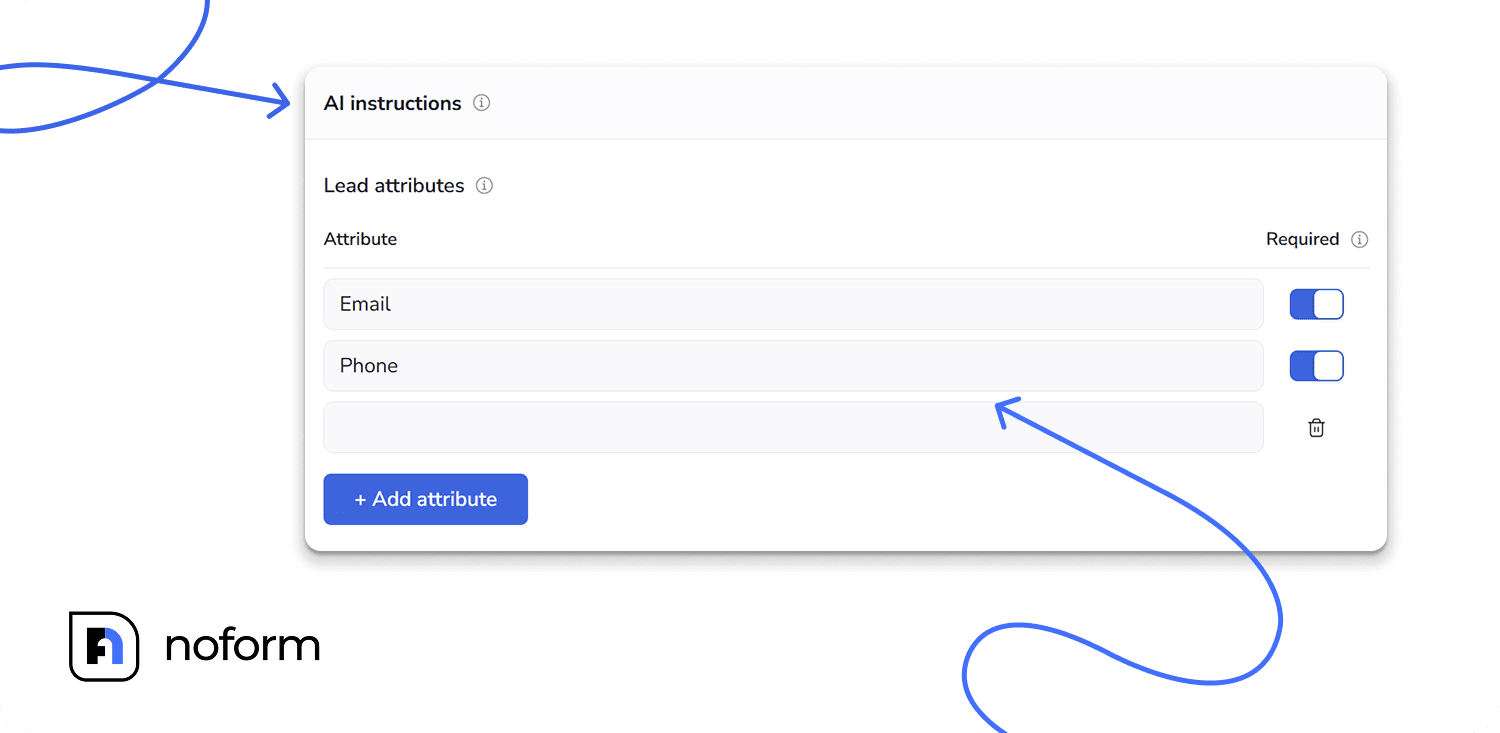
Start by setting lead attributes: if certain data points appear in the chat, like an email or phone number, the conversation is automatically marked as a lead.
Then, add custom logic to score and classify responses based on your sales criteria. For example:
- Budgets within your pricing range score higher
- Lack of decision-making authority lowers priority
- Short timelines signal stronger intent
- Relevant pain points or use cases increase lead quality
These rules help the bot evaluate responses in real time, so only the most qualified leads reach your team.
4. Deploy the chatbot on your site
NoForm AI makes launching your qualification chatbot easy. In the Installation tab, you’ll find a ready-to-copy code snippet with one-click options for platforms like WordPress, Wix, and others.
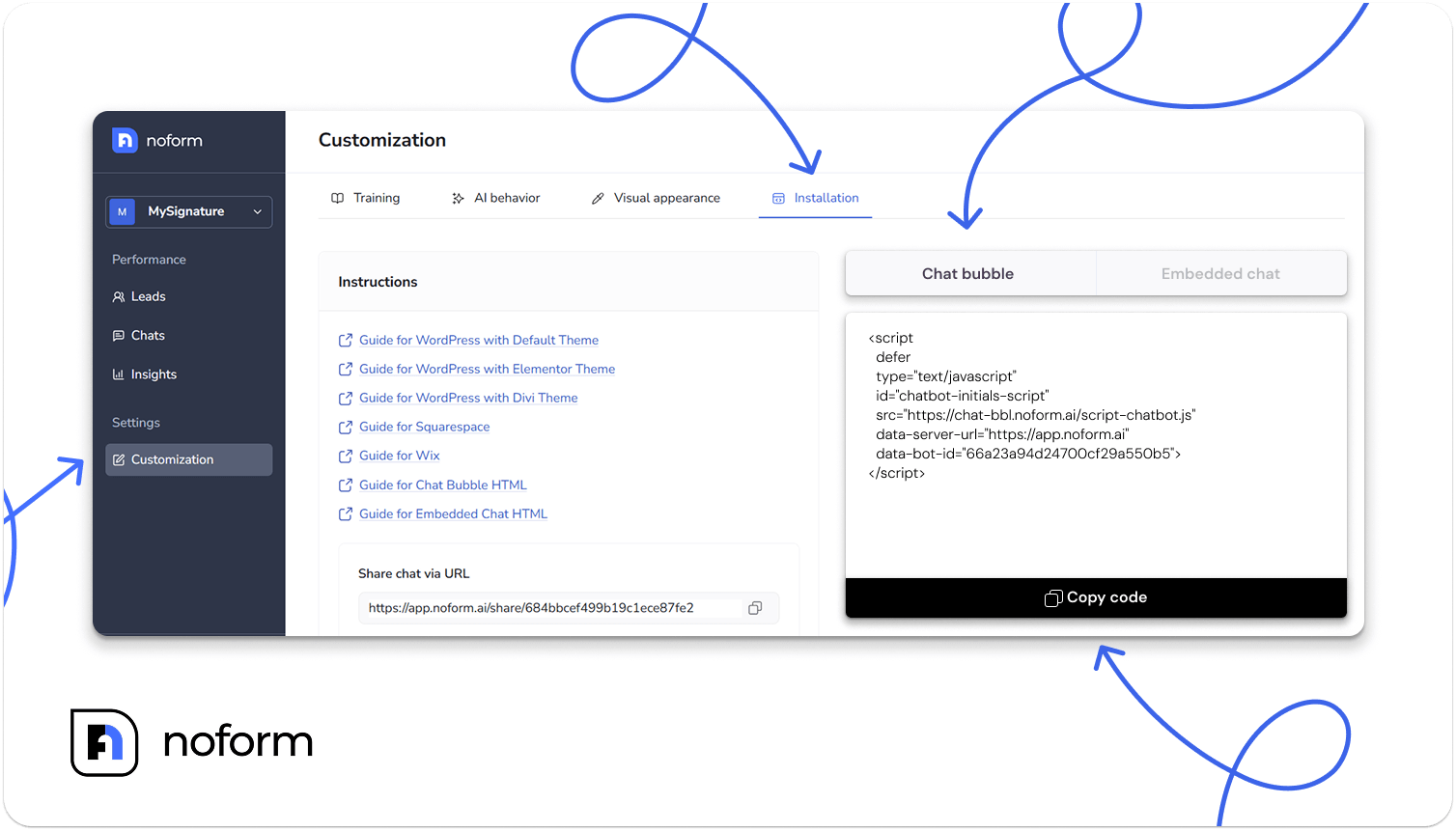
Choose between a floating chat bubble or an embedded box, copy the code, then drop it into your site where it fits best.
- The floating bubble appears in a fixed position on your website, commonly in a bottom corner (you can choose which corner in the Visual Appearance tab on the dashboard). This option can be easily added to a single page or automatically appear across all pages of your site.
- The embedded chat doesn’t show up by default. Instead, you choose the exact location where you want it to appear on a specific page, such as within a form, a landing section, or a dedicated contact area.
5. Track and manage leads from your inbox or CRM
All your leads are stored in the NoForm AI dashboard, complete with chat history and qualification details.

If you manage leads in an existing CRM, simply connect NoForm AI via Zapier or Make. High-quality, pre-qualified leads will be sent automatically — ready for your sales team to take over.
What are the key benefits of using AI chatbots for lead qualification?
Businesses that use AI chatbots to improve lead qualification see 3x better conversion into sales compared to those relying on website forms — and that’s no coincidence. This jump in conversion rate comes from a range of practical advantages that make chatbots more effective at qualifying and converting leads.
Here are the key pros of chatbots that make them a must-have for any modern sales process:
- Time and cost savings: AI chatbots automate up to 80% of common customer queries, freeing sales teams to focus on high-value activities instead of repetitive tasks. This not only cuts SDR workload in half but also helps reduce operational costs. Use the chatbot ROI calculator to get an estimate for your business.
- Scale faster without hiring additional SDRs: Chatbots manage high lead volumes without extra SDRs. Dog Gone Taxi saw a 37% increase in leads using NoForm AI, driving measurable growth with the team they already had.
- 24/7 availability: AI chatbots engage potential customers anytime, capturing leads even outside business hours. Dog Gone Taxi’s 24/7 chatbot boosted quote requests and improved customer satisfaction.
- Improved lead quality: Accurate scoring and real-time validation help chatbots filter out low-quality leads, so your team spends time only on those worth pursuing.
- Enhanced customer experience: Chatbots qualify leads through personalized, conversational flows — not overwhelming forms — boosting completion rates by 20%. With 78% of customers expecting more personalization, this approach builds trust and keeps them engaged. Take Cheqmark, for example. After they started using NoForm AI, they saw a 67% jump in unique page views. This really highlights how a more intuitive and engaging chatbot can really make a difference, helping users find what they’re looking for and explore more of your site.
- Data-driven insights: Chatbots collect detailed data that helps optimize sales and marketing efforts over time. Dog Gone Taxi used this insight to reduce errors, streamline bookings, and replace long forms with personalized quotes.
- Lead nurturing and routing: Chatbots keep leads engaged with timely, relevant messages and route them to the right teams based on their responses and intent.
- Global engagement: With multilingual support and GDPR/CCPA compliance, chatbots let you connect with leads worldwide while staying aligned with local regulations.
Summing up
If your team is wasting hours chasing the wrong leads or missing good ones after hours, it’s time to rethink how you qualify. Chatbots do the work for you — engaging visitors instantly, asking the right questions, and sending only high-quality leads to your team.
With NoForm AI, getting started takes minutes. Whether you’re running a small business, agency, SaaS startup, or scaling enterprise, you can build a custom chatbot that scores leads based on your criteria, sends real-time notifications, and stores every conversation. No dev team needed — just train your bot, drop it on your site, and start converting smarter.
Try NoForm AI or book a demo to see how it fits your lead generation workflow.
Frequently Asked Questions
How do chatbots qualify leads automatically?
AI chatbots qualify leads automatically by asking targeted questions based on BANT criteria (Budget, Authority, Need, Timeline), scoring responses against your predefined criteria in real time, and flagging the conversation as a qualified lead the moment a visitor provides a contact detail like an email or phone number. The entire process happens without human involvement — and without a form.
Can a chatbot qualify leads based on company size or number of employees?
Yes. Company size — including number of employees — is a standard custom attribute you can configure in a lead qualification chatbot. If your product targets companies with 50+ employees, the bot can ask about team size early in the conversation and adjust the lead score accordingly. Visitors below your threshold can still be captured as conversations; they just don’t get flagged as qualified leads until they meet your criteria.
How do I train an AI chatbot for lead qualification?
To train an AI chatbot for lead qualification:
- Define your Ideal Customer Profile and the data points you need from each lead;
- Feed the chatbot your website content, FAQs, product docs, and pricing information;
- Configure lead attributes and qualification logic in the dashboard;
- Test the conversation flow before going live.
With NoForm AI, the chatbot auto-trains from your website URL — no scripting or manual flow-building required.
How do chatbots automate lead qualification flows?
Chatbots automate lead qualification flows by replacing the manual sequence of form → review → follow-up with a real-time conversation sequence: visitor lands → bot greets them → bot asks qualifying questions → bot scores responses → qualified lead is flagged and sent to your CRM with a summary. This entire flow happens in under two minutes, 24/7, without any human in the loop until a qualified lead needs follow-up.
What’s the difference between a lead qualification bot and a regular contact form?
A contact form collects data passively — it waits for a visitor to fill it out and submit it. A lead qualification bot engages actively: it asks the right questions, adapts to responses, and qualifies in real time. Forms have a typical completion rate of under 3%. Conversational chatbots that answer visitor questions first — before asking for contact details — consistently outperform static forms by 3x or more on conversion rate.