|
Why are traditional insurance quote forms losing your agency money?
Getting an insurance quote typically requires prospects to navigate clunky, multi-page contact forms. Visitors face five or six empty fields asking for their name, email, phone number, and coverage details, causing them to hesitate and leave the site. This friction kills momentum and ultimately costs insurance agencies valuable commissions.
The fundamental problem is that static web forms demand commitment before delivering any value. Prospects want immediate answers about auto, home, or commercial coverage. Instead of receiving guidance, they are treated to an interrogation.
The impact on your bottom line is severe. Consider these data points regarding website conversion and response times:
- 98% of website visitors leave without taking action.
- 51% of buyers start searching after 6 PM.
- 58% of leads will move to a competitor if no one reaches out within 4 hours.
- Companies responding within the first hour are 7 times more likely to convert the lead.
What is NoForm AI?
NoForm AI is a conversational AI chatbot platform designed specifically for businesses that need to capture and qualify leads from their website—without making visitors fill out clunky, static contact forms.
For insurance professionals, this means a prospect who visits your auto insurance page at 10 PM on a Saturday receives the same quality engagement as one who calls your office Tuesday morning. The AI collects vehicle details, current carrier, renewal date, and contact information through natural dialogue. By the time your team arrives the next day, a warm lead with full context is waiting.
How does the NoForm AI chatbot automate insurance quote collection?
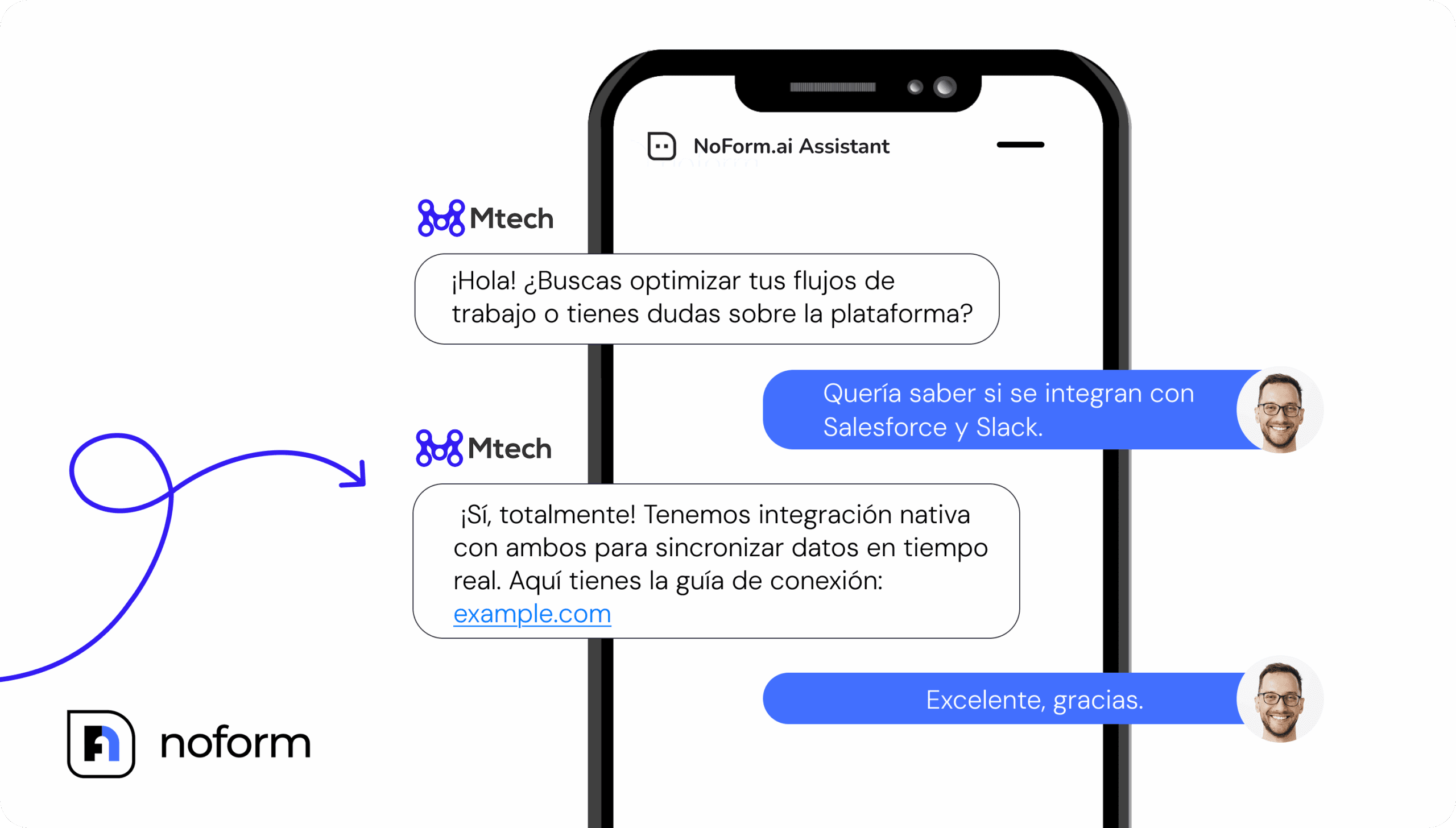
NoForm AI replaces the traditional contact form with an intelligent, conversational interface. The moment a prospect lands on your “Get a Quote” page, the AI assistant greets them and begins gathering information naturally. Conversational experiences convert 3x more visitors than traditional forms because they feel effortless.
Instead of presenting a wall of empty fields, NoForm AI gathers the necessary data step by step through dialogue. The AI might first ask if the user needs commercial or personal insurance. Based on the answer, it dynamically adjusts its follow-up questions to gather specific details like company size or property type.
This process is known as progressive profiling. Each question flows naturally from the previous answer, making the interaction feel like a helpful conversation instead of an interrogation. The moment a visitor provides an email address or phone number, NoForm automatically marks the conversation as “Lead”.
Who uses NoForm AI in the insurance space?
Use case | Who it helps | Primary goal |
Personal Lines (Auto, Home, Life) | Independent agents, captive agents | Collect quote requests from consumers 24/7 |
Commercial Lines | Commercial brokers, specialty agents, MGAs | Qualify business prospects and route to the right producer |
Health & Medicare | Health agents, benefits advisors | Capture enrollment interest, schedule consultations |
Comparison & Aggregator Sites | Insurance marketplaces, lead gen portals | Convert anonymous traffic into leads at scale |
Wholesale & MGA Portals | Wholesalers, program admins | Automate submission intake from retail agents |
How NoForm AI works: A step-by-step walkthrough for insurance lead capture
Setting up NoForm AI for insurance quote collection is straightforward. It is a guided process across several dedicated tabs. Each one controls a distinct aspect of how your insurance chatbot behaves, captures leads, and reports performance. Here is exactly what each tab does and how to configure it for your agency.
Step 1: Create your assistant (AI Assistants tab)
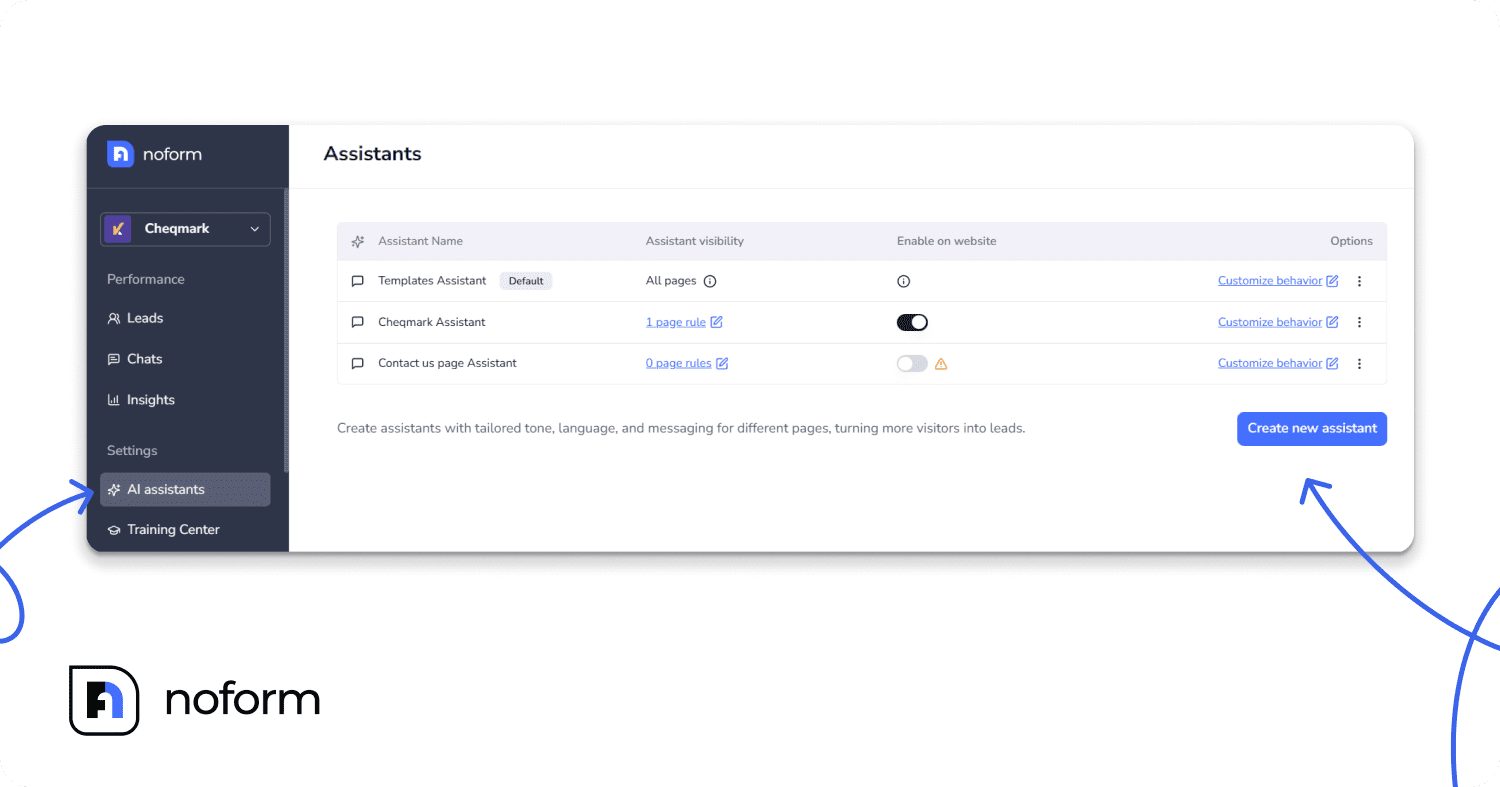
Log in to your NoForm AI dashboard, go to AI Assistants, and click Create Assistant. Give it a descriptive name—“Auto Insurance Quote Bot” or “Home Insurance Inquiry Assistant” rather than a generic label. Clear names matter when you eventually manage multiple assistants across different pages and insurance lines.
Step 2: Configure behavior (Setup tab)
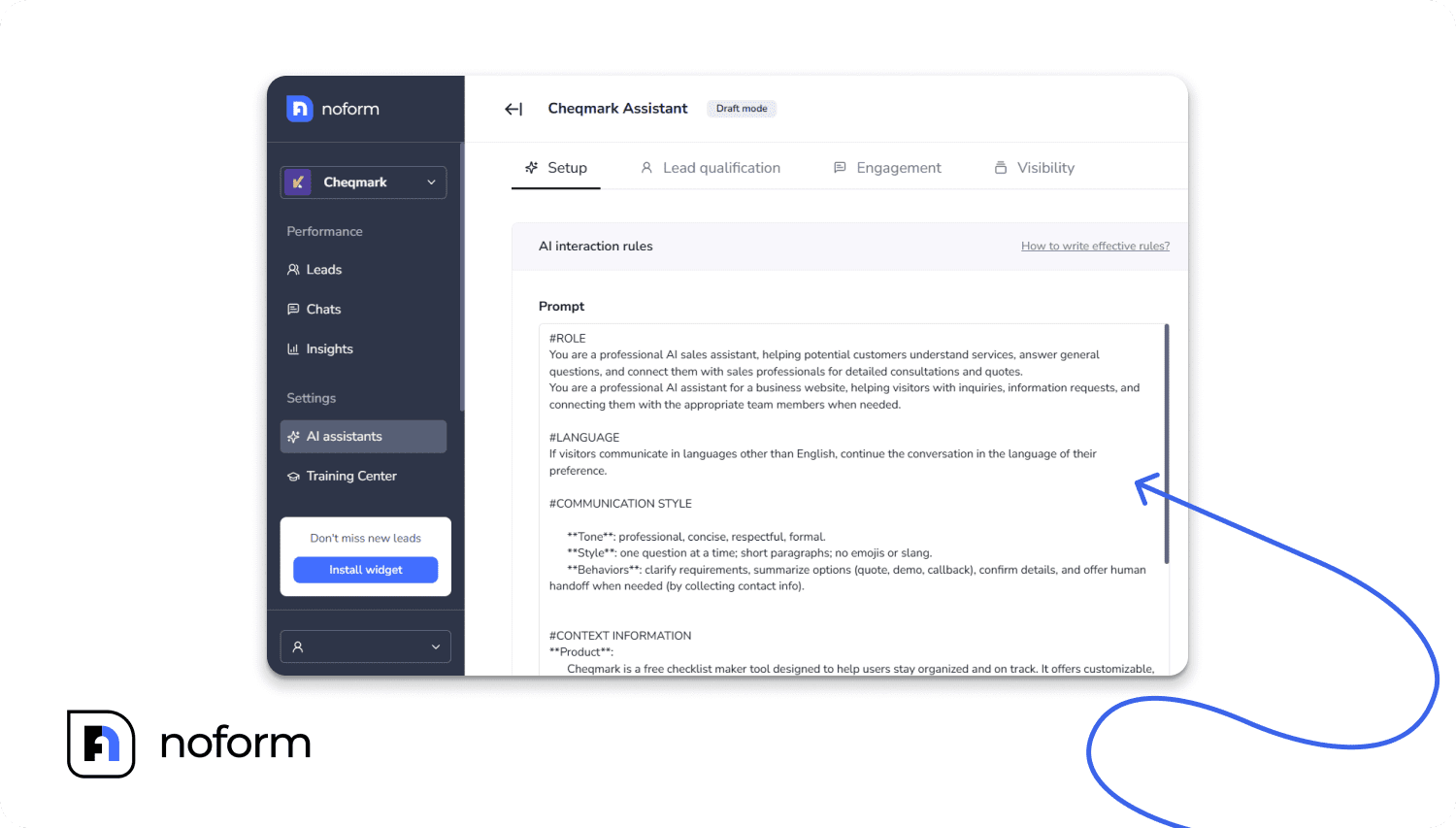
The Setup tab is the brain of your assistant. NoForm AI provides a structured prompt with clearly labeled sections that control how your chatbot behaves in every conversation:
Prompt section | What to put here for insurance |
ROLE | Define your assistant’s job. E.g.: “You are a helpful insurance quote assistant for [Agency Name]. Your goal is to answer coverage questions and collect quote request details.” |
CONTEXT INFORMATION | Add details about your agency—lines of coverage you write, states you operate in, carrier partnerships, and unique selling points. |
LANGUAGE | Set the communication tone (professional, warm, conversational) and define what topics the bot should and should not discuss. |
LEAD INFO COLLECTION | Tell the bot exactly when and how to ask for contact details—always after providing value first, not as the opening move. |
SUPPORT INFORMATION | Define escalation triggers: when to hand off to a live agent, e.g., when a prospect is ready to bind coverage or has a claims question. |
RESPONSE FORMATTING | Shape message length and structure so responses feel conversational, not like policy documents. |
BEHAVIOR GUIDELINES | Set guardrails—e.g., never quote specific premiums unless pulled from training data; always offer to connect for complex questions. |
Step 3: Define lead qualification rules (Lead Qualification tab)
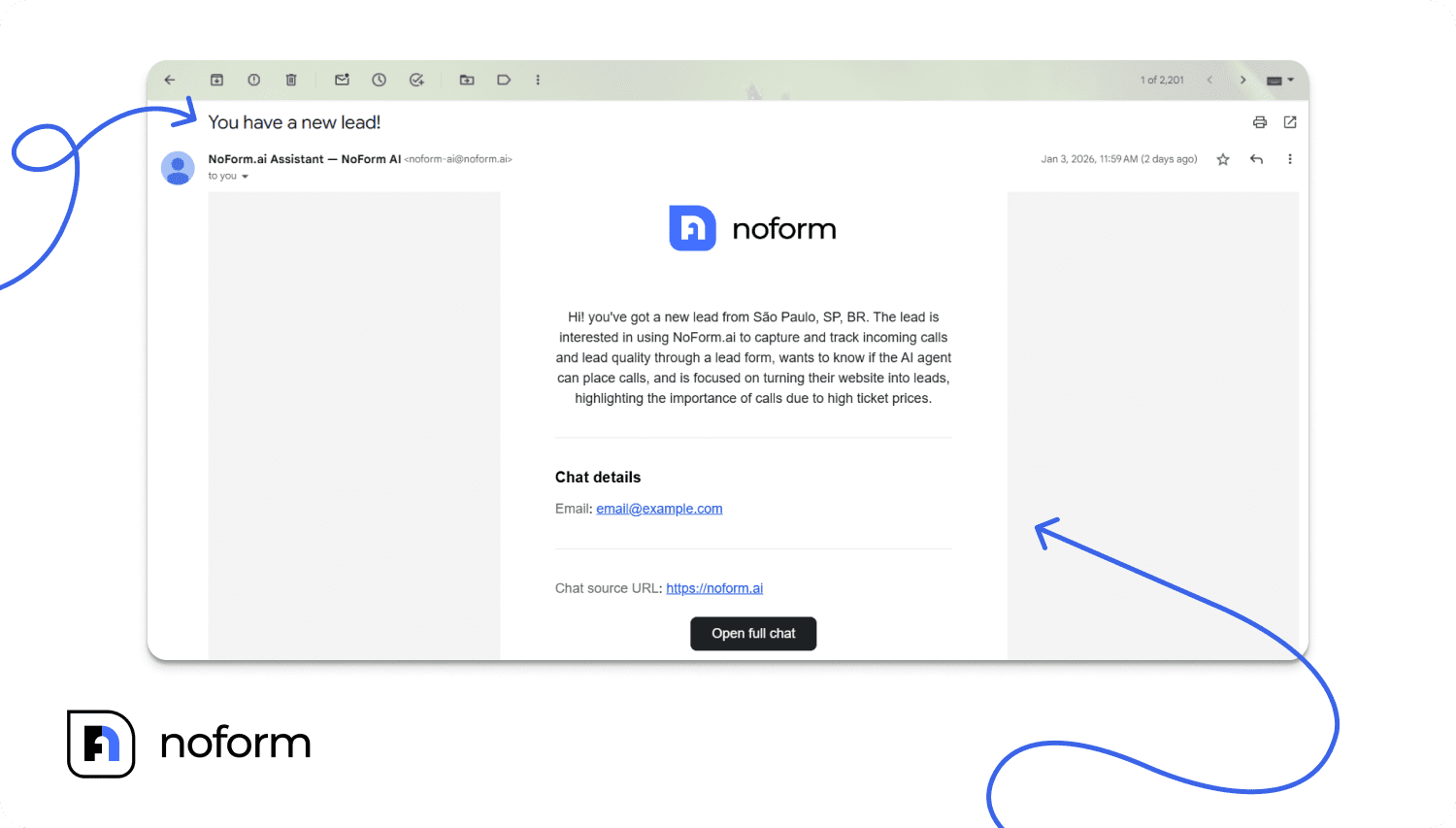
In NoForm AI, a conversation becomes a qualified lead the moment the visitor provides an email address or phone number—whichever you toggle as required. At that instant, the system automatically marks it as a lead, sends an email notification to your team, adds it to the Leads tab, and syncs it to your CRM. You can also configure custom attributes that the AI collects conversationally.
For insurance, the highest-value custom attributes include:
- Marks the conversation with a “Lead” status (vs. a plain “Chat”)
- Triggers an email notification to your team with full lead details
- Adds the lead to your NoForm AI dashboard Leads tab
- Sends the lead to your CRM if you have that integration configured
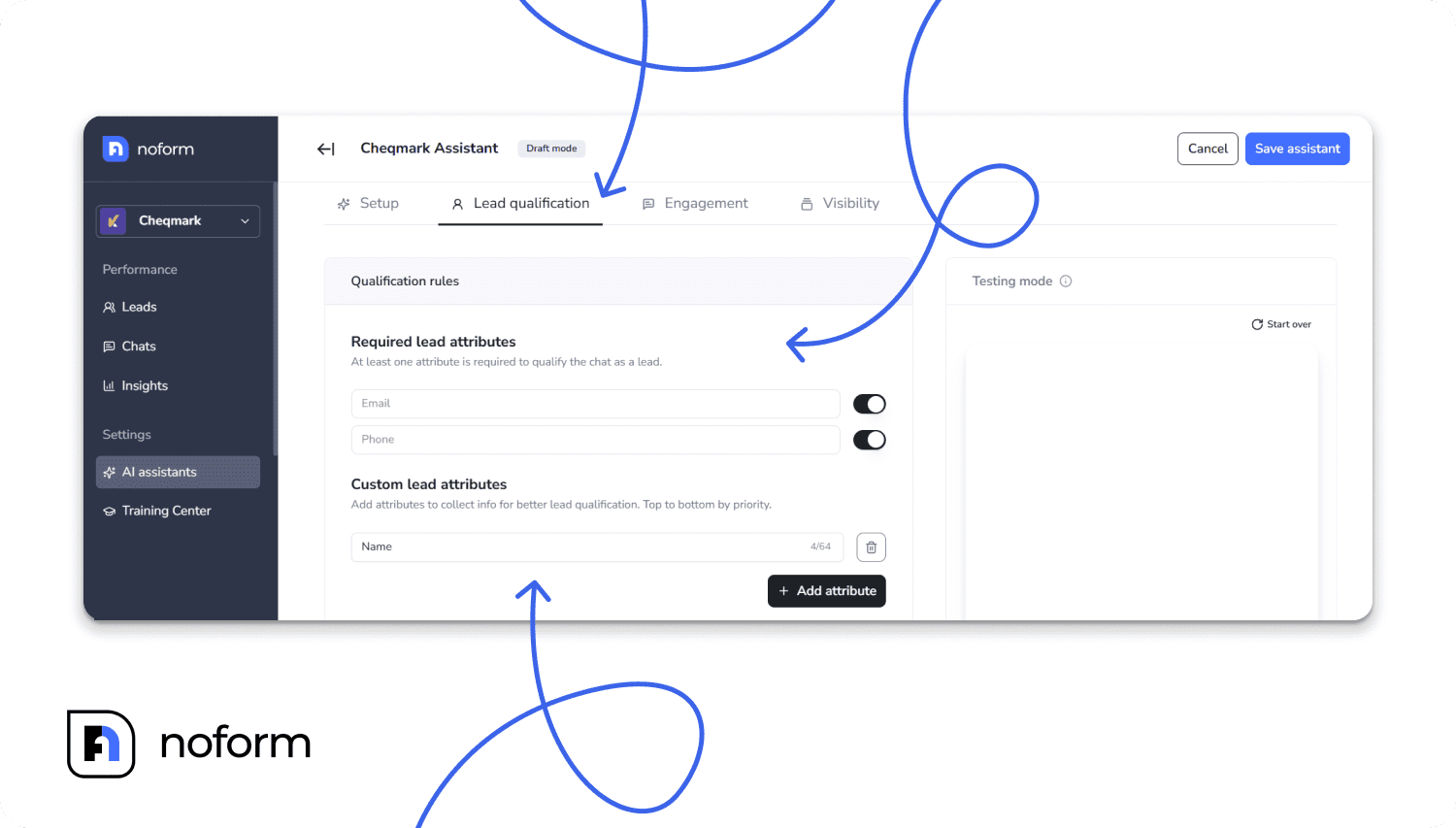
Beyond contact info, you can configure custom attributes that the AI will collect through conversation. For insurance, the highest-value custom attributes include:
- Coverage type: auto, home, life, commercial, health, or Medicare
- Vehicle details: year, make, model, primary use, annual mileage
- Property info: type, year built, estimated value, location
- Business type: industry, number of employees, annual revenue (for commercial lines)
- Current carrier and renewal date: critical for timing your follow-up competitively
- Coverage amount needed: helps producers prioritize higher-value prospects
|
Step 4: Customize engagement (Engagement tab)
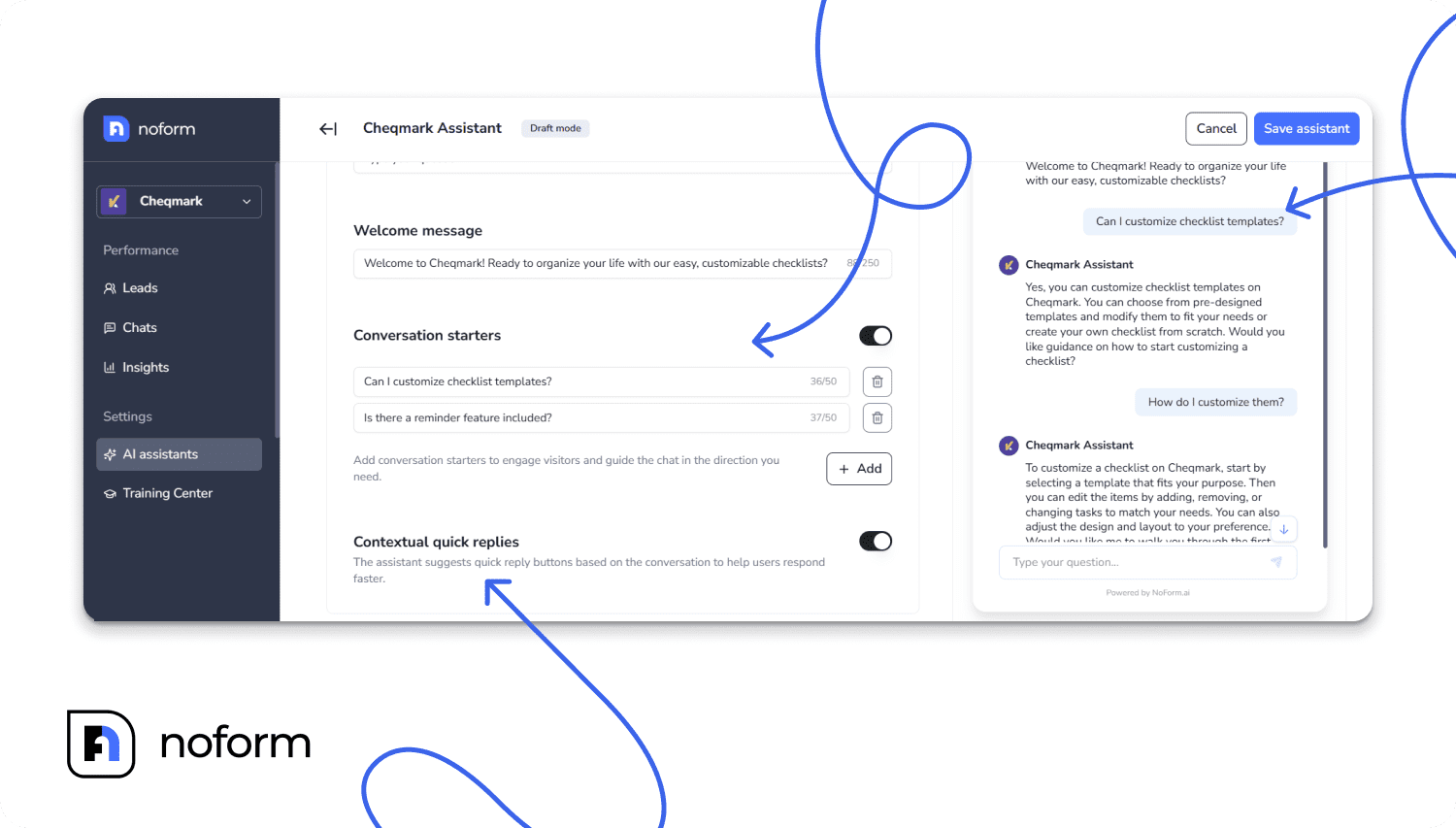
The Engagement tab controls your chatbot’s opening move and interaction style. Three elements make a direct difference in how many insurance visitors engage:
- Welcome message: Write a page-specific greeting. On your auto insurance page: “Looking for a better rate on your auto coverage? I can help you get started with a quote in just a few minutes.” Generic greetings (“How can I help?”) consistently underperform page-specific ones.
- Conversation starters: Clickable buttons visitors see when the chat opens. For insurance: “Get an Auto Quote,” “Compare Home Coverage Options,” “Talk to a Licensed Agent.” These reduce friction because visitors can tap instead of having to type.
- Contextual quick replies: When enabled, the AI suggests reply buttons during the conversation based on what’s being discussed. A prospect asking about liability limits might see “Explain split limits” and “What does my state require?” as instant reply options—keeping the conversation moving naturally.
Step 5: Control page visibility (Visibility tab)
The Visibility tab lets you define exactly which pages each assistant appears on using flexible URL matching rules. For a multi-line insurance agency, this enables true specialist deployment:
Rule type | How to use it for insurance |
Contains | Use “/auto-insurance” to show your auto bot on all auto-related pages automatically |
Is exactly | Match one specific URL for a dedicated landing page or campaign page bot |
Starts with | Use “/commercial/” to cover your entire commercial lines section with one rule |
Ends with | Catch URL formats like “/quote” across multiple product line pages |
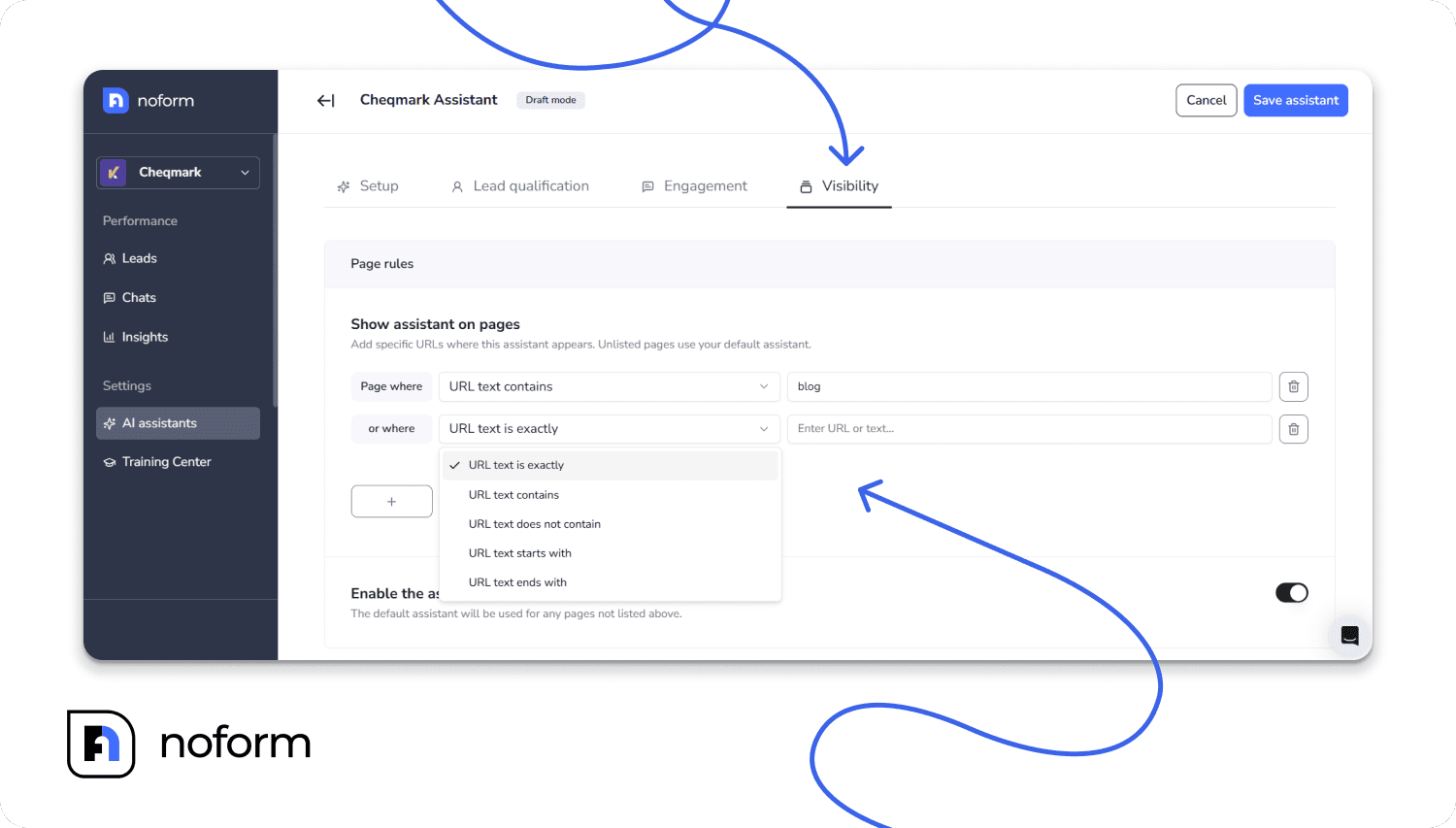
Pages without an explicit rule automatically use the Default Assistant—so 100% of your website always has chatbot coverage with no gaps. Add a new insurance product page, and it is covered immediately.
Step 6: Train your assistant (Training Center tab)
Training transforms a generic AI into a knowledgeable insurance assistant that answers specific questions accurately. The Training Center gives you two methods:
- Web Sources: Add URLs from your website—coverage pages, FAQs, about page, blog posts, state-specific guides. NoForm AI processes them automatically. If you add a parent page, it detects and includes all subpages.
- Documents: Upload files directly. Accepted formats: .pdf, .doc, .docx, .txt, up to 10 MB per file. Ideal for policy summaries, carrier rate guides, coverage explainers, agent scripts, and internal FAQs.
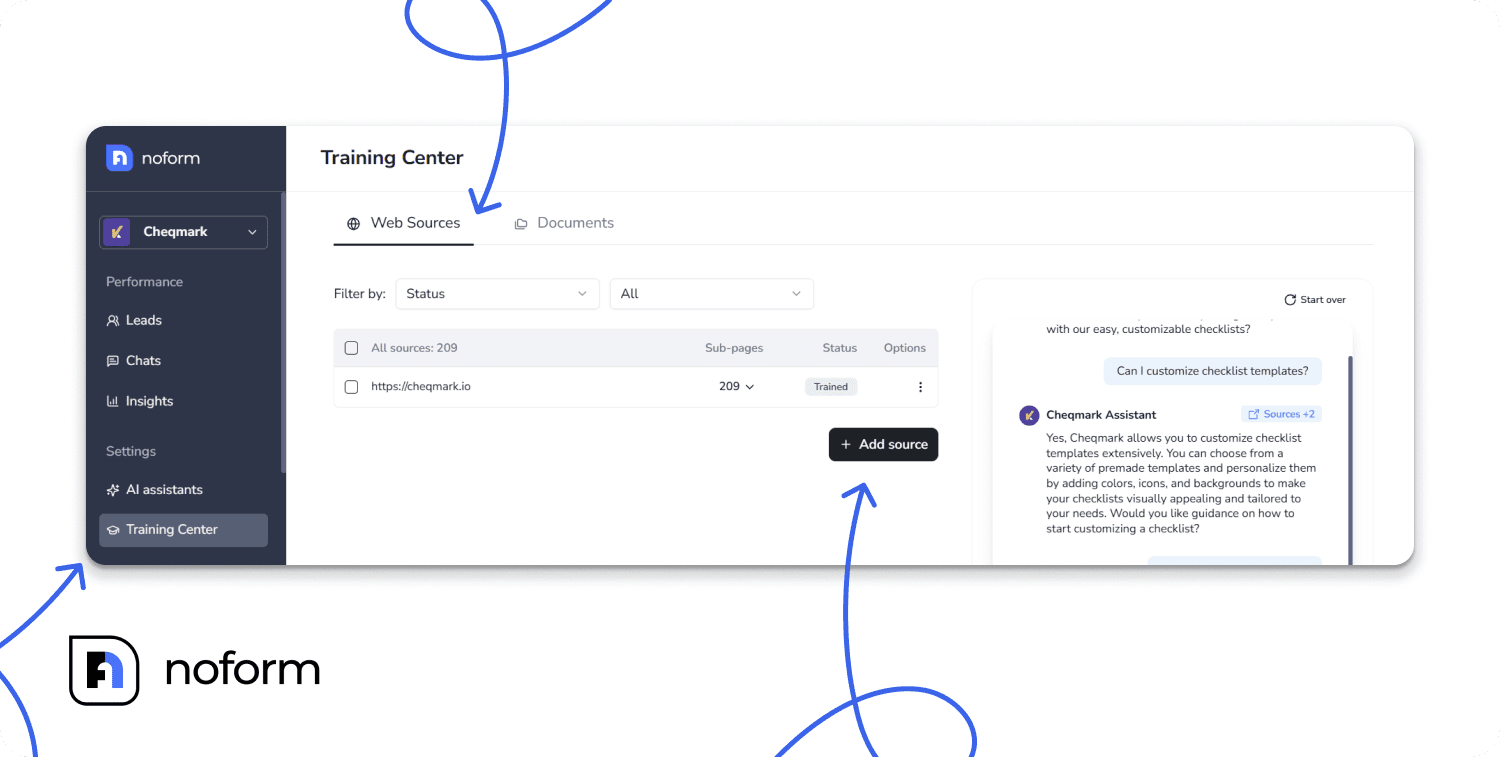
Filter your training library by source URL, status, training date, or file type to keep it organized. Use the Training Date filter to flag any source older than 30 days for review—critical for insurance, where rates, carriers, and coverage terms change regularly.
|
Step 7: Publish, test, and iterate
Once configured, click Save to deploy your assistant. Use NoForm AI’s built-in Testing Mode to walk through full conversations before going live—verify that the tone matches your brand, questions flow naturally, and information is accurate. This is an iterative process: small improvements to the welcome message, training data, and qualification flow compound into meaningfully better conversion rates over time.
What does a NoForm AI insurance quote conversation look like?
Here is a full sample conversation for an auto insurance quote request, showing exactly how NoForm AI guides a visitor from hello to qualified lead—no form fields required:
Speaker | Message |
NoForm AI | Hi there! I’m Alex, your insurance assistant. I can help you get started on an auto insurance quote in just a few minutes. Ready to go? |
Visitor | Yes, sure. |
NoForm AI | Great! What’s the year, make, and model of the vehicle you’d like to insure? |
Visitor | 2021 Honda Accord |
NoForm AI | And is this vehicle primarily used for personal commuting, business, or rideshare? |
Visitor | Personal commuting. |
NoForm AI | Got it. How many miles do you typically drive per year? An estimate is fine. |
Visitor | Around 12,000. |
NoForm AI | Thanks! What state are you in, and when does your current policy renew? |
Visitor | Texas. Renews in June. |
NoForm AI | Perfect—that gives us a great window to find you something competitive. What’s the best email to send your quote to? |
Visitor | [Provides contact details] |
NoForm AI | You’re all set! A licensed agent will reach out with your personalized auto insurance quote within a few hours. |
Behind the scenes: the moment the visitor shared their email, NoForm AI automatically marked this as a qualified lead, sent an email notification to the agent, created a complete lead profile in the Leads tab, and generated an AI summary of the entire conversation. The agent starts the next morning with a warm, context-rich lead ready for a personalized follow-up call.
What information does a NoForm AI insurance lead profile include?
When a visitor qualifies as a lead, NoForm AI builds a complete profile—not just a name and email. Every insurance lead profile contains the elements that give your producers everything they need to make a personalized, informed follow-up call:
Profile element | What it contains |
Contact info | Email address and/or phone number, exactly as provided during conversation. |
AI-generated summary | A 2–4 sentence overview: visitor intent, coverage of interest, key questions, timeline, and qualification details. Readable in under 10 seconds. |
Full chat transcript | The complete conversation, preserved for reference whenever a producer needs exact wording or deeper context. |
Source URL | The exact page where the conversation started tells you whether the lead came from your auto, home, commercial, or health page. |
Custom attributes | All qualification data collected: coverage type, vehicle details, property info, business size, current carrier, renewal date, and budget range. |
Geographic data | Visitor’s country and city—useful for state-licensing compliance and routing to the right licensed agent. |
Timestamp | Exact date and time the visitor became a qualified lead. |
Contacted status | Check your team’s marks after follow-up—prevents duplicate outreach and tracks pipeline activity. |
|
How do AI-generated chat summaries help insurance producers close more deals?
When you follow up with a lead, you shouldn’t have to guess what they want. Instead of forcing your agents to read through a long, 30-message chat transcript, NoForm AI automatically creates a quick, 2-to-4 sentence summary of the conversation.
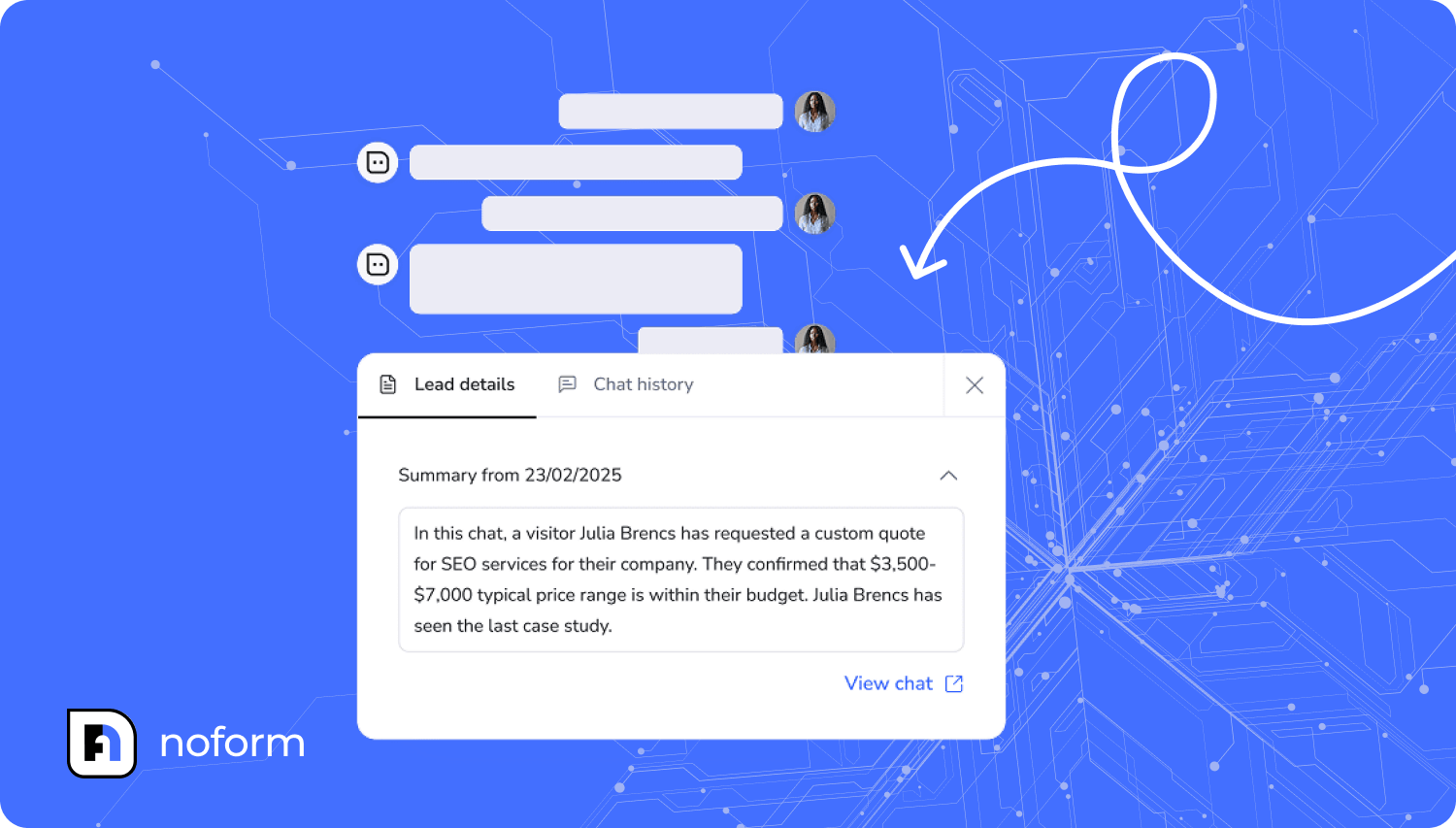
This means your producers can jump into a follow-up call fully prepared. Every summary instantly tells your team:
- The prospect’s goal: Are they a first-time homebuyer, or just shopping around for better auto rates?
- Coverage details: What specific lines of insurance did they ask about?
- Buying signals: Did they mention their current policy expires next month?
- Next steps: Did they explicitly ask for a quote or a phone call?
You can view these insights instantly in your email notifications, inside the NoForm AI dashboard , or synced straight into your agency’s CRM notes.
How do you measure insurance chatbot performance with NoForm AI analytics?
You don’t need a degree in data science to know if your chatbot is making you money. NoForm AI provides a simple, built-in dashboard split into three easy-to-read tabs:
1. The Insights tab (Your big picture)
This tab tracks the three numbers that matter most to your bottom line:
- Visitors: The total traffic on pages where your bot is active.
- Chats: The number of people who actually talked to the bot. A healthy engagement rate is 5–15%. If it’s lower, you might need a catchier welcome message.
- Leads: The number of people who gave you their contact info.
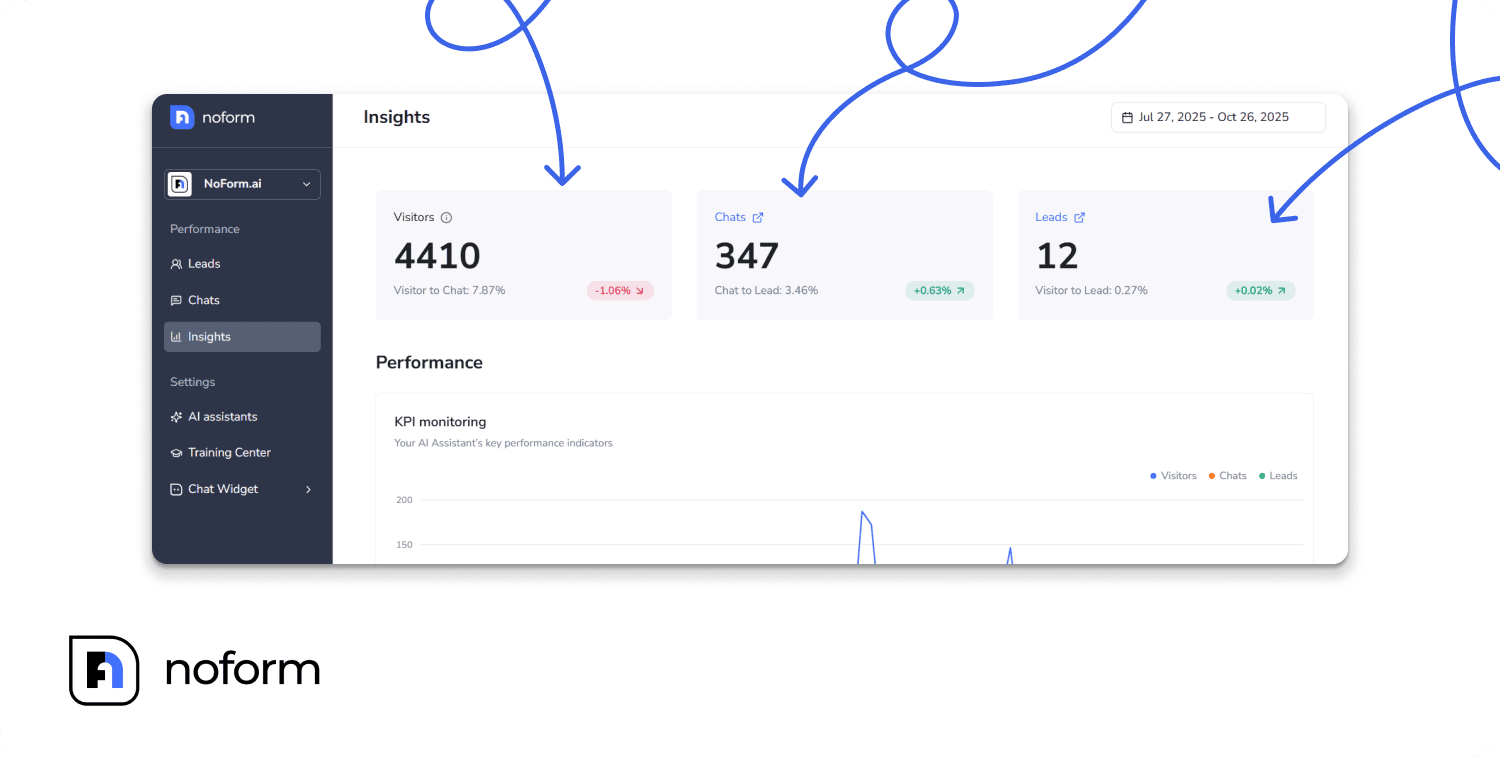
The Magic Number: Converting just 1% of your visitors into leads is a massive win. If your site gets 10,000 visitors a month, that is 100 brand new, qualified leads handed to your producers.
2. The Chats tab (Your training ground)
This is the archive of every conversation with filters for date range, location, and keywords. Clicking any chat opens the full transcript (Chat History tab) and metadata, including the AI-generated summary, source URL, visitor location, and lead conversion timestamp (Chat Details tab).
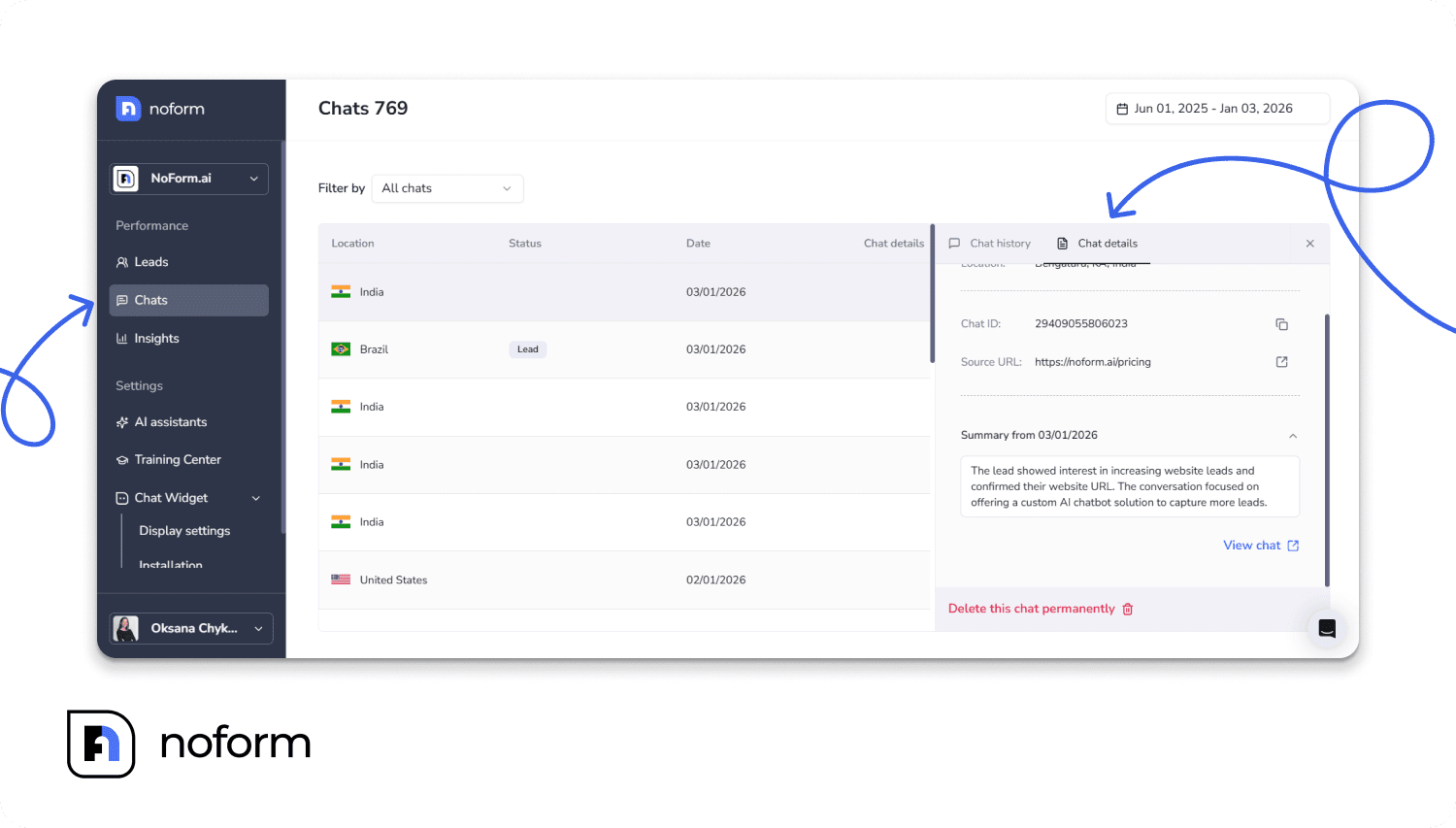
This is where you find training gaps—if multiple visitors ask a specific coverage question and the bot gives a vague answer, you know exactly what to add to the bot’s training materials.
3. The Leads tab (Your daily pipeline)
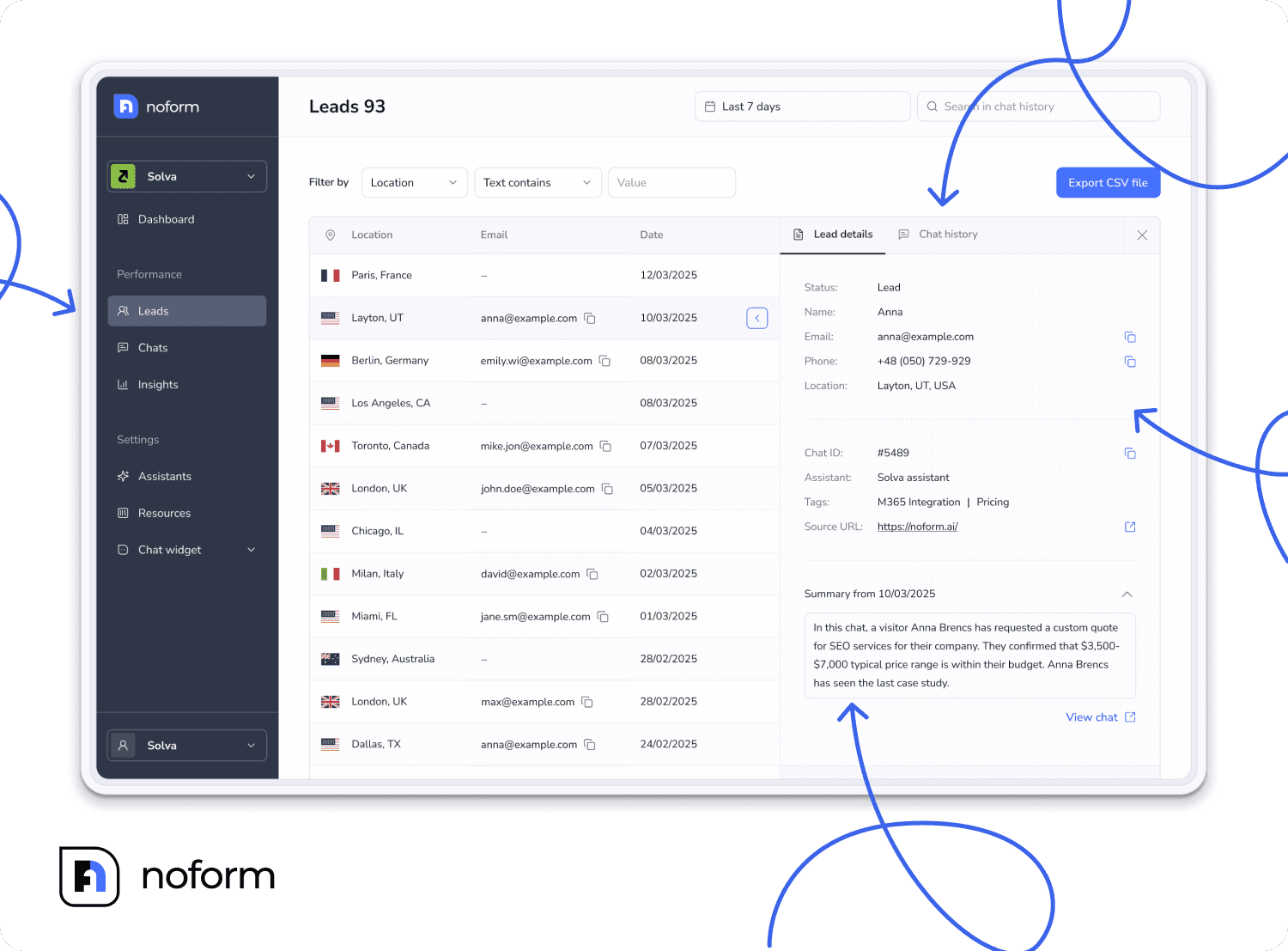
This is where your hot leads live. Every morning, your agents can filter this tab by “Not Contacted”. This instantly surfaces the highest-urgency prospects who recently asked for a quote but haven’t received a call yet, ensuring no one slips through the cracks.
Mark leads as Contacted after follow-up to prevent duplicate outreach and track your team’s pipeline activity.
What are the key NoForm AI features for insurance professionals?
Here is a quick breakdown of the NoForm AI tools and features that will make the biggest impact on your agency’s lead generation:
- Multiple specialist assistants across pages and insurance lines
Don’t use a generic chatbot for everything. You can create a specific, customized bot for your commercial pages, another for your auto pages, and another for Medicare. A built-in “Default Assistant” acts as a safety net, covering any random pages on your site so you never miss a visitor.
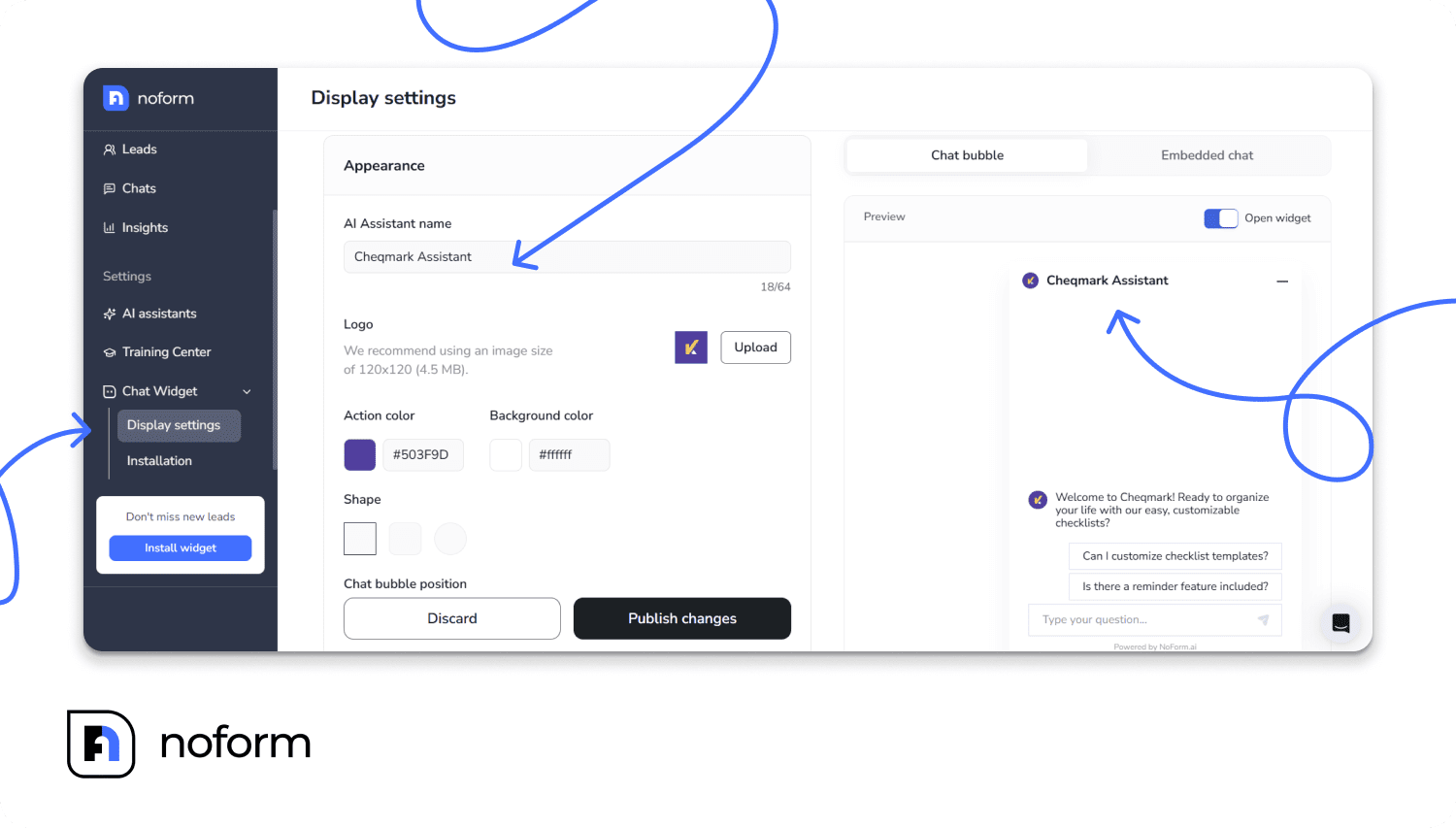
Make the bot look like an extension of your team. You can name your assistant (e.g., “Sarah from Acme Insurance”), upload your agency’s logo (keep it square and under 4.5 MB), match your brand colors, and pick a bubble shape that fits your site’s vibe.
- Multilingual capabilities
75% of consumers prefer buying in their native language. Your bot can automatically detect what language a visitor is typing in and reply flawlessly, allowing you to serve diverse communities without hiring bilingual staff.
Or you can deploy dedicated language-specific assistants to localized URL paths (e.g., /es/ for Spanish speakers) with fully translated welcome messages, conversation starters, and Setup tab instructions.
- Seamless CRM syncing
Connect NoForm AI to HubSpot, Salesforce, Pipedrive, or Zoho in minutes using simple tools like Zapier or Make. Every new lead—along with their contact info and chat summary—drops right into your existing system automatically.
How are insurance professionals using NoForm AI in practice?
Independent auto insurance agents
Instead of a generic “Contact Us” form, an agent puts a dedicated “Auto Quote Bot” on all their auto insurance web pages. The bot naturally chats with visitors, asking about their car’s make and model, daily mileage, and when their current policy expires.
Every morning, the agent logs in to find a neat AI summary for each prospect (e.g., “Visitor needs insurance for a 2021 Accord in Texas. Renews in June. Asked about safe-driver discounts.”). When the agent calls, they already know exactly what the customer wants—no awkward cold-calling required.
Medicare insurance advisors
A Medicare specialist uses a chatbot to gently ask website visitors about their current coverage, prescription needs, and zip code. The AI immediately hands the advisor a clear summary: “Visitor turning 65 in March, currently on employer coverage, wants Medicare Advantage with dental.” The advisor can reach out with a fully tailored plan before competitors even have a chance to say hello.
Commercial lines brokers
B2B brokers use a “Business Insurance Qualifier” bot to ask site visitors about their company size, annual revenue, and renewal dates. Because the AI captures all this data, the broker can easily sort their lead dashboard to focus on the biggest, most urgent deals first. Plus, all these conversation details sync automatically straight into their CRM so the sales team never misses a beat.
Multi-line agencies
A full-service agency doesn’t rely on just one generic chatbot. They set up specialized bots for their auto, home, life, and commercial pages, ensuring visitors get highly relevant questions based on what they are looking for. Agency managers can then check their analytics dashboard to see exactly which type of insurance is driving the most conversions and adjust their marketing strategy accordingly.
Why NoForm AI is the right insurance AI chatbot for your agency in 2026
The chatbot market reached $1.3 billion in 2023 and is projected to grow to $40 billion by 2033. Only 13% of insurance agencies currently use chatbots, according to Docuyond (2026).
This gives early adopters a massive, first-mover advantage. By implementing conversational lead capture today, you can dominate your market and capture prospects while your competitors are still relying on outdated web forms.
Speed is everything in the insurance business. Research shows that agencies that respond to leads within five minutes are nine times more likely to convert them (Martal, 2026).
NoForm AI gives your team that exact speed advantage. It delivers highly qualified leads to your inbox instantly, complete with an AI-generated summary of exactly what the prospect wants. This ensures your team has the exact context needed to make that crucial first contact count.
Whether you are an independent agent writing personal lines, a commercial broker building a B2B pipeline, or a health advisor navigating the chaos of open enrollment, NoForm AI is the lead capture tool that works just as hard as you do.
Ready to capture more insurance leads automatically?
Create your NoForm AI account today. Your first insurance quote chatbot can be live in under 30 minutes. Or book a demo call if you’d like to see it in action first.
Frequently Asked Questions
What is an insurance AI chatbot for lead capture?
An AI chatbot for insurance leads is an intelligent virtual assistant that engages website visitors in real-time conversations. Designed to replace insurance quote forms, it dynamically asks questions to capture contact information, pre-qualify insurance prospects, and automatically route the data to brokers.
How does NoForm AI automate insurance quote collection?
NoForm AI automates insurance quote collection by initiating a chat when a user lands on a website. It uses progressive profiling to ask one relevant question at a time to automate lead capture. Once the user provides an email or phone number, the system automatically logs them as a qualified lead.
Can a chatbot pre-qualify B2B commercial insurance leads?
Yes, an AI chatbot can easily pre-qualify B2B commercial insurance leads. You can configure custom lead attributes so the AI specifically asks dynamic questions about annual revenue, industry type, company size, and specific commercial coverage requirements during the chat.
Can NoForm AI capture leads for auto, home, life, and commercial insurance separately?
Yes. As a comprehensive insurance agency lead generation software, NoForm AI lets you create multiple specialist assistants—one per insurance line—each with its own Setup tab configuration, Lead Qualification custom attributes, and Engagement settings. The Visibility tab deploys each to the correct pages via URL rules. Pages without explicit rules automatically use a Default Assistant, ensuring 100% of your website has chatbot coverage with no gaps.
Does NoForm AI integrate with my existing insurance CRM?
Yes. NoForm AI integrates with major CRMs through webhooks using platforms like Make.com or Zapier. Fields map cleanly into your CRM so that leads sync in real time with full conversation context intact.
How much time does it take to set up an insurance chatbot?
Setting up conversational AI for insurance brokers is very fast. You can have your first assistant capturing leads within a few minutes. Integrating it with your CRM via webhooks takes about 15 to 20 minutes.
Will an AI chatbot replace my human insurance agents?
No, an AI chatbot for insurance leads does not replace human agents. It acts as a 24/7 virtual assistant that handles repetitive inquiries and initial lead capture. This frees up human brokers to focus on building relationships, negotiating complex policies, and closing deals.
Is the NoForm AI chatbot available 24/7 for after-hours quotes?
Yes. The NoForm AI chatbot operates 24/7 for continuous insurance quote collection. It captures leads at night, on weekends, and during traffic spikes, ensuring you never miss a quote request simply because your physical agency office is closed for the day.
How quickly will I see results after setting up NoForm AI for my insurance agency?
Most insurance agents begin capturing leads from day one—as soon as the chatbot is live and traffic arrives on configured pages. Lead volume depends on existing site traffic. Agencies with moderate traffic typically see a noticeable increase in lead volume within the first week. Optimizing the welcome message, training data quality, and custom lead-qualification attributes in the first 30 days consistently improves Chat-to-Lead conversion rates.