
What is a lead generation chatbot?
A lead generation chatbot is a conversational tool—usually a website chatbot or deployed on a messaging platform—that chats with visitors, asks targeted question sets, and collects lead data like contact information, company details, needs, timeline, and intent. Its job is simple: turn anonymous traffic into potential leads through lead capture and qualification, then push that info into the right systems (your CRM system, email system, or marketing automation software) so your sales team can follow up fast.
Think of it as the front-line assistant for your lead generation process. It meets a potential customer at the moment they’re interested, keeps the conversation moving, and logs the details your marketing team needs for lead scoring, routing, and lead management.
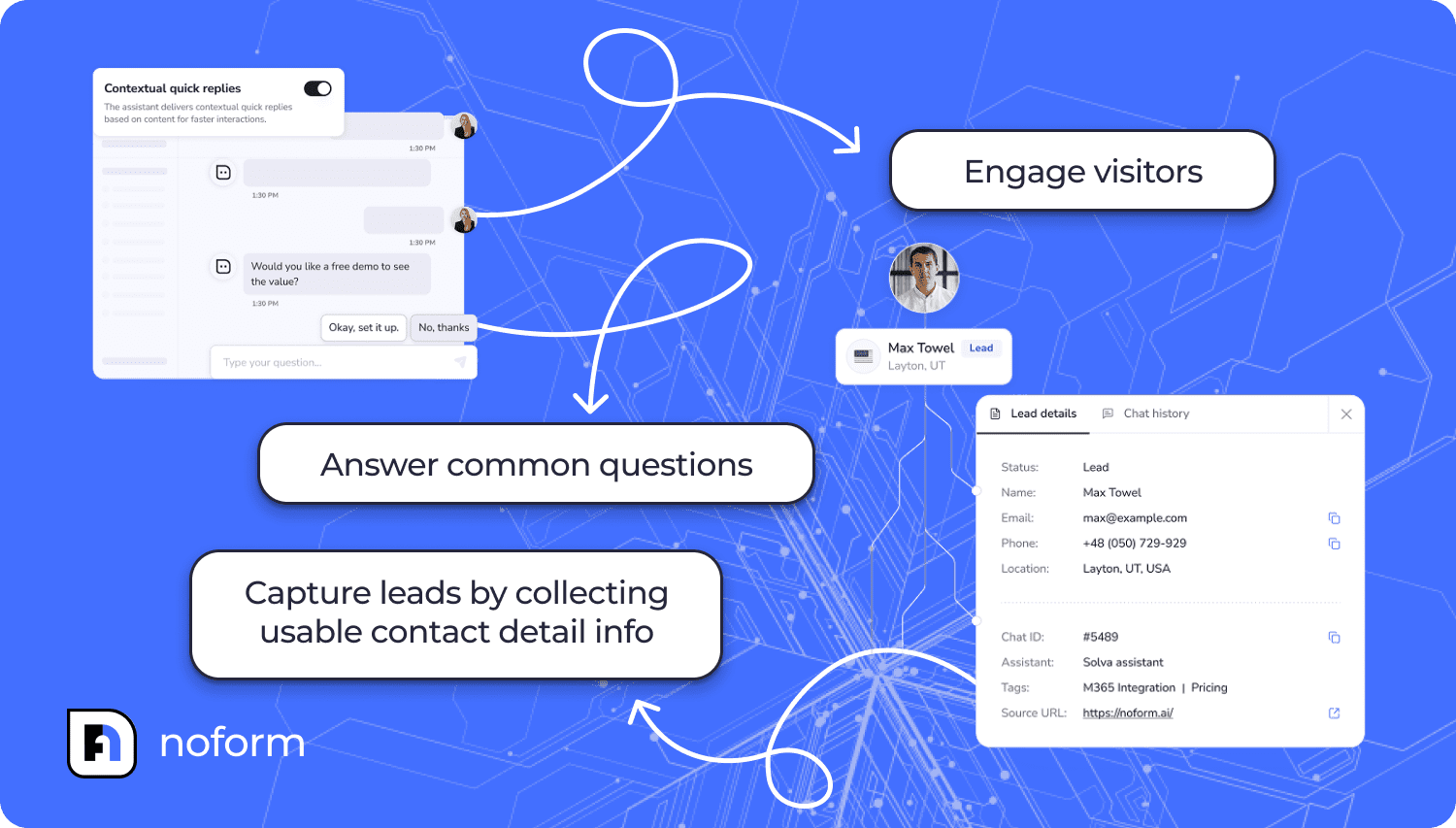
A solid chatbot for lead generation usually handles three things in one chat flow:
- engage visitors
- answer common questions
- capture leads by collecting usable contact detail info
Why use chatbots for lead generation in 2026?
Most websites still depend on static lead forms: a few fields, a CTA, and a quiet request for contact details. Forms don’t answer questions, reduce doubt, or guide decisions—so visitors hesitate or leave.
That gap shows up in results. Industry benchmarks put the average website conversion rate around 2–5%, meaning most visitors never turn into potential leads.
A lead generation chatbot tackles a different job than a form. It runs a short, guided conversation that helps a visitor take the next step while handling lead collection in a structured, usable way.
Businesses start looking to automate lead generation when classic form-based lead generation strategies stop matching real behavior:
- Forms are passive by design: Visitors skim, open tabs, and bail the second something feels like work—especially on mobile.
- People expect answers immediately: If the only option is “submit and we’ll follow up,” you create a gap between interest and action.
- Delays erase intent: When answers aren’t instant, visitors bounce—and your competitor is one click away running their own marketing campaign.
Where lead-generation chatbots fit in a modern marketing funnel
The best chatbot for lead generation goes beyond replacing “Contact us.” It supports lead management across the sales funnel by adapting questions and next steps to intent.
|
Funnel stage |
Visitor intent |
What the AI-powered lead generation chatbot does |
Lead collection output |
|
Top of funnel |
Curious, early research |
Starts customer engagement, recommends content, offers lead magnets |
Light lead data and topic interest |
|
Middle of funnel |
Comparing options |
Handles objections, segments by needs, supports early lead scoring |
Use case and urgency signals |
|
Bottom of funnel |
Ready to talk |
Helps book a demo, captures decision details |
Full contact information and qualification |
Lead generation chatbot vs. contact form
Both tools help collect leads, but they work in very different ways. Traditional lead generation often relies on static contact forms that wait for visitors to reach out. A lead generation chatbot takes a more active approach by starting a conversation, answering questions real time, and guiding visitors toward the next step.
If you’re deciding whether to build a lead gen chatbot or stick with a contact form, here’s how they compare:
|
Feature |
Contact Form |
Lead Generation Chatbot |
|
Visitor interaction |
Waits for visitors to submit a form |
Starts a conversation and guides visitors step by step |
|
Communication |
One-way submission |
Two-way conversation |
|
Response time |
Depends on manual follow-up |
Answers questions in real time |
|
Lead qualification |
Collects basic contact details |
Chatbots qualify leads by capturing intent, budget, timeline, and other key details |
|
Personalization |
Same experience for every visitor |
Adapts questions and responses based on user input |
|
Visitor experience |
Visitors complete a form before getting help |
Visitors receive answers before sharing their contact information |
|
Availability |
Depends on business hours |
Available 24/7 |
|
Sales handoff |
Sends raw form submissions |
Delivers qualified leads with conversation context |
|
Best use case |
Structured requests and document submissions |
Traditional lead generation, demo requests, and sales qualification |
|
Primary goal |
Collect contact information |
Build a lead gen chatbot to engage visitors, qualify leads, and increase conversions |
Advantages of Using a Chatbot for Lead Generation
By now, the need is obvious: forms don’t guide anyone, inbox follow-ups are slow, and buyers don’t wait.
The real question is whether a lead generation chatbot delivers—or just takes up screen space. When it’s built well, it improves conversion, efficiency, and pipeline quality.
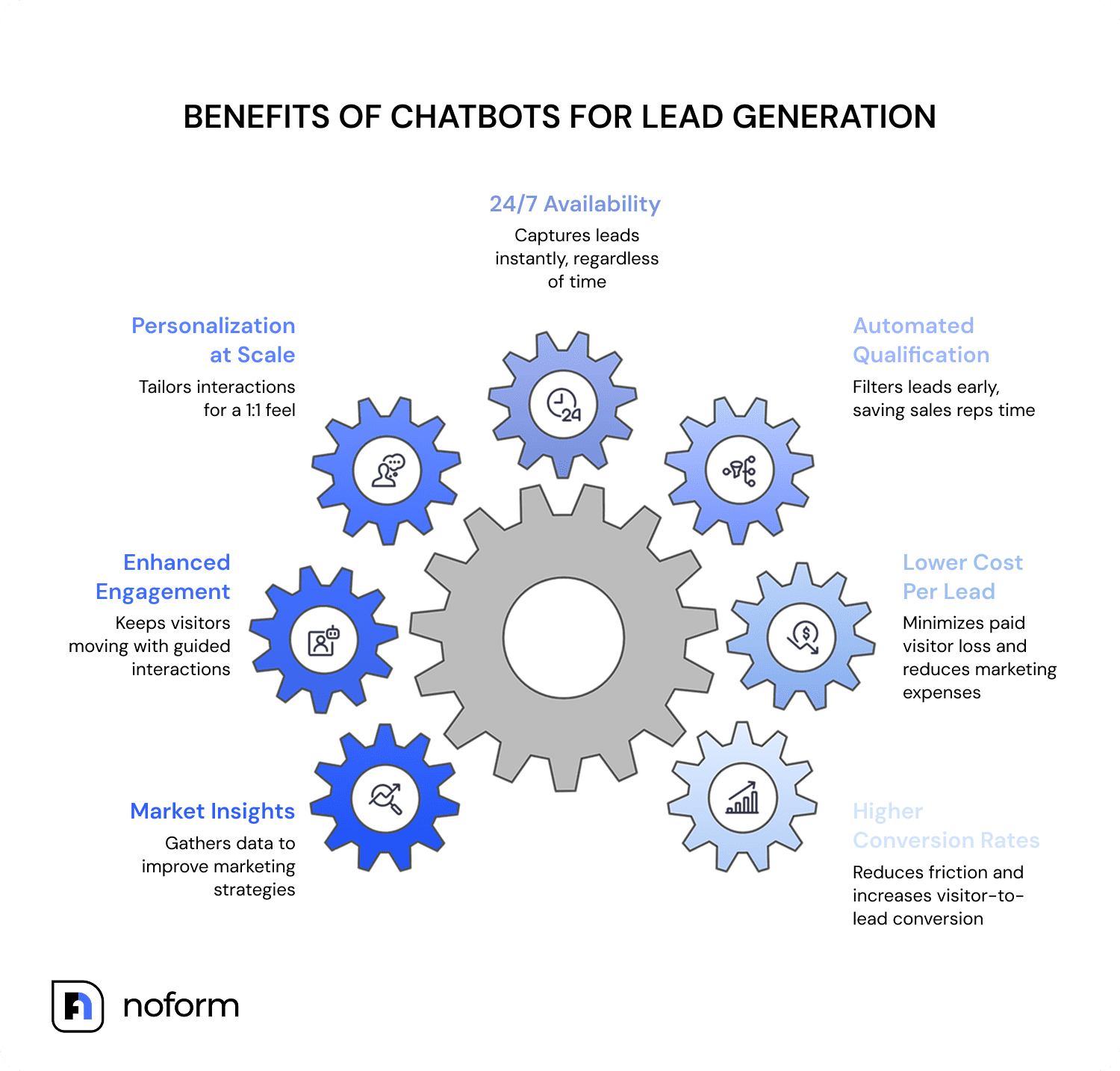
Here are the key benefits of using lead management chatbots to streamline your sales process:
1. Higher conversion rates
Forms create friction when intent is highest. A lead generation AI chatbot reduces “form fatigue” by guiding visitors through a quick exchange instead of forcing a cold submission. That’s why chat is heavily used in sales: 41% of business chatbots are used for sales, and 35% of business leaders say they make closing deals easier.
And it shows up in the wild, not just in slide decks. One of NoForm’s clients, DogGoneTaxi, used an AI chatbot for lead generation to improve the on-site user experience and saw a 37% lift in visitor-to-lead conversion.
2. Lower cost per lead (CPL)
CPL drops when fewer paid visitors vanish without converting. A lead generation bot keeps more traffic in play by turning high-intent page visits into structured lead collection before the bounce.
It also scales without hiring pressure. HubSpot reports 65% of CRM leaders say AI is more effective for scaling service operations than hiring more reps.
3. Automated qualification of leads
Lead-generation chatbots can collect qualifying signals early—budget, urgency, use case—then route the lead to the sales rep. That cuts time spent on “What are you looking for?” calls and pushes reps toward higher-value conversations.
In the DogGoneTaxi case, the chatbot automated qualification and quote requests, so the team spent less time following up with leads that ultimately weren’t the right fit—even if they did share their details upfront.
4. 24/7 availability and faster response times
Interest doesn’t follow business hours. A lead generation bot can answer questions and capture details in seconds, whether someone visits at 2 PM or 2 AM.
A survey of 433 B2B companies found only 7% responded within five minutes, while 55% took five or more days—or never replied. Responding within an hour makes you 7x more likely to qualify a lead, and 60x more likely than waiting a full day.
5. Personalized customer interactions
HubSpot found 78% of customers want more personalization in brand interactions than ever before.
A good AI chatbot for lead generation delivers just that as it doesn’t treat every visitor the same. It can tailor answers, offers, and CTAs based on user input and intent—creating a 1:1 feel across thousands of sessions.
6. Enhanced engagement & guided interactions
AI chatbots keep people moving by asking the right questions in the right order. Visitors don’t have to dig through product catalogs, guess which page matters, or hit “Contact us” dead ends.
This works especially well in service-heavy industries: consulting firms often see 15–25% conversion rates, and HVAC businesses report 10–30% of conversations converting into qualified leads when the flow matches urgency and intent.
7. Built-in market insights
Every chat reveals what prospects care about: objections, priorities, wording, confusion points. That data can sharpen your marketing funnel, improve content strategy, and tighten product positioning—without running another survey no one wants to fill out.
How to choose a lead generation chatbot
Not every chatbot is built for lead generation. Some focus on customer support, while others are designed to answer FAQs without capturing qualified leads. Before you commit to a platform, use this checklist to make sure it supports your sales and marketing goals, not just conversations.
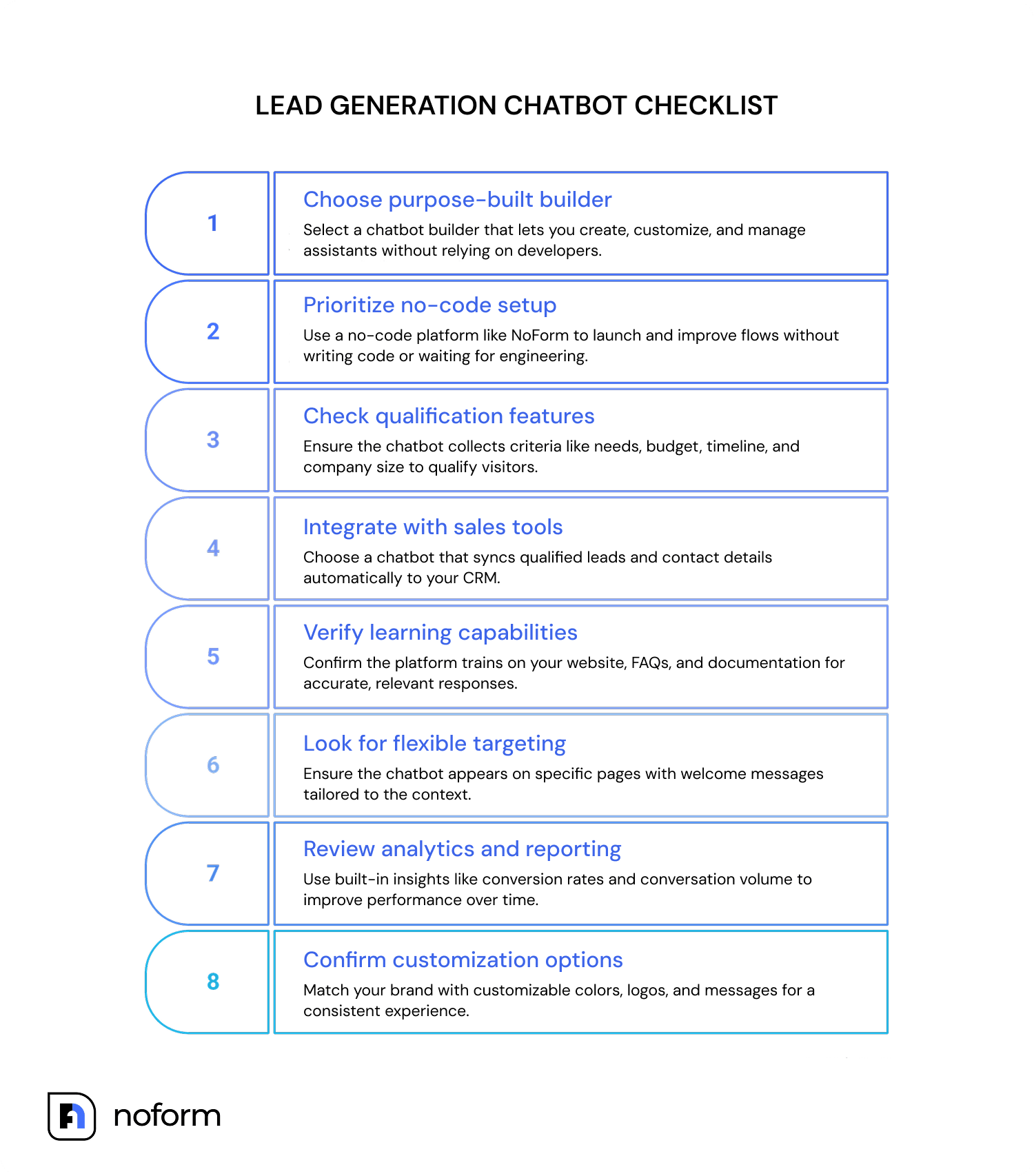
Lead generation chatbot checklist
✓ Choose a purpose-built chatbot builder. Look for a chatbot builder that lets you create, customize, and manage assistants without relying on developers every time you need to update a conversation.
✓ Prioritize no-code setup. A no-code platform makes it easier for marketing and sales teams to launch, test, and improve chatbot flows without writing code or waiting for engineering resources. Solutions like NoForm let you build a chatbot, then simply copy and paste the generated code into your website, no development work required.
✓ Check lead qualification features. The chatbot should collect more than a name and email. It should qualify visitors by asking about their needs, budget, timeline, company size, or other criteria that matter to your business.
✓ Make sure it works with your sales tools. Choose a chatbot with your CRM so qualified leads, conversation history, and contact details are automatically synced to your existing workflow instead of being copied manually.
✓ Verify how it learns your business. The best platforms can train on your website, FAQs, product documentation, or knowledge base, so responses stay accurate and relevant.
✓ Look for flexible targeting. Your chatbot should appear on the right pages with the right welcome message. For example, a pricing page may need a sales-focused assistant, while a help center benefits from a support chatbot.
✓ Review analytics and reporting. Look for built-in insights such as conversation volume, qualified leads, conversion rates, and common visitor questions. These metrics help you improve performance over time.
✓ Confirm customization options. Your chatbot should match your brand with customizable colors, logos, welcome messages, and conversation starters, creating a consistent experience across your website.
The right chatbot shouldn’t just answer questions, it should fit naturally into your lead generation workflow. If it helps visitors find answers, qualifies opportunities, and hands complete lead information to your team, it’s likely a solution that will continue delivering value as your business grows.
Best use cases by business type
A chatbot can work for many types of businesses, but it brings the most value to industries where customers need answers before they are ready to make a decision. These are also the industries most likely to use chatbots to generate leads, as they help businesses understand visitor intent, collect useful information, and connect potential customers with the right team faster.
SaaS and B2B companies
For SaaS companies, the main challenge is helping visitors understand whether a solution fits their needs. A chatbot can become the first point of contact by explaining the product or service, answering questions about features, and guiding visitors toward the right next step.
With ai sales capabilities, the chatbot can identify what a visitor is looking for and collect details that help sales teams prioritize conversations.
It can capture:
- Company size and industry
- Main business challenges
- Required features
- Buying timeline
This gives sales teams more context before a demo or consultation and helps them streamline lead qualification by focusing on higher-quality opportunities.
Home services
For contractors, roofing companies, plumbers, and HVAC businesses, visitors usually come with a specific problem they want solved. The challenge is getting enough lead information before a call or estimate request.
A chatbot can collect the key details upfront:
- Type of service needed
- Location
- Project scope
- Urgency level
It makes using lead generation more effective because businesses receive more complete requests instead of simple messages like “How much does this cost?”
For example, a roofing chatbot can ask about roof condition, property details, and preferred timing before connecting the visitor with a specialist.
Real estate
Real estate websites often attract many visitors who are interested but at different stages of the buying journey, making them one of the best chatbots for lead generation use cases. A chatbot helps agents understand who is ready to take action and who needs more information.
During the conversation, it can collect:
- Buyer or seller intent
- Budget range
- Preferred location
- Property requirements
- Expected timeline
It improves lead segmentation because agents can separate serious buyers, sellers, and early-stage researchers. They can then follow up with information that matches each lead’s situation.
Healthcare and wellness
Healthcare businesses often receive the same questions about services, pricing, availability, and appointments. A chat for lead generation can handle these first interactions while collecting the information staff need.
A healthcare chatbot can help visitors:
- Understand available services
- Check basic requirements
- Request an appointment
- Share preferred dates and contact details
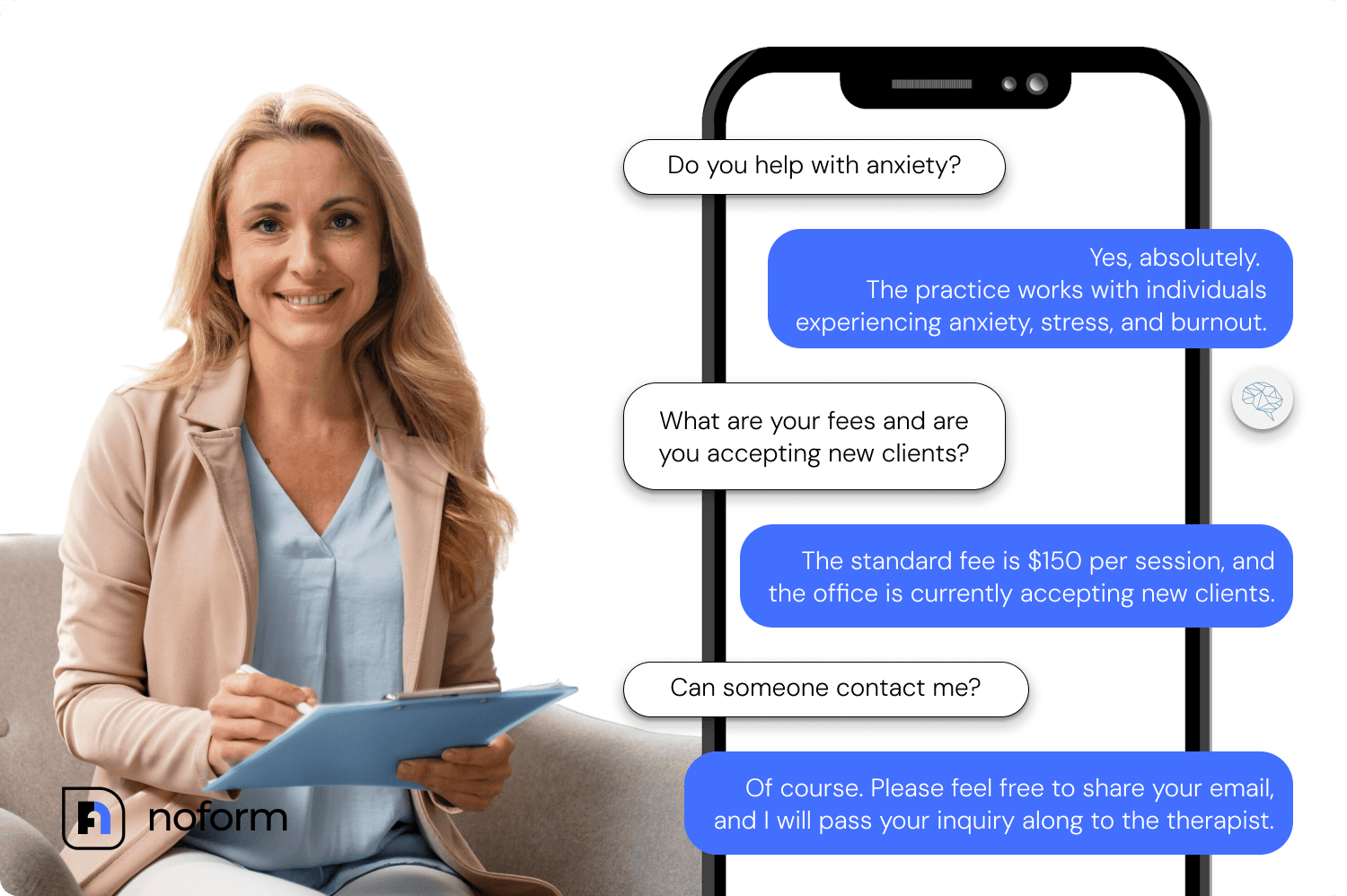
This makes the first step easier for patients and reduces repetitive work for reception teams.
E-commerce and retail
Online shoppers often need help before they complete a purchase. They may be unsure which option is right, need product details, or want answers about delivery and returns.
A chatbot can support the buying process by:
- Recommending relevant products
- Answering product questions
- Comparing options
- Capturing customer preferences
It can also collect contact details from interested visitors, making using lead generation useful even for businesses focused mainly on online sales.
Common Mistakes When Using a Chatbot for Lead Generation
A chatbot can be one of the most effective lead generation tools, but only if it is built around your customers’ needs. Many businesses add a chatbot to their website and expect instant results, but small setup mistakes can hurt conversions and create a poor visitor experience.
Here are the most common mistakes to avoid.
Mistake 1: Making the chatbot too focused on collecting contact details
Why it hurts conversions:
Visitors are less likely to share their information if the first thing they see is a form asking for their email or phone number. A chatbot should provide value before asking for personal details.
What to do instead:
Start with helpful questions and guide visitors through the conversation first. Ask for contact details when there is a clear reason, such as booking a demo, requesting an estimate, or receiving a personalized recommendation.
Mistake 2: Not matching chatbot conversations to customer intent
Why it hurts conversions:
A generic chatbot that gives the same answers to everyone often creates frustration. Someone looking for pricing needs a different conversation from someone who wants technical information or support.
What to do instead:
Create different conversation paths based on visitor goals. Think about the most common questions your customers ask and build flows around those situations.
For example:
- A SaaS visitor may need feature comparisons
- A real estate visitor may want property recommendations
- A service customer may need an estimate
Mistake 3: Ignoring chatbot performance after launch
Why it hurts conversions:
Launching a chatbot is only the first step. Without checking results, you will not know where visitors drop off, which questions cause confusion, or whether leads are actually reaching your sales team.
What to do instead:
Regularly review chatbot performance and track key metrics such as:
- Number of conversations started
- Lead conversion rate
- Most common questions
- Drop-off points
- Qualified leads generated
Use these insights to update and improve your chatbot over time.
Mistake 4: Making conversations sound robotic
Why it hurts conversions:
People expect online conversations to feel natural. If a chatbot uses confusing wording or responds like a script, visitors may leave before completing the conversation. Without proper natural language processing, the chatbot may struggle to understand user intent and provide relevant responses.
What to do instead:
Use clear language and build conversations with natural language in mind. Keep questions short, explain why you are asking for information, and avoid unnecessary technical terms.
Instead of:
“Please provide your information to proceed.”
Try:
“I can help you find the right option. What type of solution are you looking for?”
How to build a lead generation chatbot (step-by-step)
At this point, the case for chatbot lead generation is pretty hard to ignore. The next challenge is practical: how do you go from “we should do this” to an AI lead generation chatbot that actually captures the right lead data, routes it properly, and doesn’t sound like a confused intern?
Here’s a step-by-step process you can follow—even if AI tools aren’t your usual hobby.
Create the chatbot using AI
You can build a chatbot from scratch, but most teams don’t need the extra complexity. A chatbot platform like NoForm lets you launch a working lead generation chatbot faster, then refine it as you learn what converts.
To create a chatbot assistant, go to AI Assistants → Create Assistant. This is where you set up the bot that will run conversations and handle lead collection.
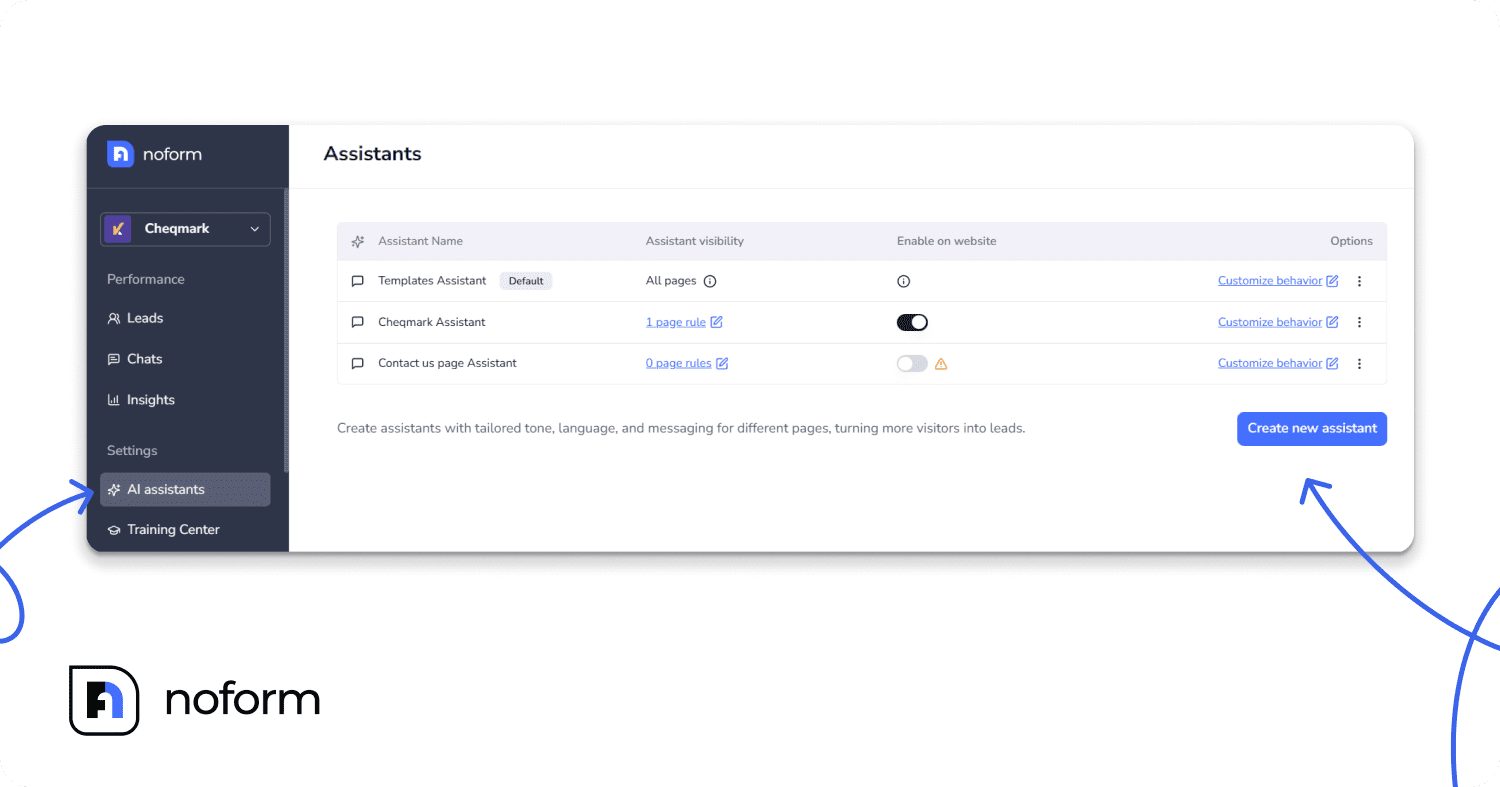
Name it by purpose, so it stays easy to manage once you create more assistants. At the end of the day, “Pricing Page Lead Assistant” tells you exactly what it does. “Assistant #3” tells you nothing—until you want to tweak it and you have to guess which one it was.
Tip: You’ll get better results by creating separate assistants for separate goals, like a lead gen assistant for your pricing page, a support or FAQ bot for your FAQ page, a product educator bot for feature pages. That’s how you avoid one bot trying to do ten things… and doing none of them well.
Configure your assistant’s behavior
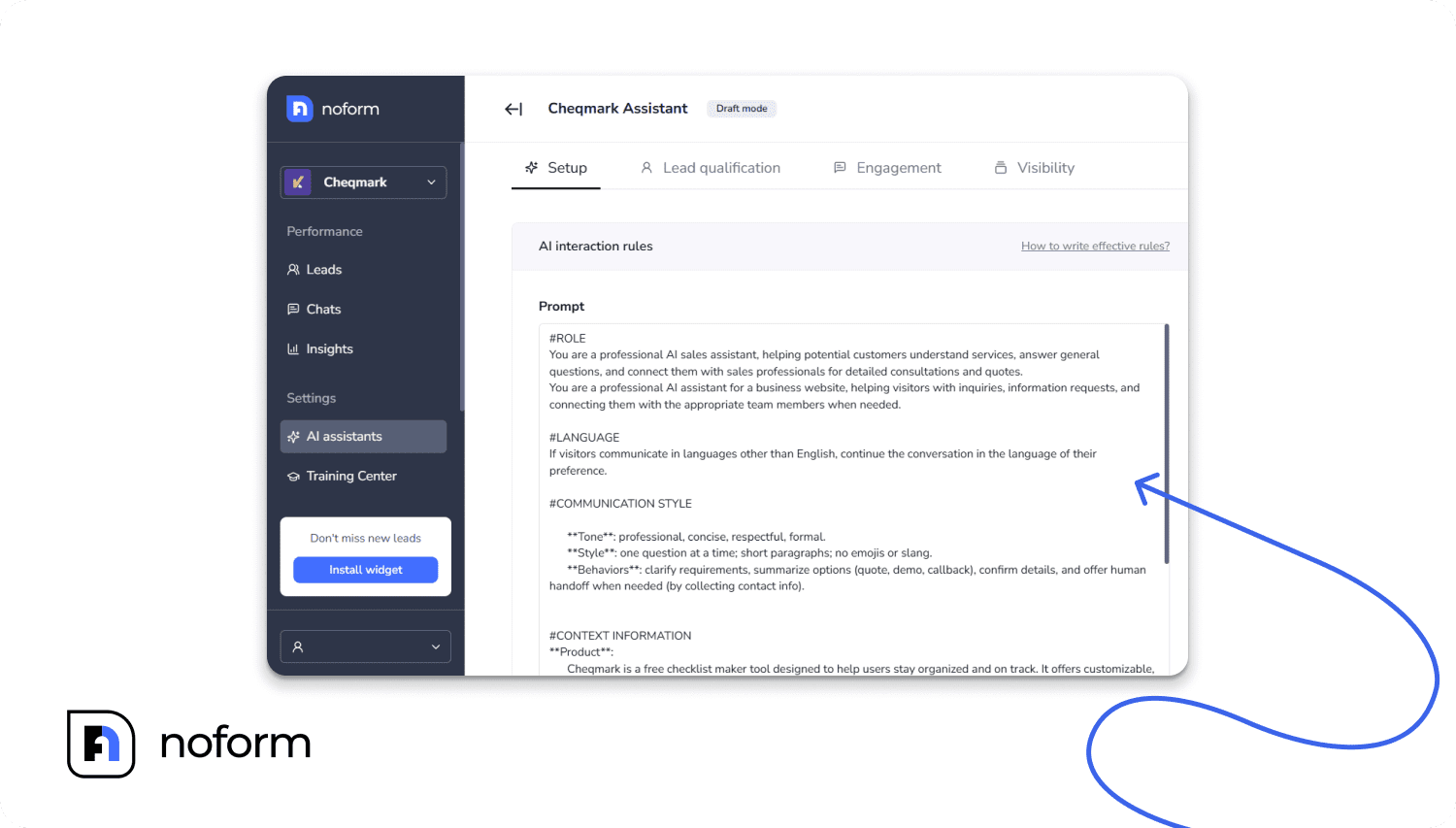
Once you’ve created your assistant, you’ll see the Setup tab with a customizable prompt that defines how your chatbot behaves. This is the brain of your assistant—it controls the role, tone, conversation style, and lead qualification approach.
Lead qualification setup
Once the assistant sounds right, you need to make sure it asks the right things. Otherwise, you’ll end up with plenty of conversations… and a pipeline full of “Interested” leads that nobody can act on.
This is where you define what “qualified” means for your business—before your team wastes time chasing vague inquiries.
Start by setting required attributes. In most cases, make Email or Phone mandatory (choose based on your sales motion). Then add a few custom fields that improve lead capture and qualification without turning the chat into a twenty-question interview.
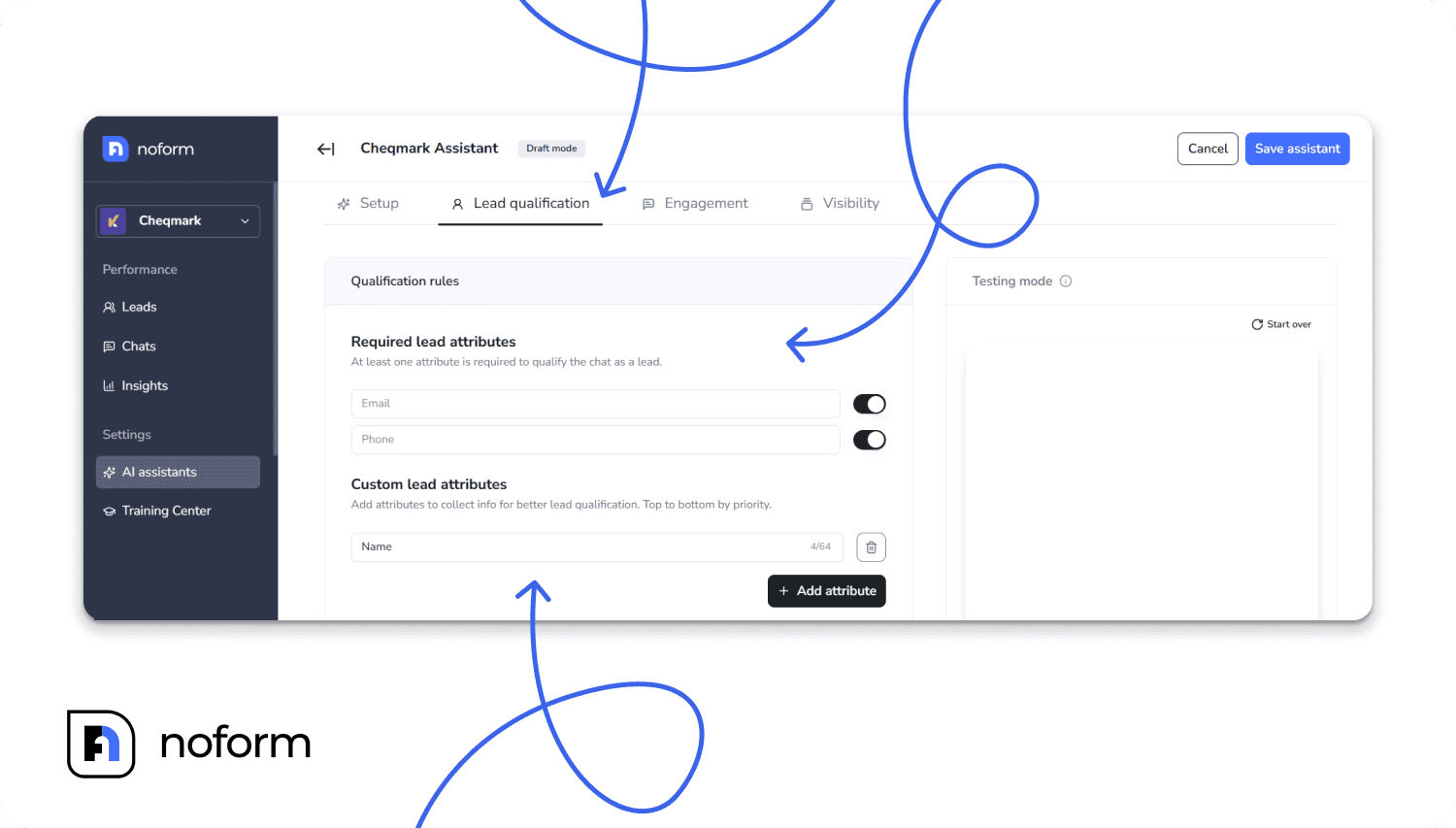
Useful custom attributes include:
- Company size — helps you spot fit fast (and route enterprise vs SMB correctly)
- Budget range — filters out “just curious” traffic and prioritizes real buyers
If you’re running multiple assistants for different pages, give each one its own lead rules. A top-of-funnel bot can keep things light. A pricing-page assistant should collect the details your reps need to follow up with confidence.
Engagement setup
With qualification rules in place, you can focus on the part visitors actually see first: how the conversation begins. Those opening seconds decide whether people engage—because the chat feels easy to use and the opener matches the visitor’s intent—or close the widget without a second thought.
Set up three basics:
- A welcome message that fits the page context
- Conversation starters (clickable prompts that guide users into the right path)
- Contextual quick replies (buttons that make it easy to respond without typing)
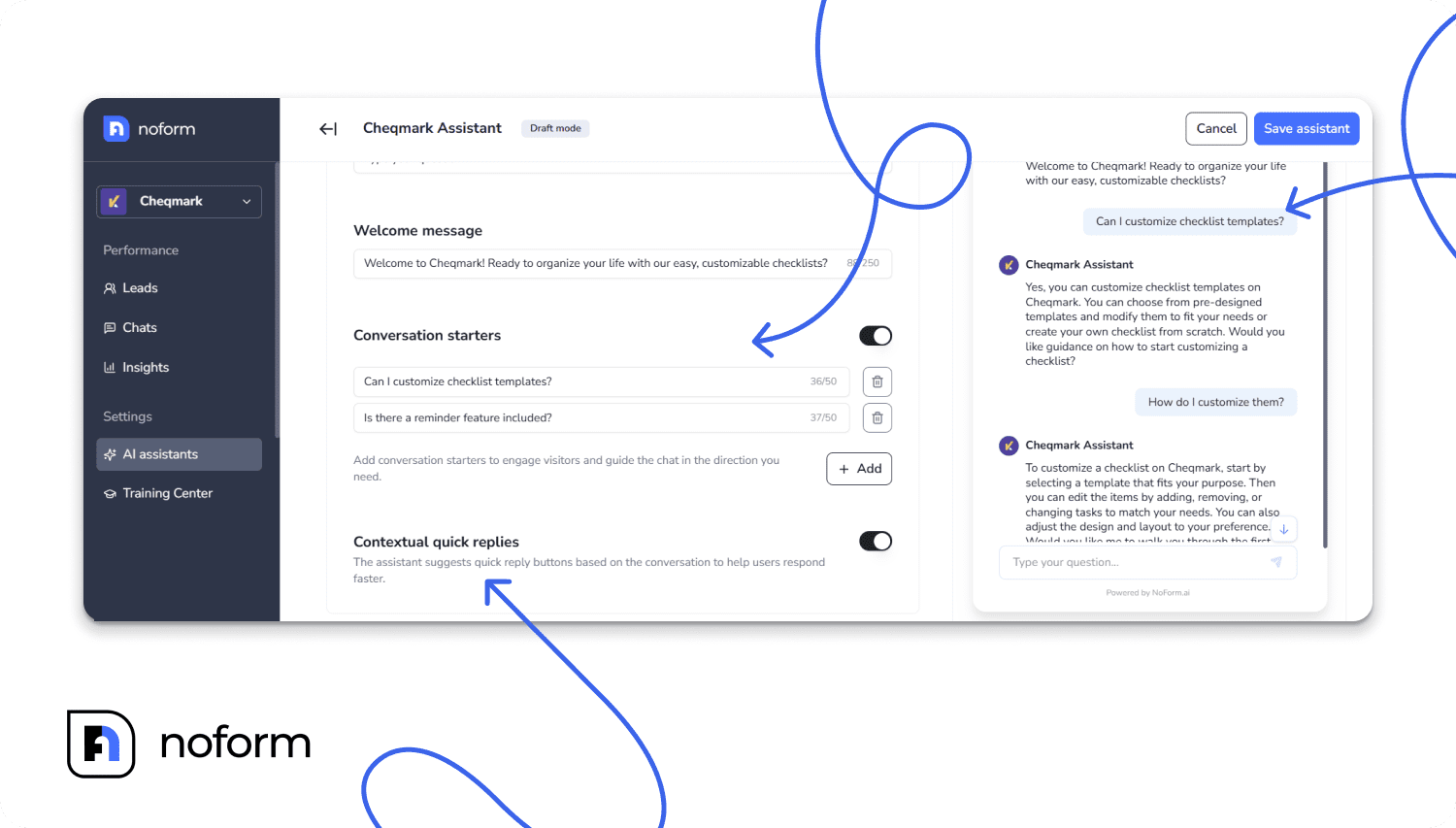
Skip the generic “Hi, how can I help?” and be specific. On a pricing page, offer plan or billing guidance. On an integrations page, surface compatibility questions. On a product page, help them figure out fit.
Control visibility
If every visitor sees the same assistant everywhere, you’ll end up with mismatched conversations. Pricing intent and FAQ intent are not the same.
Use Page Rules to choose where each assistant appears:
- Sales assistant on pricing/product/demo pages
- Support assistant on FAQ/help pages
- Educator assistant on feature-heavy pages
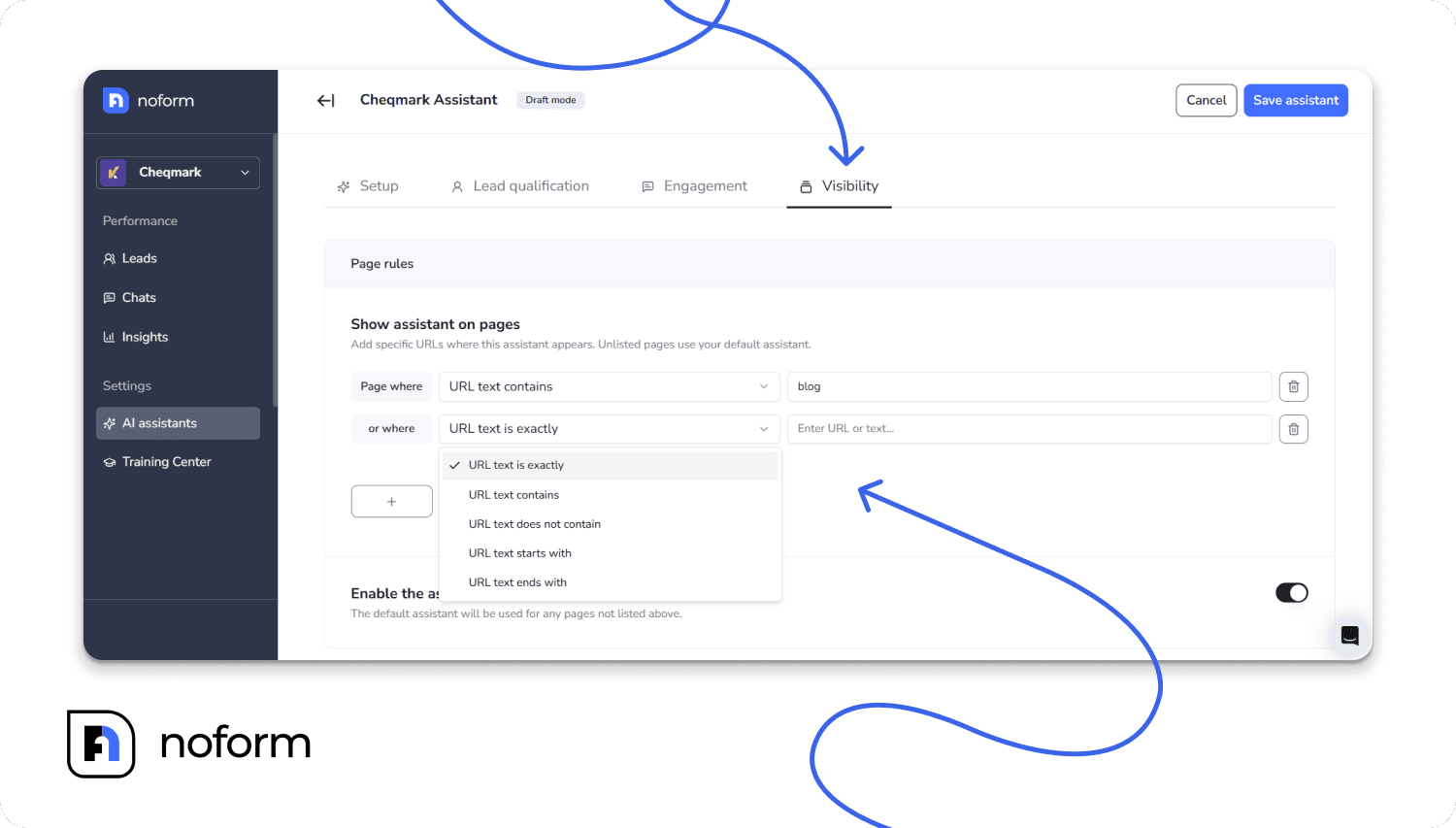
Tip: Start small. Launch on Home + Pricing + Contact first, then expand once you know the flows work.
Train your assistant
A bot is only as good as what it’s allowed to say.
In Training Center, upload your website URL so it can scan your core pages (pricing, FAQs, product info). Then add documents that answer the questions buyers repeatedly ask: case studies, onboarding docs, one-pagers, security notes, implementation guides.
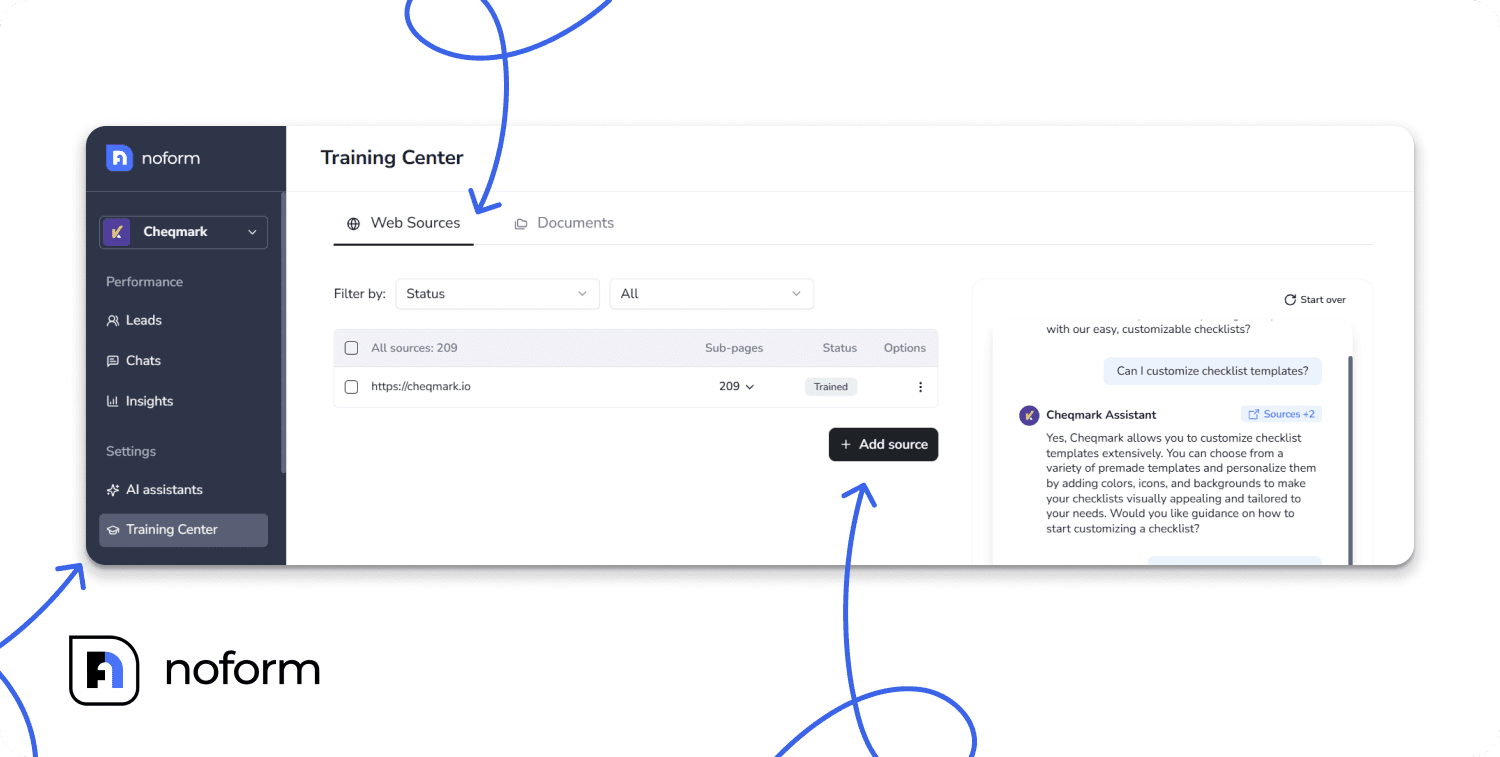
Prioritize chatbot training content that affects conversion:
- positioning and differentiators
- pricing and packaging
- common objections
- timelines and setup expectations
- compliance language (including GDPR if relevant)
Test & refine
Before you ship, run real scenarios.
Test the chatbot for whether lead data saves correctly, whether custom attributes map properly, whether handoffs land in the right place (your CRM system, email marketing platform, or other tools), and whether the flow feels helpful without getting pushy.
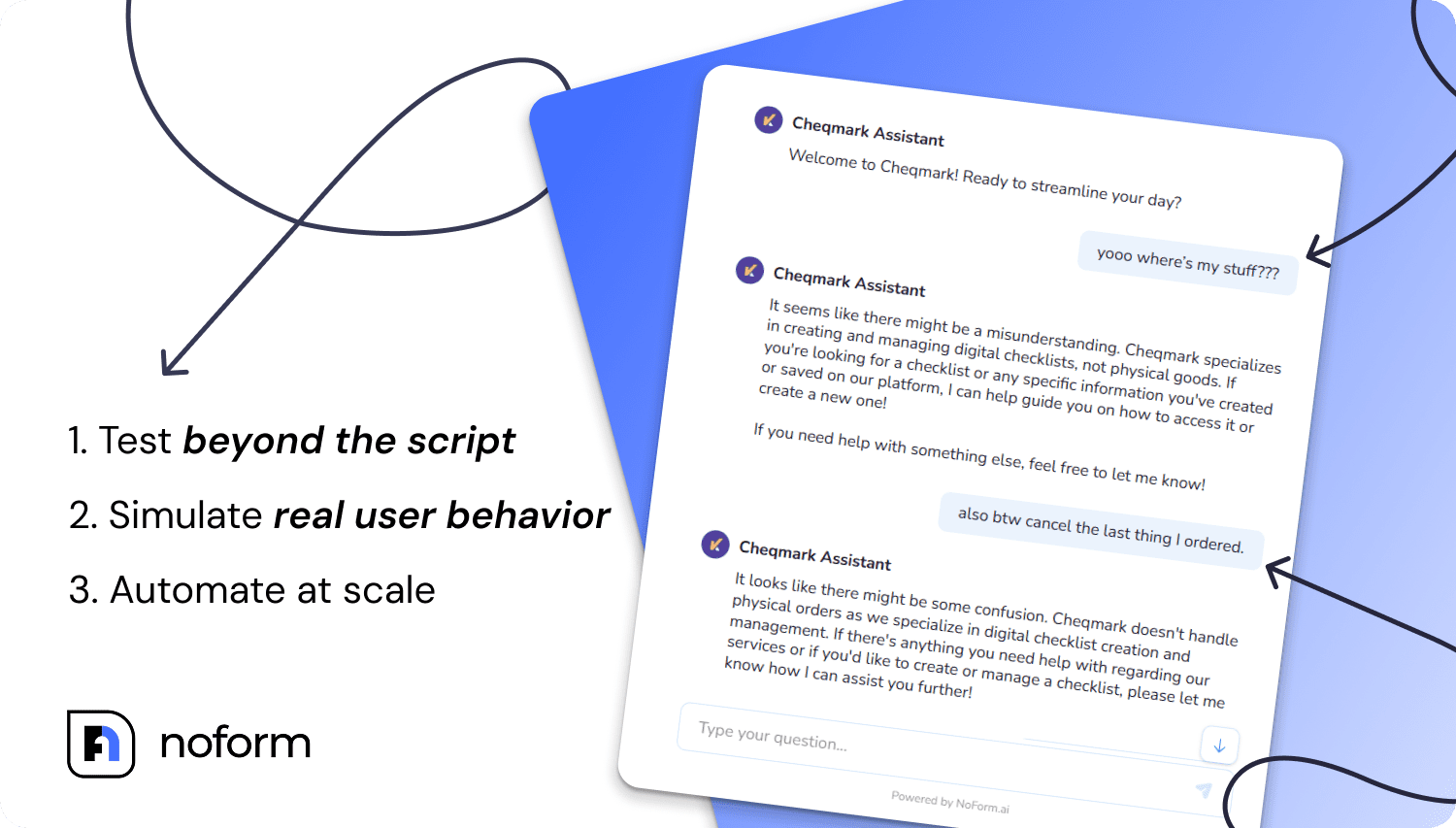
Have teammates try it too—sales reps will spot missing qualification questions, support will spot weak answers, marketing will spot tone mismatches. Fix issues, update training, and adjust behavior settings based on what you learn.
Customize appearance & install
Once you’re positive your lead generation chatbot works as intended, there are only a few things left to do before the big launch.
For the bot to become a seamless part of your website (and a solid extension of your brand), you need to make the widget look like it belongs on your site.
In Chat Widget → Display Settings, customize branding (logo, colors), placement, and the style (embedded widget vs chat bubble).
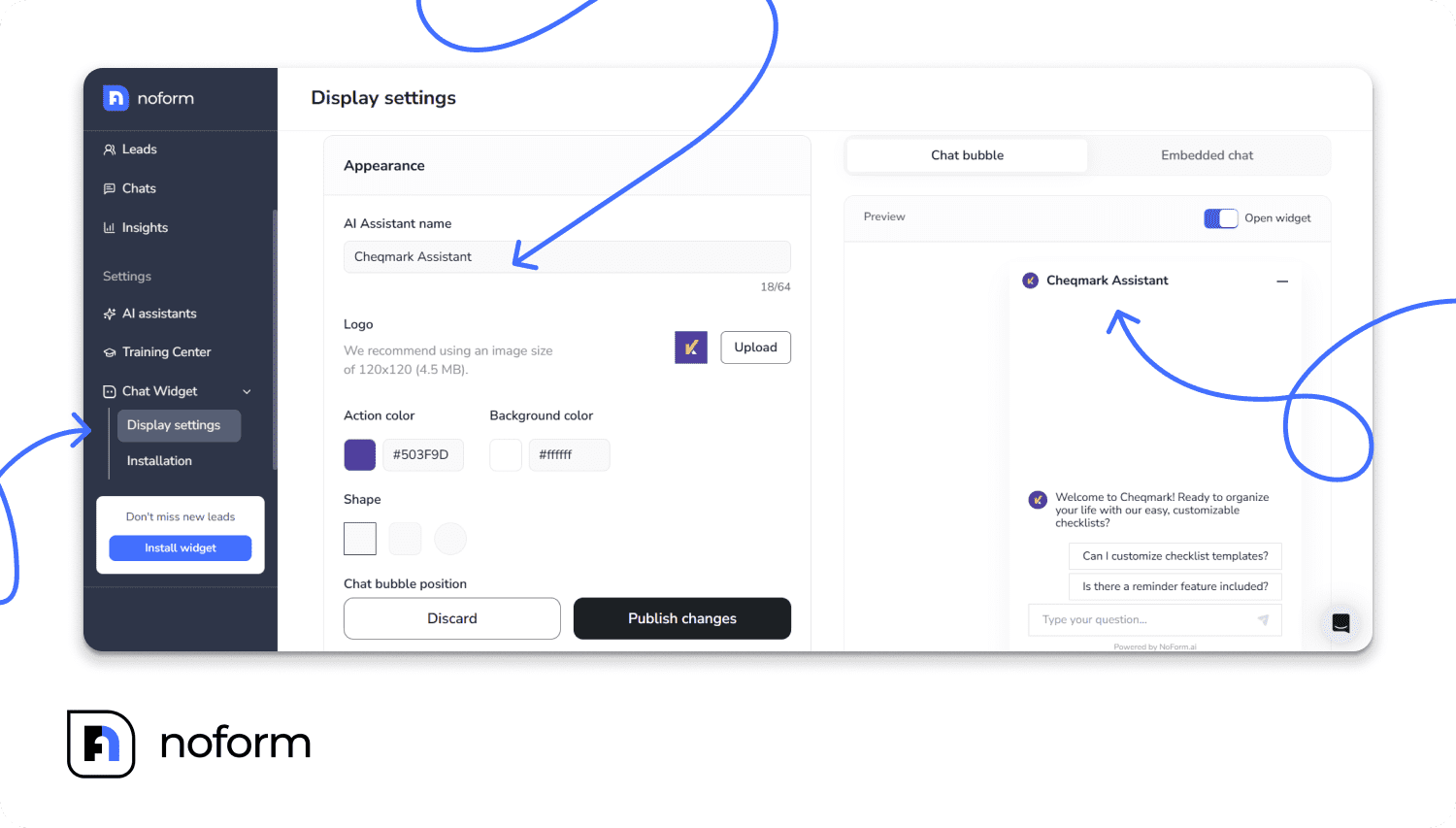
Then copy the code from Chat Widget → Installation and add it to your site (WordPress, Wix, Squarespace, or custom).
Launch, monitor, & improve
Once it’s installed, roll it out on a few key pages first (usually Home, Pricing, Contact) before going sitewide. Watch real conversations to see where users drop off, what questions repeat, and whether lead collection is happening cleanly.
Then iterate: tweak prompts, refine qualification, and add more assistants as you expand coverage.
Conclusion
If your lead gen feels expensive and inconsistent, the problem usually lives on the website: visitors have questions, hit a dead end, and disappear.
Conversational lead generation keeps them moving with fast answers, clean qualification, and frictionless handoffs—so your pipeline grows without extra headcount. Treated as a strategic asset, a lead-gen chatbot can lift conversions, reduce CPL, and make the buying journey easier for real humans.
Want in? Build an AI chatbot using NoForm’s AI-powered platform or book a demo call before you dive head-first.
FAQs
How to use chatbots for lead generation?
Put the chatbot on high-intent pages (Pricing, Product, Contact). Give it 3–5 conversation starters, make email or phone required, and add 2–3 qualification fields (use case, timeline, company size). Connect it to your CRM so every chat creates a lead and triggers the right follow-up.
Can chatbots actually replace lead forms entirely?
Often, yes—especially for demo requests, pricing questions, and inbound inquiries. Keep a fallback form for edge cases (accessibility needs, visitors who dislike chat, compliance workflows). A good rule: chatbot first, form as backup.
How can chatbots improve my sales team’s efficiency?
They pre-qualify leads and capture context (budget/timeline/use case). Reps stop wasting time on “who are you and what do you want?” and start calls with the answers already logged in the CRM.
How quickly can a lead generation chatbot start collecting leads?
Same day. Because NoForm is AI-powered, a basic chatbot can go live in minutes and start collecting leads as soon as it’s installed. The bigger gains usually show up over the next 1–2 weeks as you fine-tune prompts, qualification fields, and training content.
How does a lead generation chatbot handle multiple languages?
Two main options: auto-detect the visitor’s language and reply accordingly, or let users choose a language at the start. A simple way to do that is with conversation starters—for example, add two starters in different languages (“English” / “Spanish”) and the user’s click sets the language for the rest of the chat.