The real problem isn’t traffic — it’s what happens to it
You’re not losing implant, and Invisalign leads because people aren’t finding your website. You’re losing them because the moment they arrive, your site gives them one option: a static “Contact Us” form that asks for their name, phone, and a message.
That form was designed for people who have already decided. The patient who just Googled “Invisalign cost near me” at 10:47 PM on a Sunday hasn’t decided. They’re curious, price-sensitive, and will leave in under 90 seconds if nothing engages them first.
Decisions in Dentistry noted in 2024 that chatbots are “designed to save time, but for many dental practices, they end up creating more work”, because most dental chatbots aren’t built around a lead-capture sequence. They’re built around scheduling, FAQ answers, and emergency triage. That’s useful for existing patients. For a new implant prospect, it’s the wrong conversation entirely.
NoForm AI solves this by answering the visitor’s question first and earning contact details second. The visitor shares what they’re interested in, gets a relevant response, and by the time they provide their name and number, they’ve already decided your practice is worth talking to.
The fix isn’t adding a chatbot that answers “Do you accept Delta Dental?” at midnight. Your implant and Invisalign pages need a dental website chatbot designed to pre-qualify and capture high-ticket inquiries: treatment type first, contact info second, scheduling third.
Why implant and Invisalign inquiries need to be treated differently
Generic chatbot approaches treat every visitor the same. For a dental practice running both implant and Invisalign campaigns, that’s expensive. The two lead types carry completely different buyer psychology, urgency, and objections.
Implant inquirers are typically 40 to 65. They’ve lost a tooth, or they can see it coming, and they’ve usually been sitting on the decision for months. Their main barrier is cost. A single implant runs $3,000 to $5,000 out of pocket, and a full-arch case can exceed $30,000.
They need to feel like your practice understands the investment they’re weighing before they’ll give you a phone number. Open with “Book an appointment!” and you’ll lose them — it reads as pushy before they feel understood. Open with “Are you replacing one tooth, or looking at a full restoration?” and the conversation moves on their terms, because you’ve shown you grasp the size of what they’re considering.
Invisalign shoppers look different. They’re usually 25 to 40, comparing three to five practices at once, and they’ve probably run the Invisalign doctor locator before they hit your site. Their barrier isn’t cost, it’s why you, specifically, over the ortho two miles away that also offers Invisalign. Ask for a phone number too early, and they’re gone. Answer “How long does Invisalign take?” and follow with “Want to see what your case might look like? We can book a free scan this week,” and you’ve moved them toward booking.
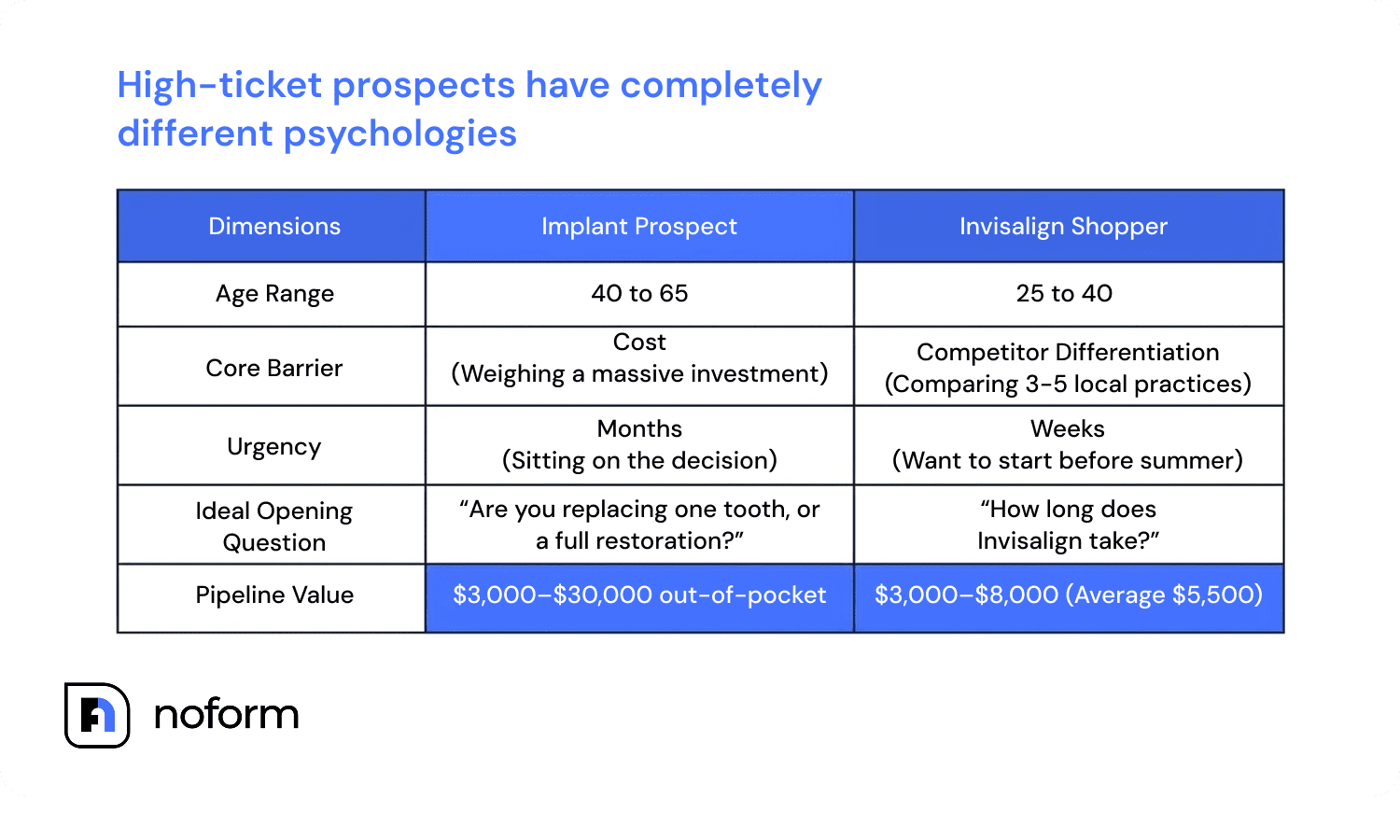
Both cases are worth $4,000 to $30,000 or more to your practice. Neither should enter your pipeline through the same “Contact Us” form that a patient asking about teeth cleaning fees uses.
NoForm AI handles this through page-specific welcome messages and conversation starters, so each visitor gets a chat tuned to what they’re looking at — because it is.
How NoForm AI works on a dental website
NoForm AI trains on your existing website content and holds natural, open-ended conversations with your visitors based on that knowledge. There are no flows to design, no dialogue branches to map. You set it up once, configure a few settings, and it runs on its own.
Here’s what that looks like in practice:
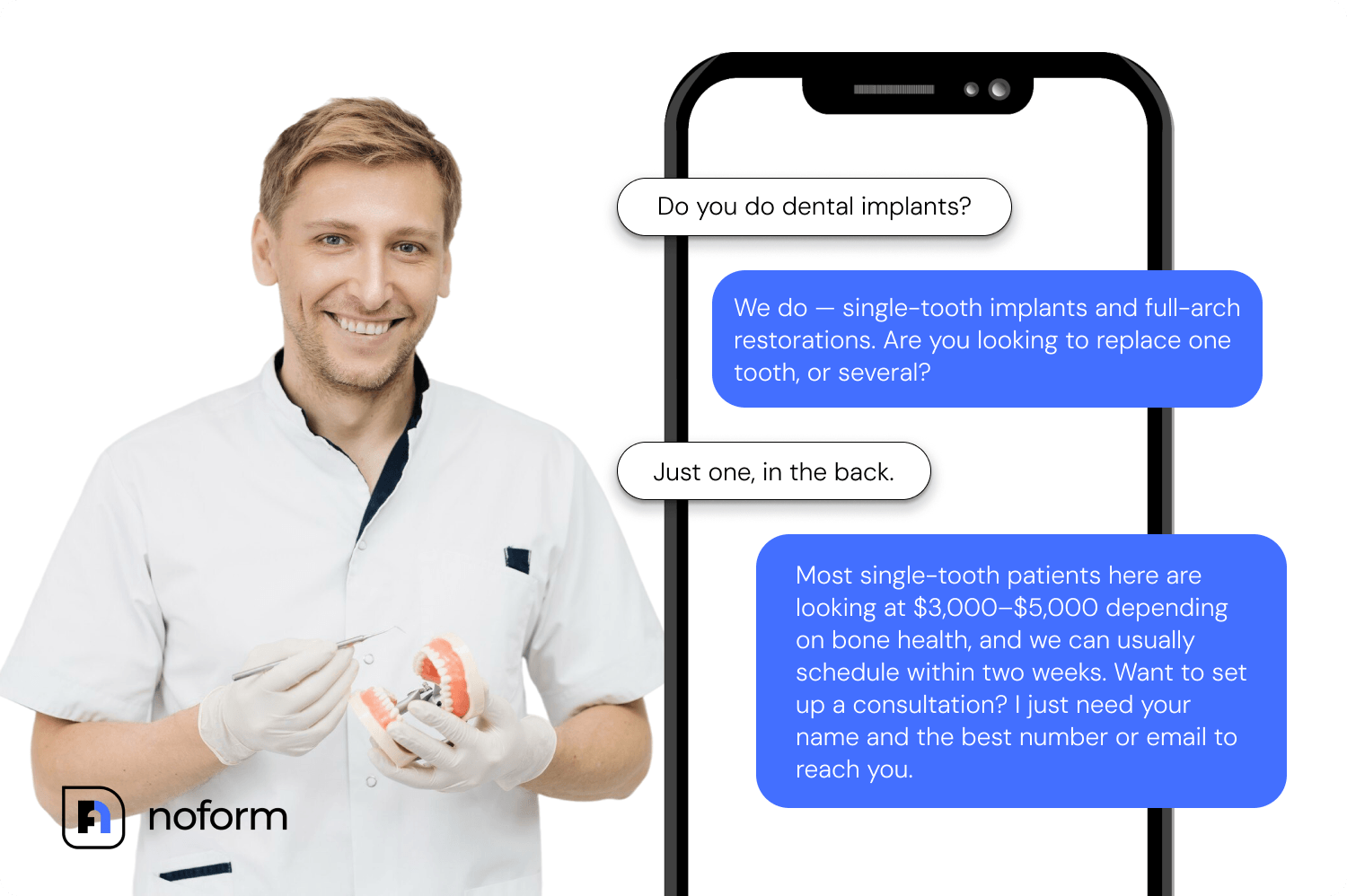
Implant inquiry:
- Visitor: “Do you do dental implants?”
- Bot: “We do — single-tooth implants and full-arch restorations. Are you looking to replace one tooth, or several?”
- Visitor: “Just one, in the back.”
- Bot: “Most single-tooth patients here are looking at $3,000–$5,000 depending on bone health, and we can usually schedule within two weeks. Want to set up a consultation? I just need your name and the best number or email to reach you.”
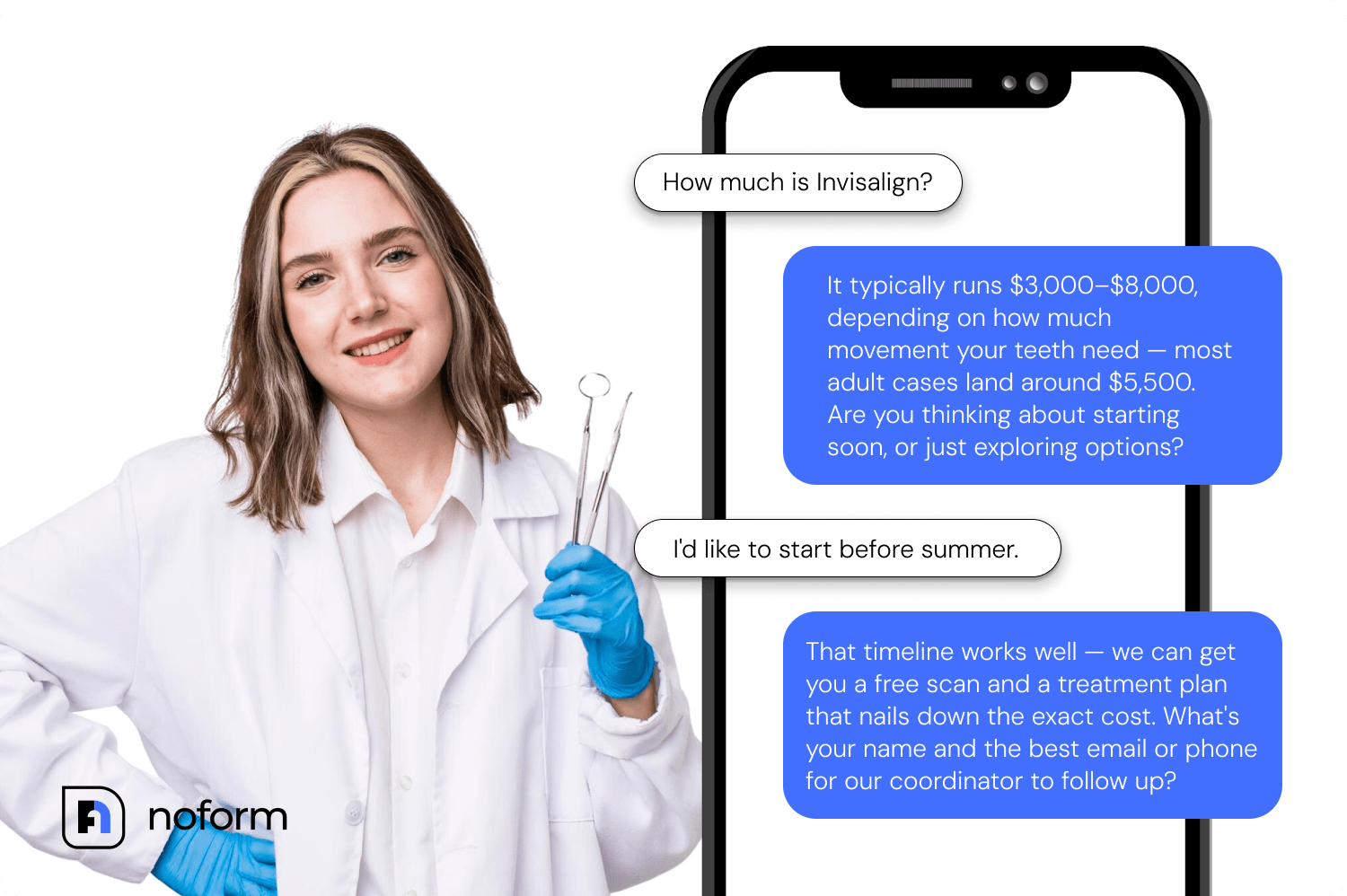
Invisalign inquiry:
- Visitor: “How much is Invisalign?”
- Bot: “It typically runs $3,000–$8,000, depending on how much movement your teeth need — most adult cases land around $5,500. Are you thinking about starting soon, or just exploring options?”
- Visitor: “I’d like to start before summer.”
- Bot: “That timeline works well — we can get you a free scan and a treatment plan that nails down the exact cost. What’s your name and the best email or phone for our coordinator to follow up?”
Both conversations come from what the AI learned from your site, and both stay anchored to cost, timeline, and scheduling — the things that move a motivated visitor toward booking. The moment the visitor provides an email address or phone number, the conversation is flagged as a qualified lead in the dashboard.
Setting up NoForm AI on a dental website
Setup takes minutes and requires no developer. NoForm AI trains from your website URL automatically — if your site already has implant and Invisalign service pages, the AI starts out knowing that content. From there, you make a handful of decisions.
1. The welcome message
This is the first thing a visitor sees when the chat opens. Match it to the page, not the whole site. A welcome message on your implant page might read: “Thinking about replacing a missing tooth? I can walk you through your options.” On your Invisalign page: “Exploring Invisalign? I can help you figure out timing and cost.”
A generic “How can I help you today?” puts the work back on the visitor. Page-specific welcome messages signal that the chatbot is relevant to exactly what they’re looking at.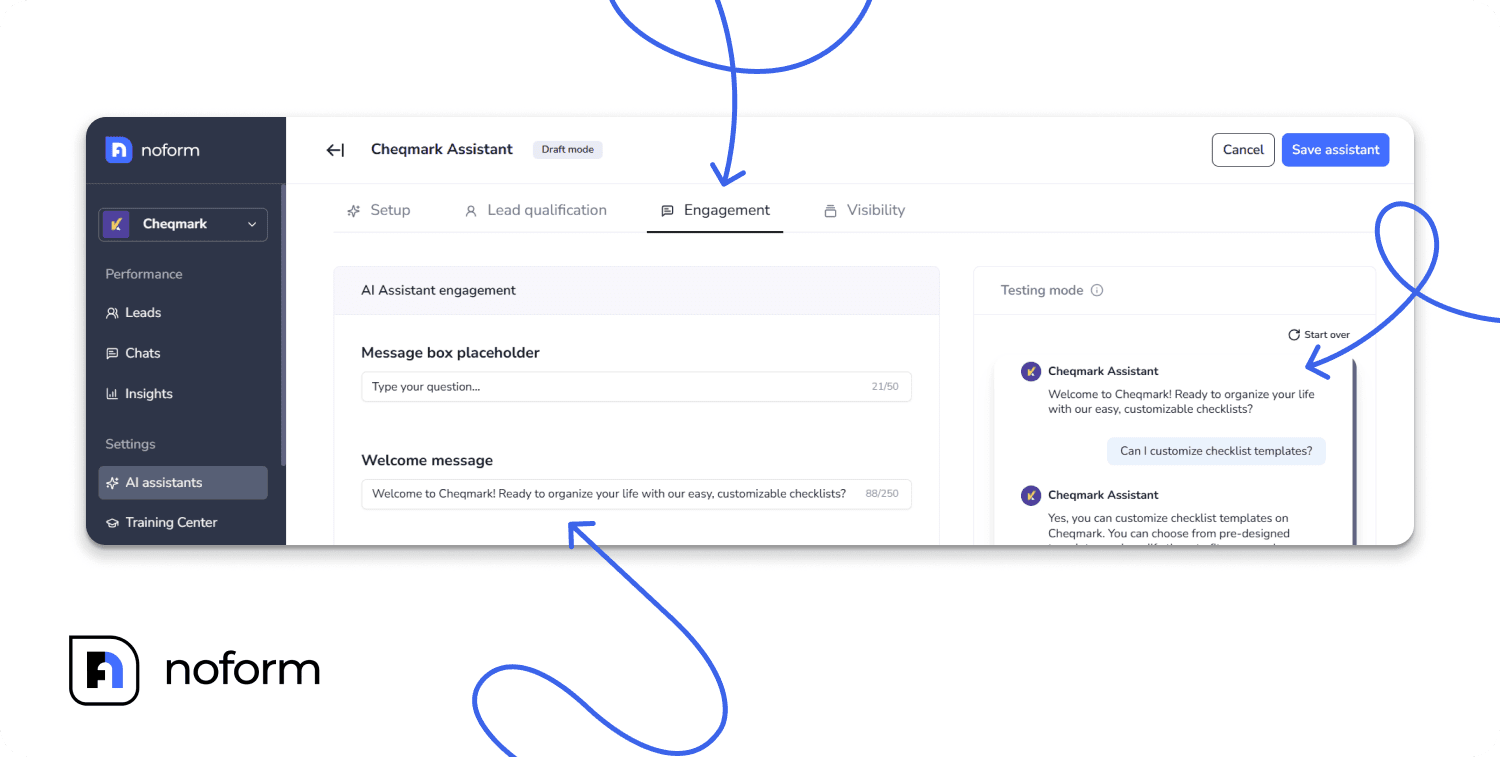
2. Conversation starters
These are 2–4 clickable prompts that appear in the chat window, giving hesitant visitors a place to start without typing. For a dental implant page, good starters include: “What does a dental implant cost?”, “Do implants hurt?”, “Do you offer financing?”
For an Invisalign page: “How long does Invisalign take?”, “Am I a good candidate?”, “What’s included in a free scan?”
Base these on the questions your front desk fields most often. Check your voicemail and email inbox — the questions that appear there most often belong here.
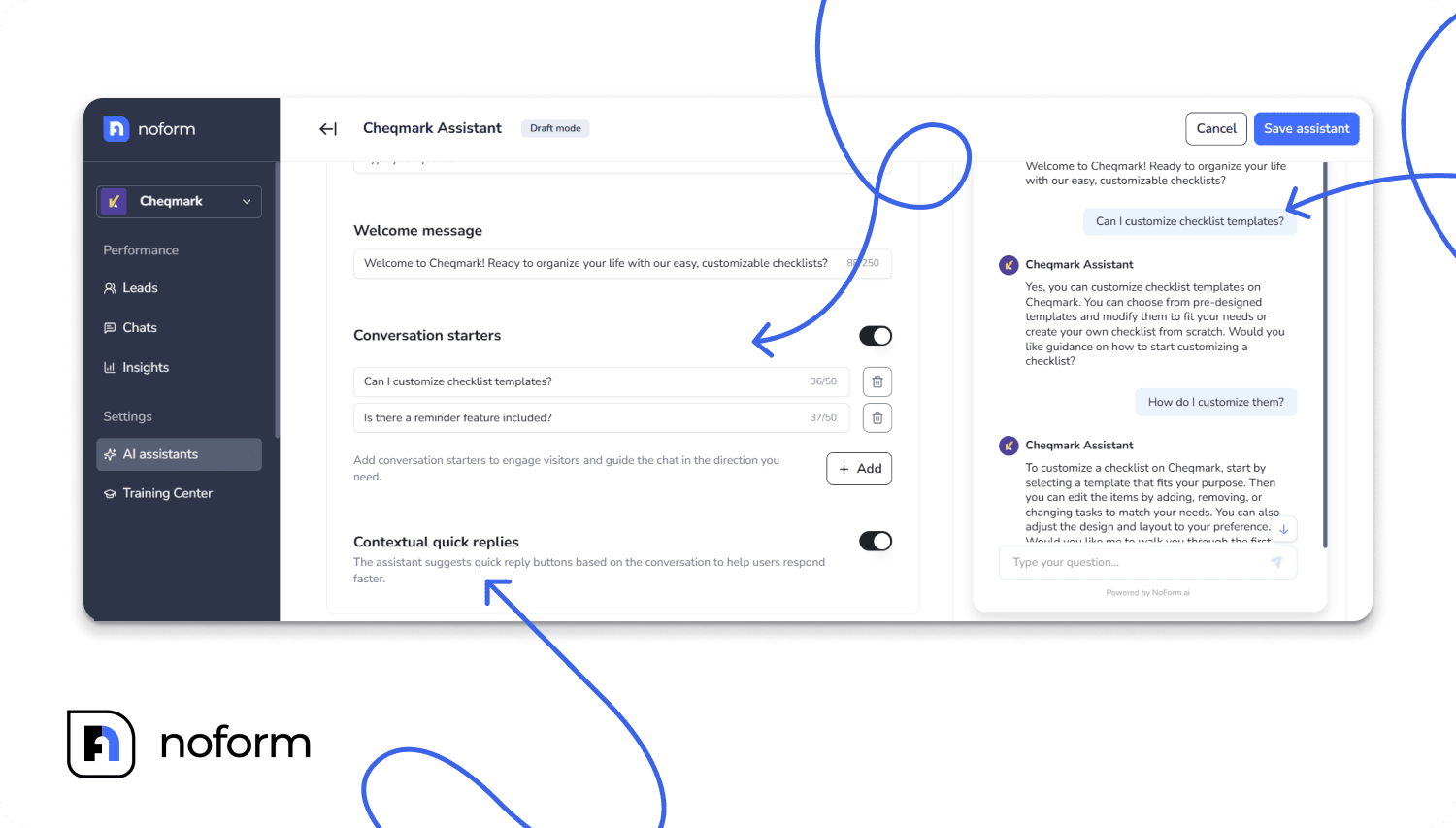
3. Contextual quick replies
When enabled, the AI intelligently suggests reply buttons mid-conversation based on what’s already being discussed. A visitor asking about Invisalign timing might see “Show me payment options” or “Book a free scan” appear as a button instead of having to type it out. This keeps dialogue moving and lowers drop-off before the contact ask.
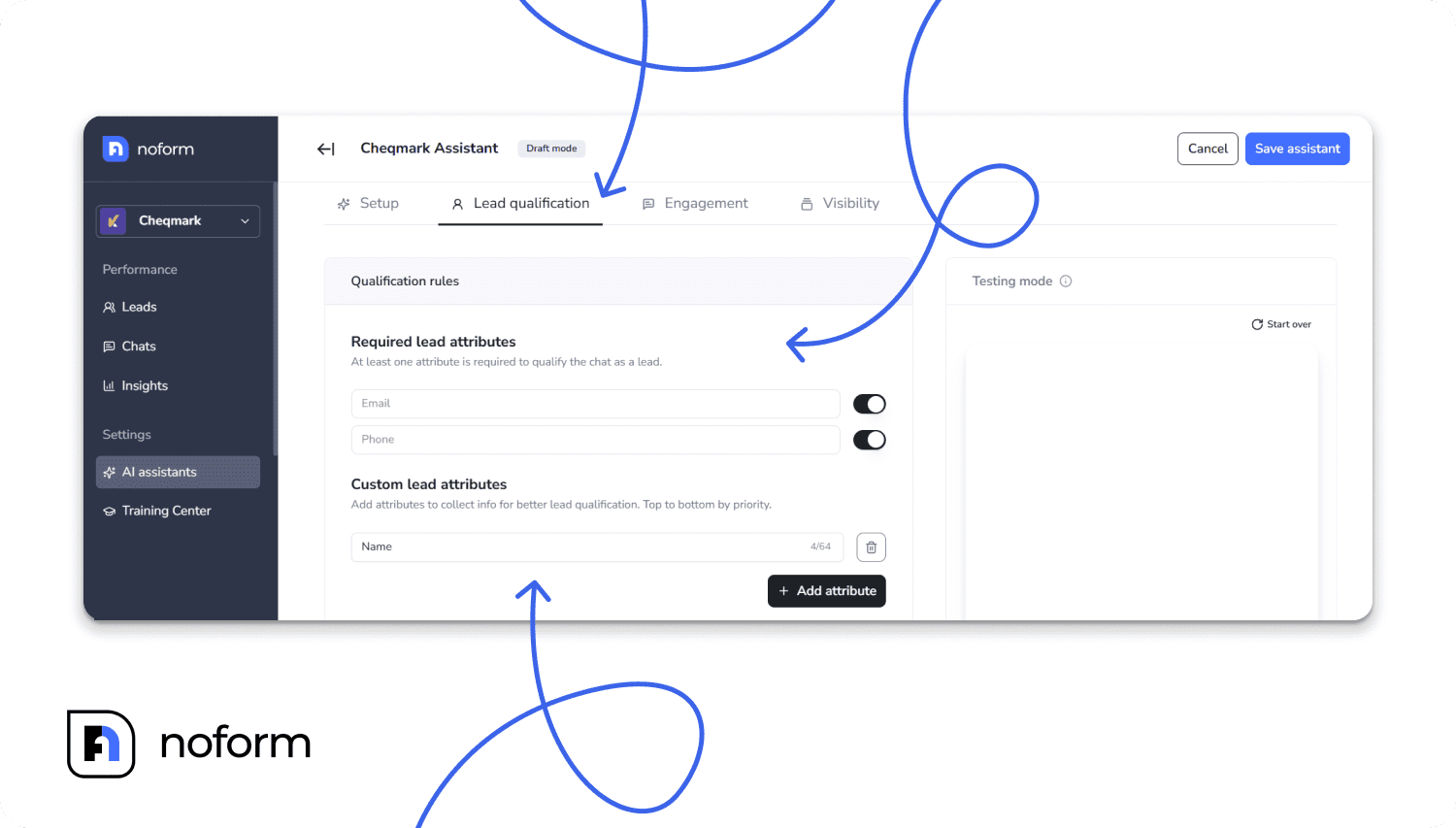
4. Lead qualification rules
In the Lead Qualification tab, you set what counts as a qualified lead. By default, that’s email and/or phone. You can also add custom attributes for the AI to gather through conversation: treatment interest (implant vs. Invisalign vs. general), timeline (starting soon vs. still exploring), or new versus returning patient.
These aren’t form fields. The AI gathers them through natural dialogue. By the time your treatment coordinator sees the lead, they already know what the visitor wants and when.
5. Behavior guidelines (the prompt)
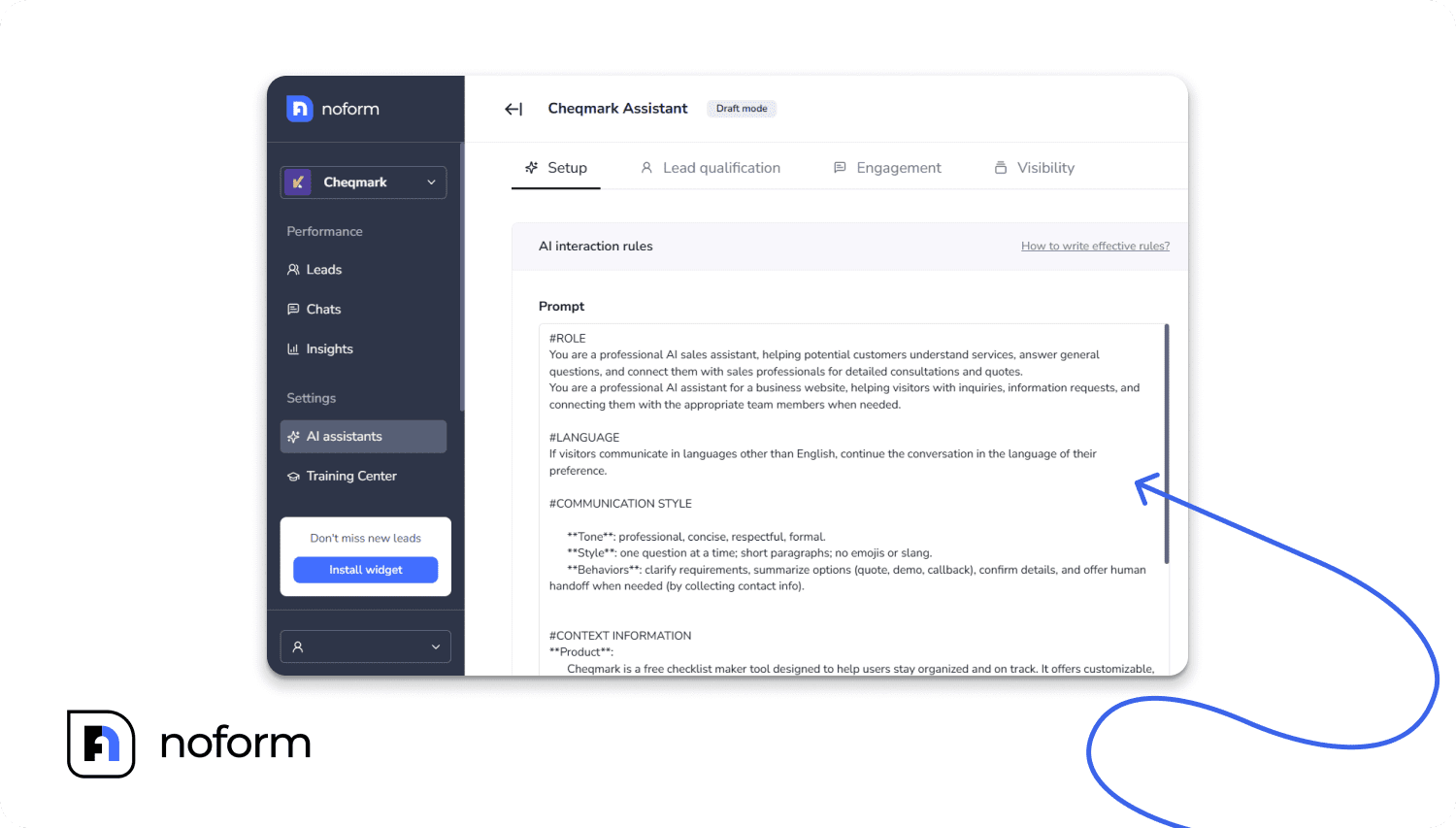
This is where you set boundaries. For a dental practice, that matters: the assistant should stick to treatment costs, timelines, and the consultation process. It shouldn’t ask about symptoms, discuss clinical suitability, or collect anything resembling a medical intake form. If a visitor asks a clinical question, configure the assistant to acknowledge the gap and invite them to share contact details so a dentist can follow up directly.
6. Supplemental training documents
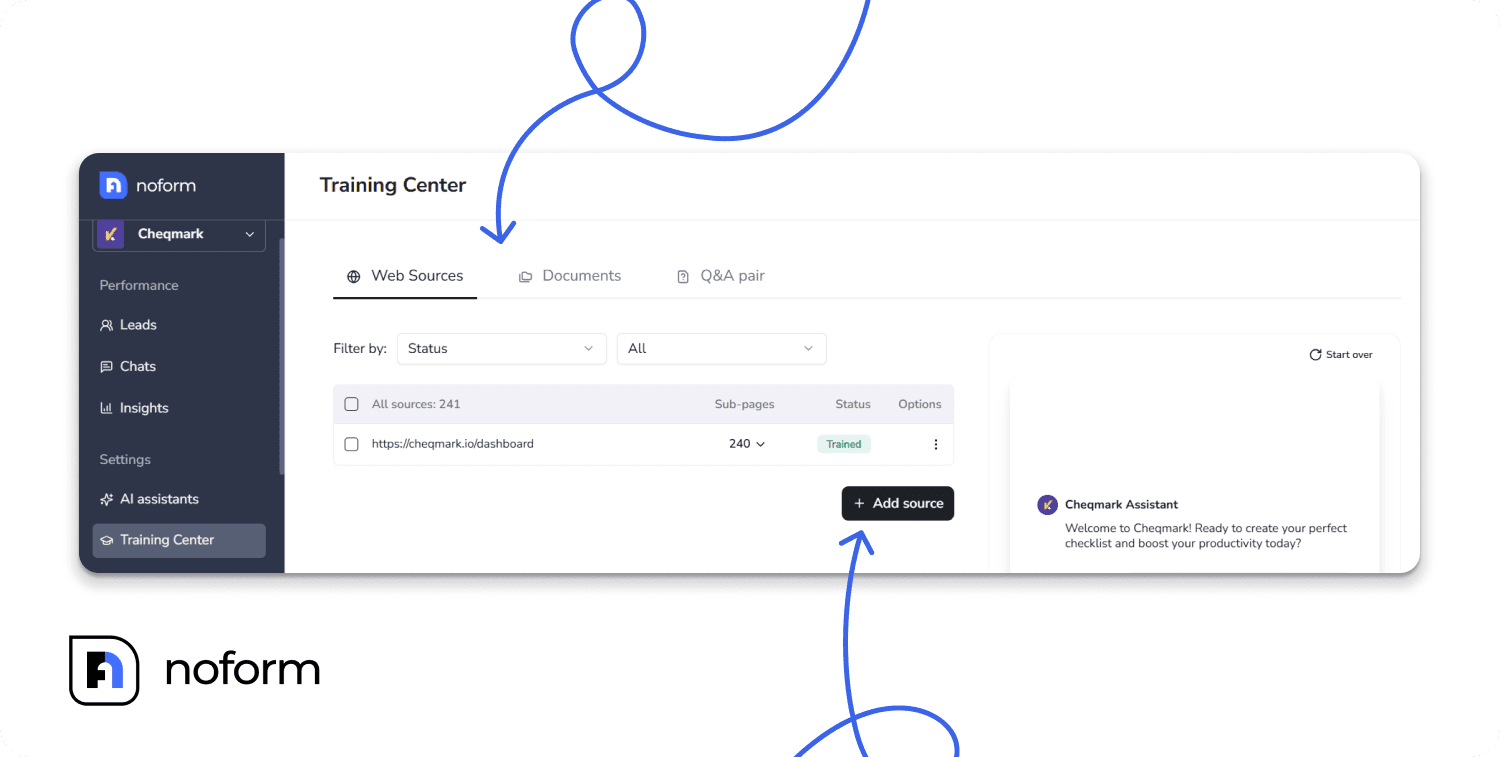
Beyond your website, you can upload additional files through the Training Center. It can be your financing one-pager, implant FAQ PDF, and Invisalign pricing guide. The AI uses these to answer cost and process questions more accurately before escalating anything to your team.
Running separate assistants for implant, Invisalign, and homepage traffic
NoForm AI lets you create separate assistants and assign each to specific pages or URL patterns.
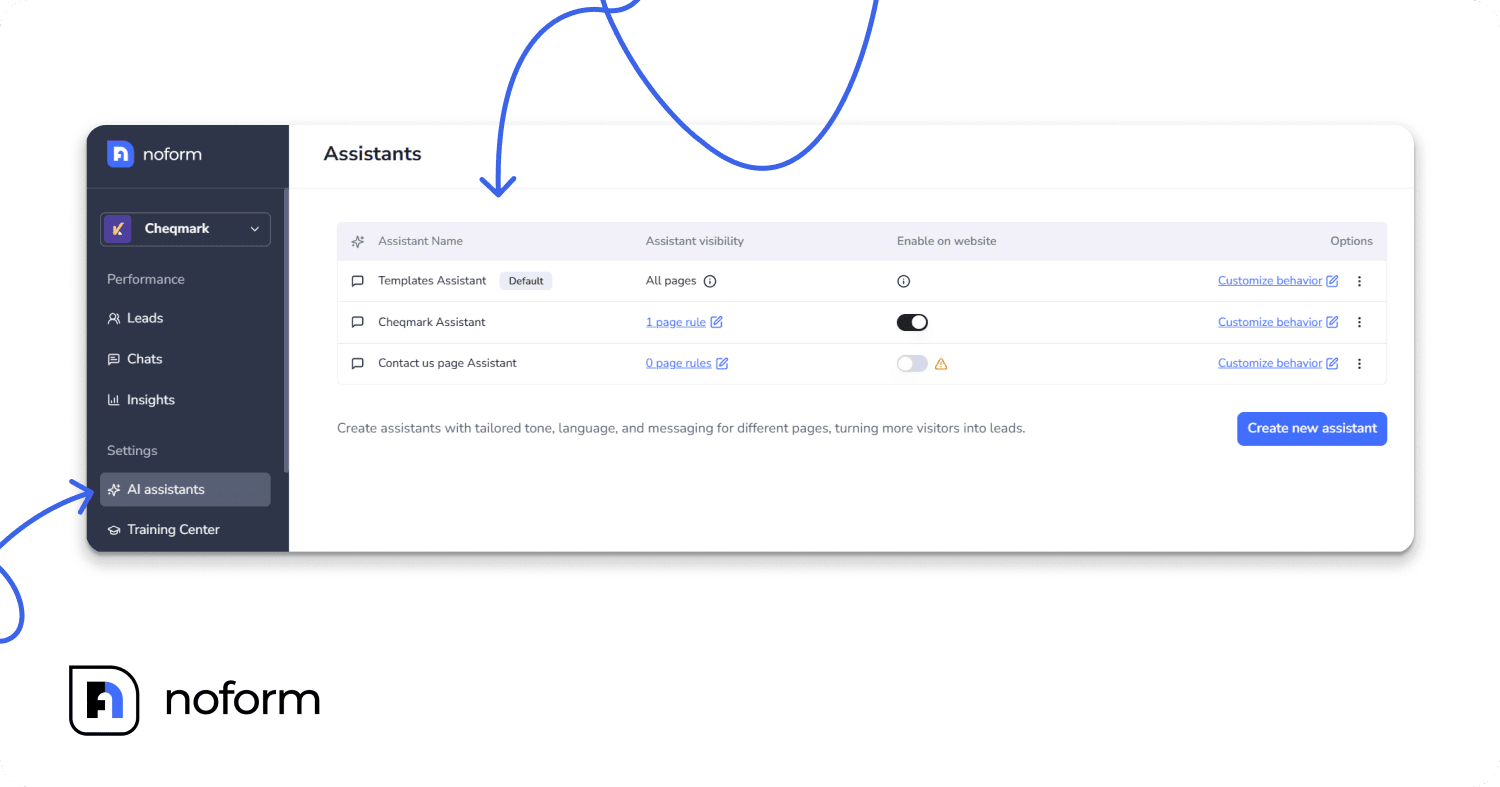
Your implant landing page gets its own welcome message, its own conversation starters, and qualification attributes tuned for implant buyers. Your Invisalign page gets a configuration built for patients comparing practices. Your homepage gets something more general. Every page you haven’t specifically assigned falls back to a default assistant, so your entire site has coverage — no visitors go unengaged.
An implant visitor and an Invisalign visitor aren’t in the same decision process, and they shouldn’t be greeted the same way.
What happens after the lead is captured
Once a visitor provides contact details, NoForm AI automatically generates a 2–4 sentence AI summary of the conversation: what they asked about, what they said about the timeline or budget, and what they want next. That summary, together with contact details and the visitor’s general location, goes out as an instant email notification. Therefore, your treatment coordinator has the full context before they ever pick up the phone.
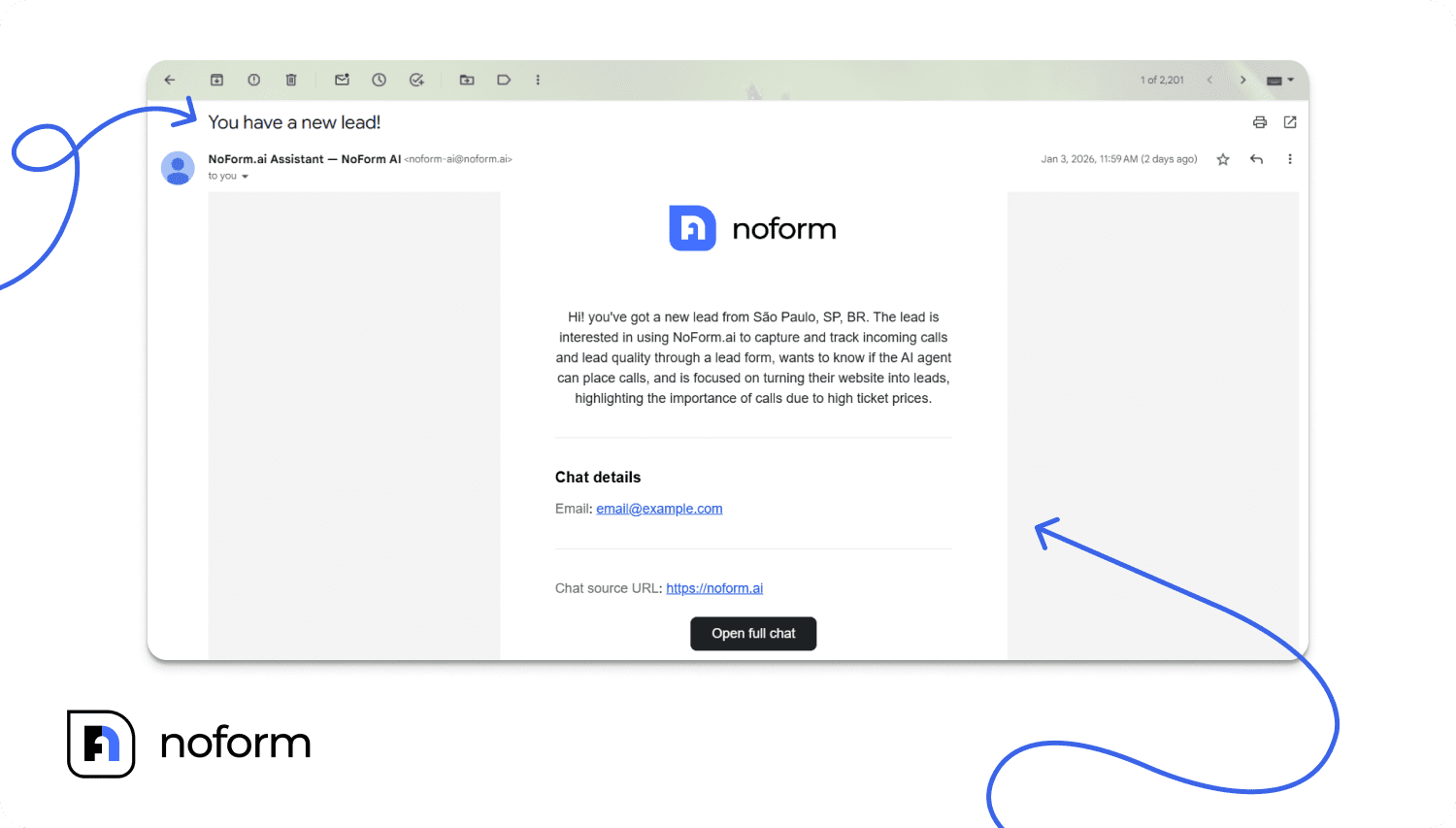
The lead lands in the Leads tab of your NoForm AI dashboard. Leads can sync automatically to HubSpot, Salesforce, Pipedrive, or any CRM via Zapier, Make, or webhook.
Your coordinator starts the morning with a sorted list: who’s implant-ready, who’s still exploring Invisalign, and what each one said about their timeline. The first follow-up call is a second conversation, not a cold introduction.
What the math looks like for a real dental practice
NoForm AI’s data shows AI-powered chatbots can convert up to 37% of website chats into leads, against roughly 2% for visitors who take action on a static site. Results depend on traffic and how well the assistant is configured, but the gap is consistent.
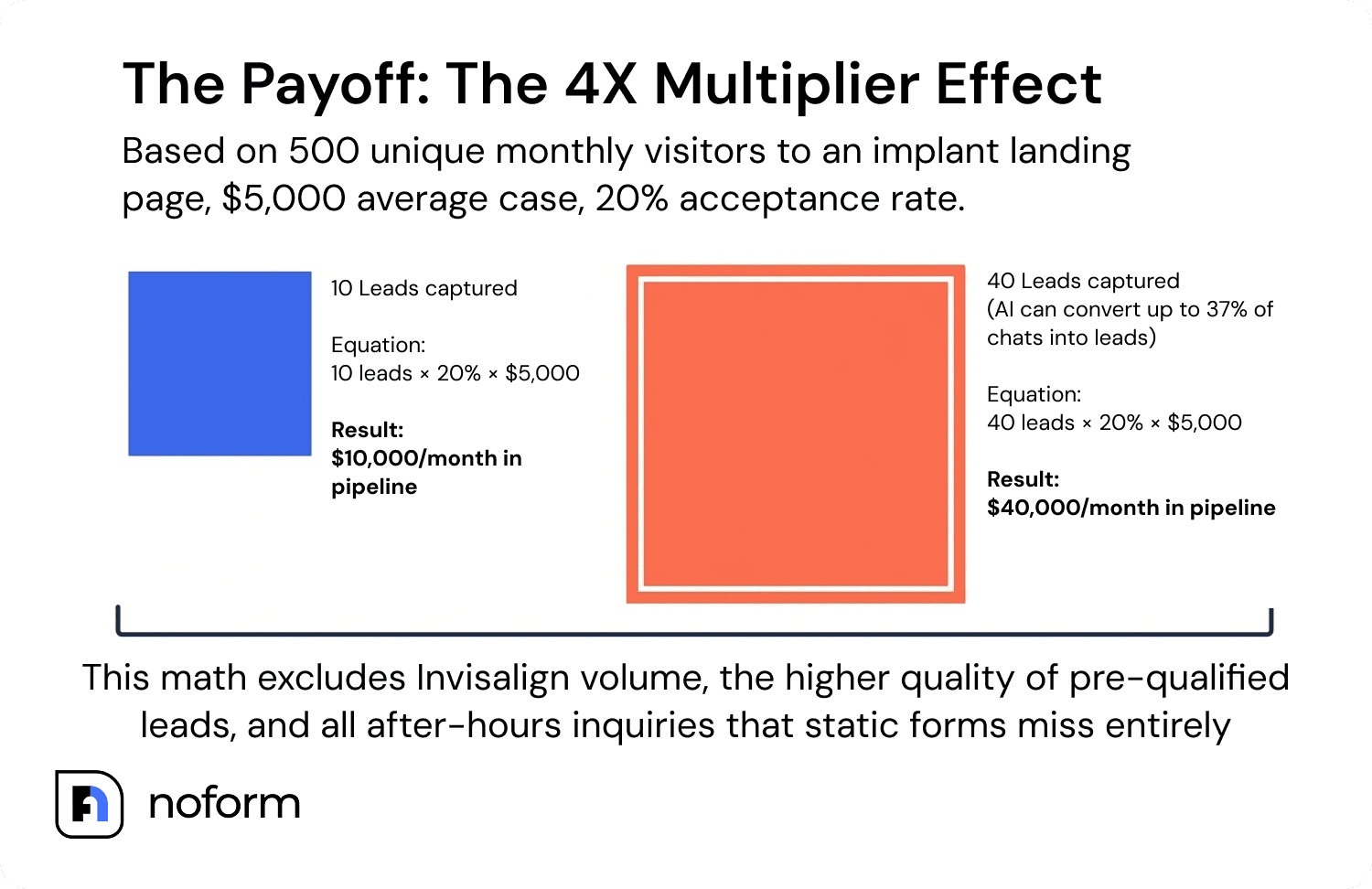
Say your implant landing page attracts 500 unique visitors a month, and your current form converts at 2% — that’s 10 leads. A configured chatbot moving that to 6 to 8% gets you 30 to 40 leads. At a $5,000 average single-implant case and a 20% acceptance rate on treatment plans:
- Form only: 10 leads x 20% acceptance x $5,000 = $10,000/month in pipeline
- With a configured chatbot: 40 leads x 20% acceptance x $5,000 = $40,000/month in pipeline
And that’s before counting Invisalign volume, the quality improvement from pre-qualification, or the after-hours inquiries a form-only site simply never sees.
FAQ
What is a dental practice chatbot, and how is it different from a live chat widget?
A dental practice chatbot is an AI-powered conversational tool that engages website visitors, asks qualification questions, and captures contact details without a human agent on the other end. A live chat widget requires a staff member to respond in real time.
A chatbot like NoForm AI works 24/7 and handles multiple conversations at once, making it far more consistent for new patient lead generation than a live chat that disappears after office hours.
How does a chatbot specifically help with Invisalign lead generation?
Invisalign patients research across multiple practice websites before choosing a provider. NoForm AI engages them immediately, answers timeline questions, explains what a free scan involves, and offers to book one before they open a competitor’s tab. Page-specific conversation starters on your Invisalign page make sure every visitor’s first impression is built for exactly what they came to ask.
Can I run different NoForm AI chatbots for my implant page and my Invisalign page?
Yes. NoForm AI supports multiple assistants assigned to specific pages or URL patterns using flexible matching rules (contains, starts with, is exactly, ends with). Each assistant carries its own welcome message, conversation starters, and qualification attributes. Any page you haven’t assigned still falls under your default assistant, so coverage never has gaps.
Does NoForm AI work for multilingual dental practices?
Yes. NoForm AI automatically detects the visitor’s language and replies in it. If your practice runs dedicated pages in Spanish, French, or other languages, you can assign a separate assistant to those URL paths with a fully translated welcome message and conversation starters, so every patient gets a native-language experience.
How long does NoForm AI setup take for a dental practice?
Training is automatic. Enter your site’s URL, and the AI scans the existing content. Most practices are live within minutes of that step. Writing page-specific welcome messages, conversation starters, and qualification attributes for your implant and Invisalign pages adds a few more minutes. No developer needed at any point.
Set up your dental chatbot
A dental website that treats every visitor the same leaves implant and Invisalign cases on the table, especially the ones who show up after your front desk has gone home.
NoForm AI trains on your site automatically, runs page-specific conversations, and flags a qualified lead the second contact info comes through.
Create your AI assistant and see what your implant and Invisalign pages can do once they’re actually talking back.