
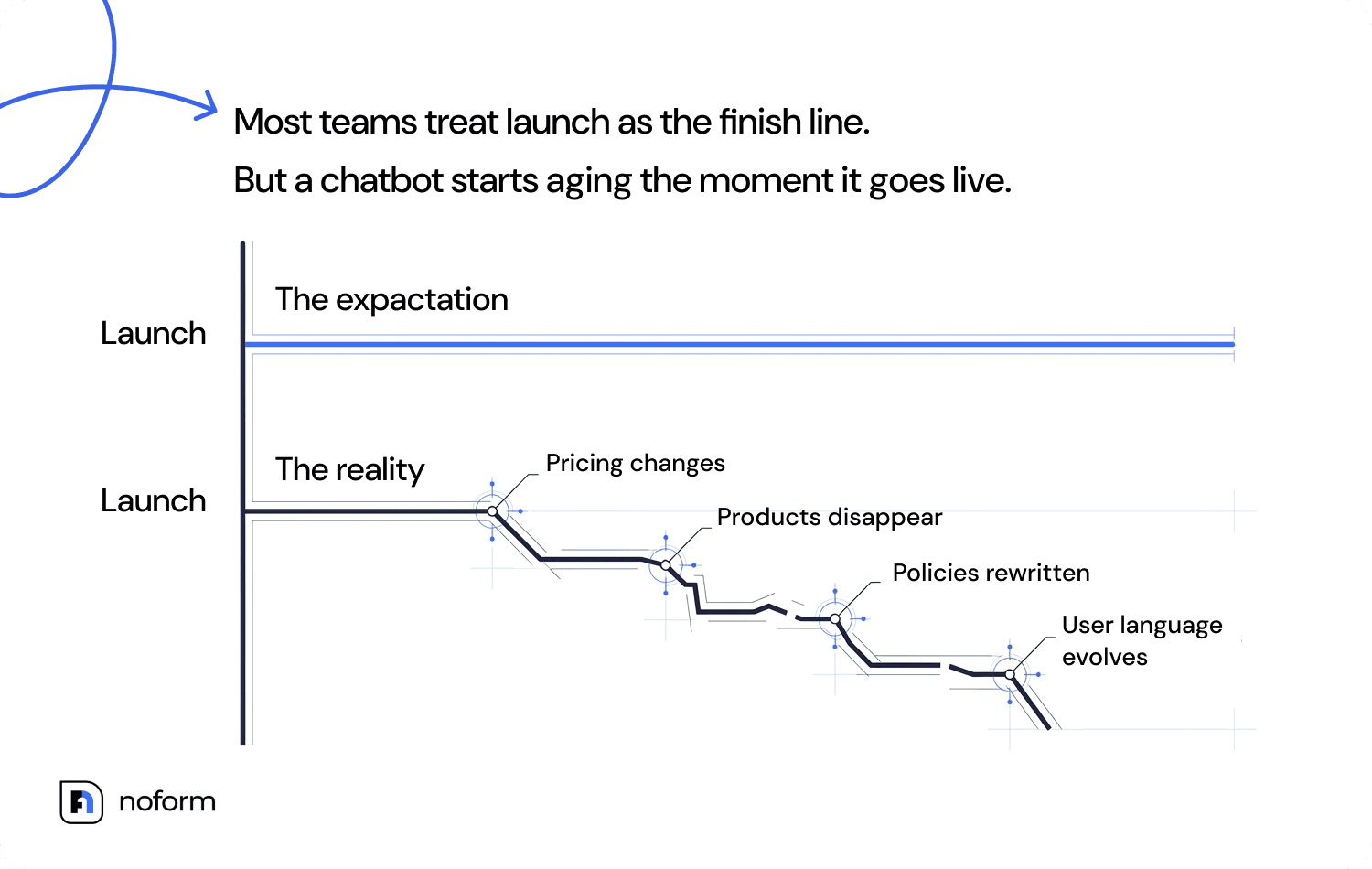
Most teams treat launch as the finish line. But a chatbot starts ageing the moment it goes live: pricing changes, policies get rewritten, products disappear, and customer language evolves. Without regular AI chatbot maintenance, its knowledge quickly becomes outdated. LLM-based assistants require continuous chatbot optimization to stay accurate and useful. This guide presents a practical maintenance framework for keeping your chatbot reliable long after launch.
What is chatbot maintenance?
Chatbot maintenance is the ongoing process of keeping your website chatbot accurate, useful, and in sync with how your business runs today. In day-to-day work, this means a variety of different things. The most obvious ones include: troubleshooting errors, monitoring performance metrics, and verifying that integrations haven’t stopped working without anyone noticing.
But it also means going back into the knowledge base when your pricing changes or your return policy gets a rewrite. It means reviewing conversation logs the way a good editor reviews a draft, hunting for moments when the bot’s response technically answers the question but misses what the user needed.
Prompt refinement, NLP improvements, intent recognition tuning, security audits, compliance checks – all of it fits under the chatbot maintenance umbrella. The mindset shift that actually matters here: this isn’t a project that closes out. This is a workflow that is more akin to the approach used to maintain data integrity in a CRM system or to optimize advertising campaigns.
Why does chatbot maintenance matter after launch?
Imagine that a product line that existed in March is discontinued by July. Your chatbot doesn’t know that automatically, and if you don’t update its data, it will confidently keep giving users outdated information. This discrepancy between what the bot says and what is actually true frustrates users. On top of that, mistakes like these can be quite costly.
Someone receives an incorrect answer about return deadlines, contacts customer support to dispute it, and now you have a support ticket that the chatbot was supposed to prevent in the first place. Multiply that by hundreds of conversations, and you’ll realize that not only are you not saving time, but you’re also creating extra work.
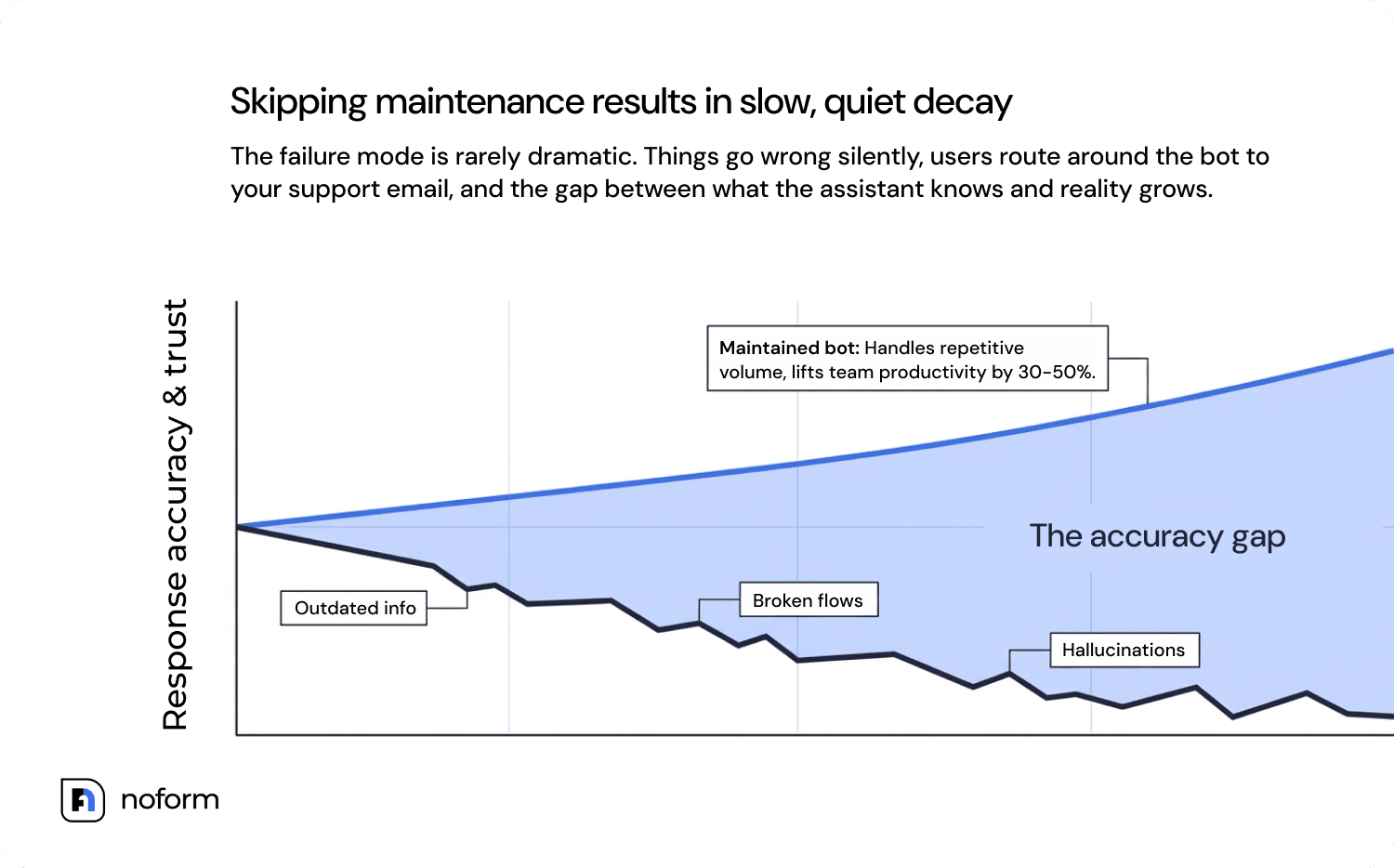
Maintained properly, the same tool does the opposite: it handles repetitive questions cleanly and supports practical AI chatbot use cases such as FAQ handling, lead qualification, appointment collection, and product guidance. Research backs this up: well-maintained chatbots can lift team productivity by 30–50% or more. But that number assumes someone is actually maintaining the thing.
What happens if you skip chatbot maintenance?
The failure mode is rarely dramatic. Things go wrong slowly and quietly. Users start getting outdated answers – maybe the bot is still quoting last year’s shipping timeframes, or referencing a feature your product team removed two months ago. Most users won’t bother telling you. They’ll just leave, or they’ll route around the bot entirely and go straight to your support email.
The point of building it was to handle that volume, and now it isn’t, and your support inbox is the first place you’ll see it. LLM-based bots add an extra layer of risk. As their knowledge base, retrieval sources, prompts, and business data become outdated, the gap between what the assistant knows and what’s actually true grows. That increases the risk of inaccurate or hallucinated answers.
Rule-based bots break differently: flows someone carefully mapped out six months ago start misfiring because users word things a little differently now, a product name changed, or a step in the process no longer exists. Both failure types land in the same place – your human team doing the cleanup. Salesforce data puts a real number on the damage: 28% of consumers have written off a brand completely after one bad chatbot experience. You won’t win those people back with a hotfix.
What’s the difference between chatbot maintenance and chatbot optimization?
| Chatbot maintenance | Chatbot optimization | |
|---|---|---|
| Goal | Keep the bot accurate and functional; prevent decay | Improve the bot’s results — engagement, conversion, performance |
| Focus | Outdated info, broken flows, security | Conversion rate, containment rate, CSAT |
| Trigger | Business/data changes, bugs, drift | Performance data, A/B test results |
| Frequency | Daily, weekly, or monthly | Quarterly or bi-annually |
| Typical tasks | Fixing broken links, updating FAQs, reviewing error logs | A/B testing prompts, redesigning flows, upgrading NLP models |
| KPIs monitored | Fallback rate, uptime, error rate | Resolution rate, CSAT, lead conversion rate |
| Example action | Update pricing in the knowledge base | Rewrite fallback copy to reduce drop-off |
Takeaway: Maintenance keeps the chatbot healthy. Optimization makes it perform better.
The 7-step chatbot maintenance lifecycle
Nobody actually sits down and designs a maintenance process from scratch. It usually goes like this: something breaks, the team rushes to fix the problem, and somewhere amid the chaos, a rough workflow takes shape. The seven steps below are basically a formalized version of what good teams end up doing anyway, once they’ve been burned enough times by skipping a step.
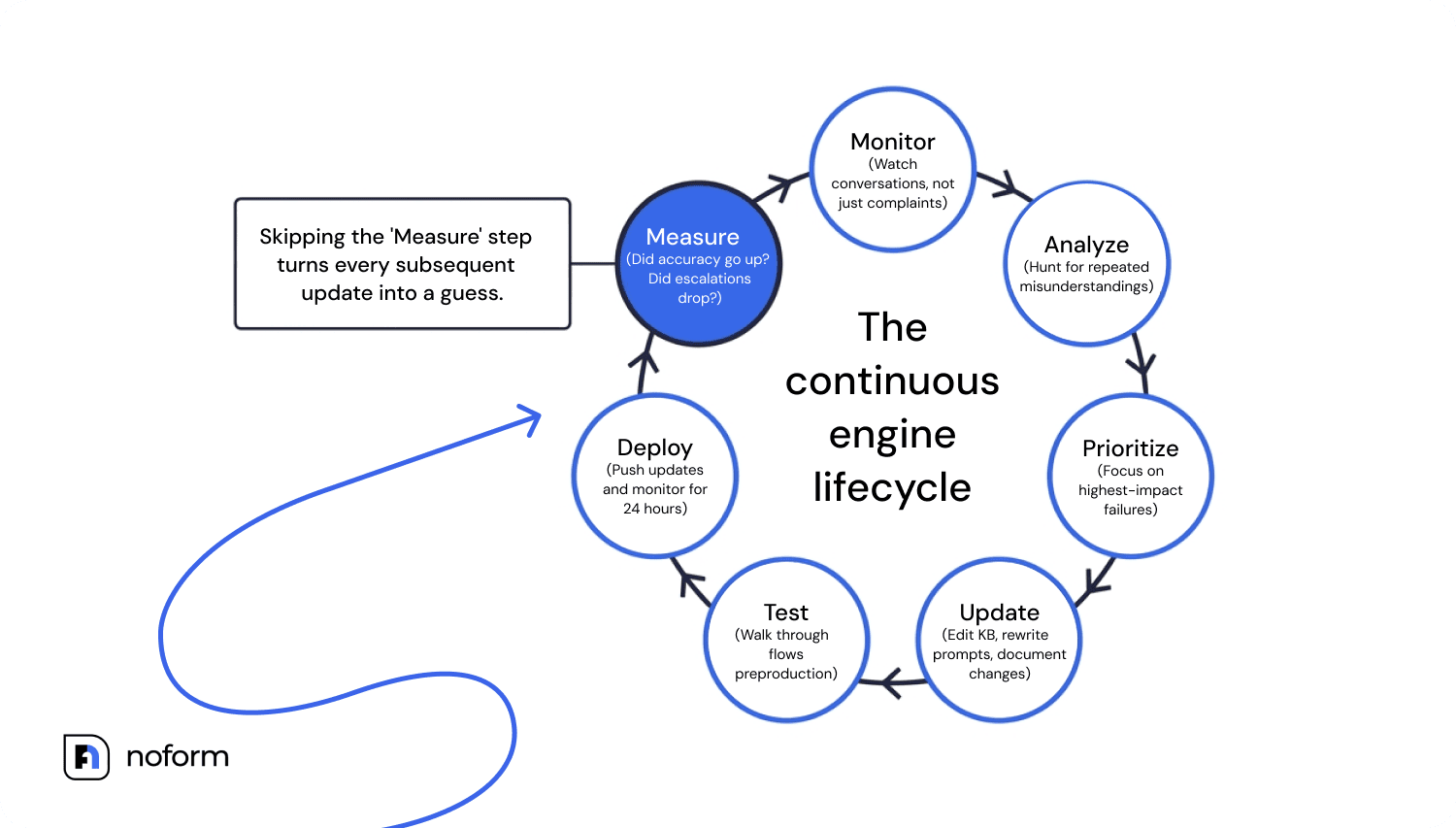
- Monitor. Watch conversations regularly, not just when users complain. By the time complaints surface, the problem has usually been happening for weeks.
- Analyze. Dig into the logs with a specific question: where exactly do things go sideways? Look for repeated misunderstandings, the messages where users bail, the questions that keep coming back unanswered.
- Prioritize. You’ll find more problems than you can fix at once, and that’s normal. Focus on whatever is hurting you most right now. Sometimes that’s a broken flow. Sometimes it’s one wrong piece of information getting served hundreds of times a day.
- Update. Make the changes the analysis pointed to. Knowledge base edits, rewritten prompts, adjusted intents – whatever it is, document what you changed and why.
- Test. Walk through the affected flows before anything reaches production to make sure the fix doesn’t introduce new problems elsewhere.
- Deploy. Push the update and actually watch what happens for the next 24 hours. Edge cases that didn’t show up in testing often appear the moment real users get involved.
- Measure. Did accuracy go up? Did escalations drop? Did that one question stop coming in? If you can’t answer these, you don’t know whether the update helped.
Then start again from step one. Running one or two of these steps in isolation is probably worse than running none, because it creates the feeling of doing maintenance without the results. The measurement step is what makes each cycle actually build on the last – skip it, and every update is essentially a guess.
How often should you maintain a chatbot?
| Frequency | What to check | Best for |
|---|---|---|
| Daily / Weekly | Critical errors, failed conversations, broken flows | High-volume support bots |
| Monthly | Knowledge base updates, fallback analysis, intent gaps | Most business chatbots |
| Quarterly | UX review, KPI analysis, automation performance, analytics platform review | Growing chatbot programs |
| After major business changes | Prices, policies, products, integrations | Any chatbot connected to live business data |
Cadence depends on: conversation volume, chatbot type/purpose, industry, frequency of product/service changes, and risk level to the user.
The complete chatbot maintenance checklist (10 steps)
Ten steps sounds like a lot. In practice, most of them are quick once you know what you’re looking for. Give it a couple of cycles, and it stops feeling like maintenance and starts feeling like a routine check-in with something you care about keeping in good shape. How often? Monthly at minimum. If your business is the kind where pricing or policies shift frequently, then closer to weekly.
Review conversation logs
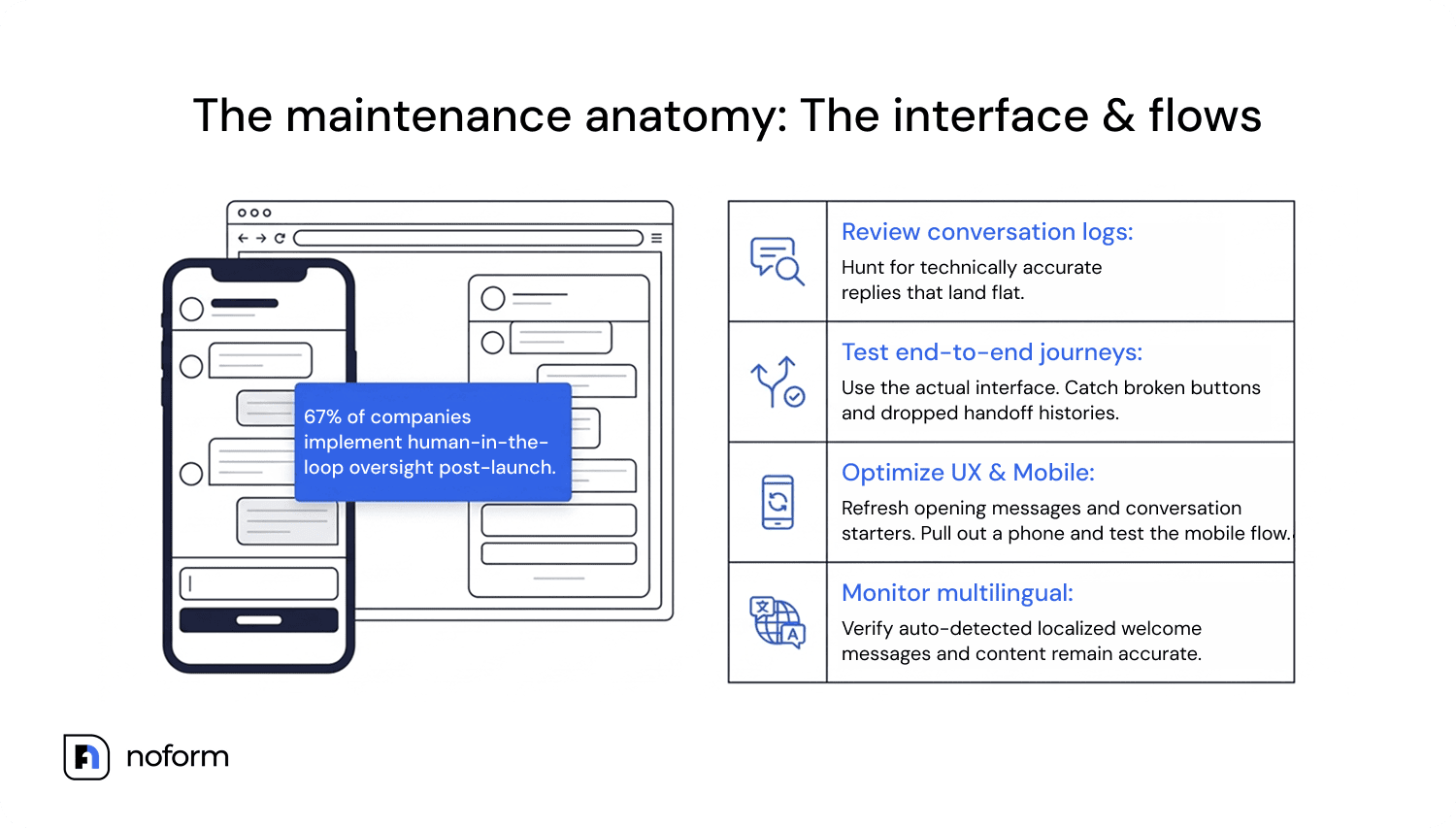
Open the transcripts and read them like a customer. You’ll spot what no dashboard metric catches: a question that keeps coming back in slightly different wording, a reply that’s technically accurate but lands flat, a moment where the user clearly gave up. That’s your real signal. Most problems show up here long before anyone files a complaint. Gartner reports that 67% of companies implemented human-in-the-loop oversight after initial deployment, reinforcing the value of reviewing real conversations after launch.
Update the knowledge base
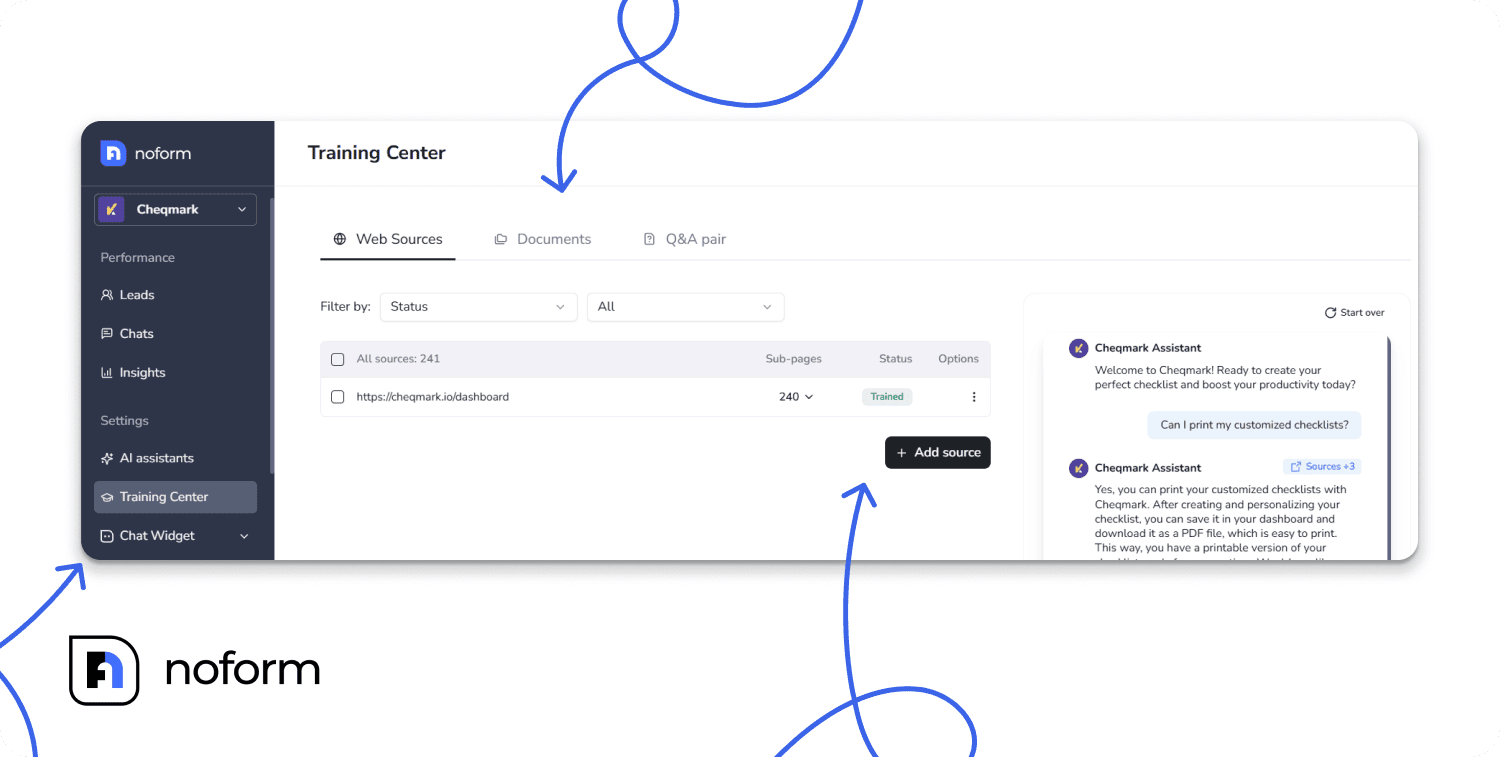
Following AI chatbot best practices starts with keeping the sources your assistant relies on accurate and up to date. Pricing changed? Update it. A product got discontinued? Pull it. Outdated knowledge base content is a common source of incorrect chatbot answers, and it’s also one of the easiest problems to prevent.
Improve intent recognition and NLP accuracy
The bot might hear the right words but miss what the user actually means. Test it regularly, especially after you update the knowledge base. If you’re running a RAG setup, this step also includes housekeeping on the retrieval layer: duplicate sources, stale documents, chunks that are too large or too small to surface useful context. It’s tedious work, but it directly affects whether the right answer comes back or the bot goes fishing in the wrong pond.
Test key conversation flows end-to-end
Go through your main flows as if you’d never seen the product before. Use the actual interface, not a staging preview you already know. Things break in ways that are invisible from the backend: a button that doesn’t fire, a response that makes sense on its own but has nothing to do with what the user just said, a handoff that drops the conversation history entirely. Walking through it yourself is still the fastest way to catch those.
Optimize UX
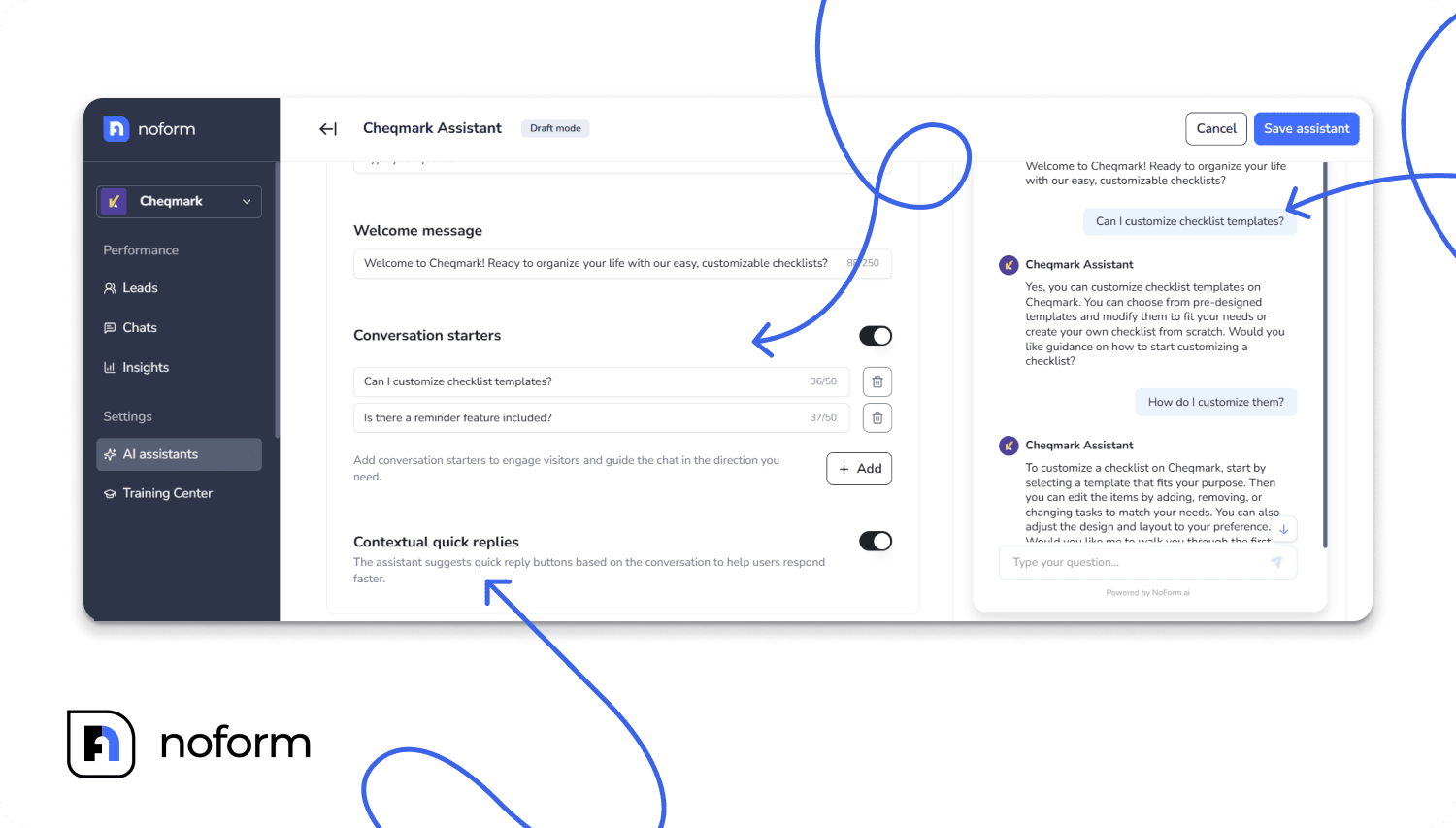
The opening message and conversation starters are almost always written once at launch and then completely forgotten. Which is a problem, because they’re often the reason users engage, or don’t. Go back and read them fresh. Do they still make sense for where the business is right now? Check handoff too: does the agent receiving an escalation actually see the conversation history, or are they starting cold? And pull out your phone and test the whole flow on mobile. It’s the thing teams consistently skip, and where UX breaks most often.
Check integrations and APIs
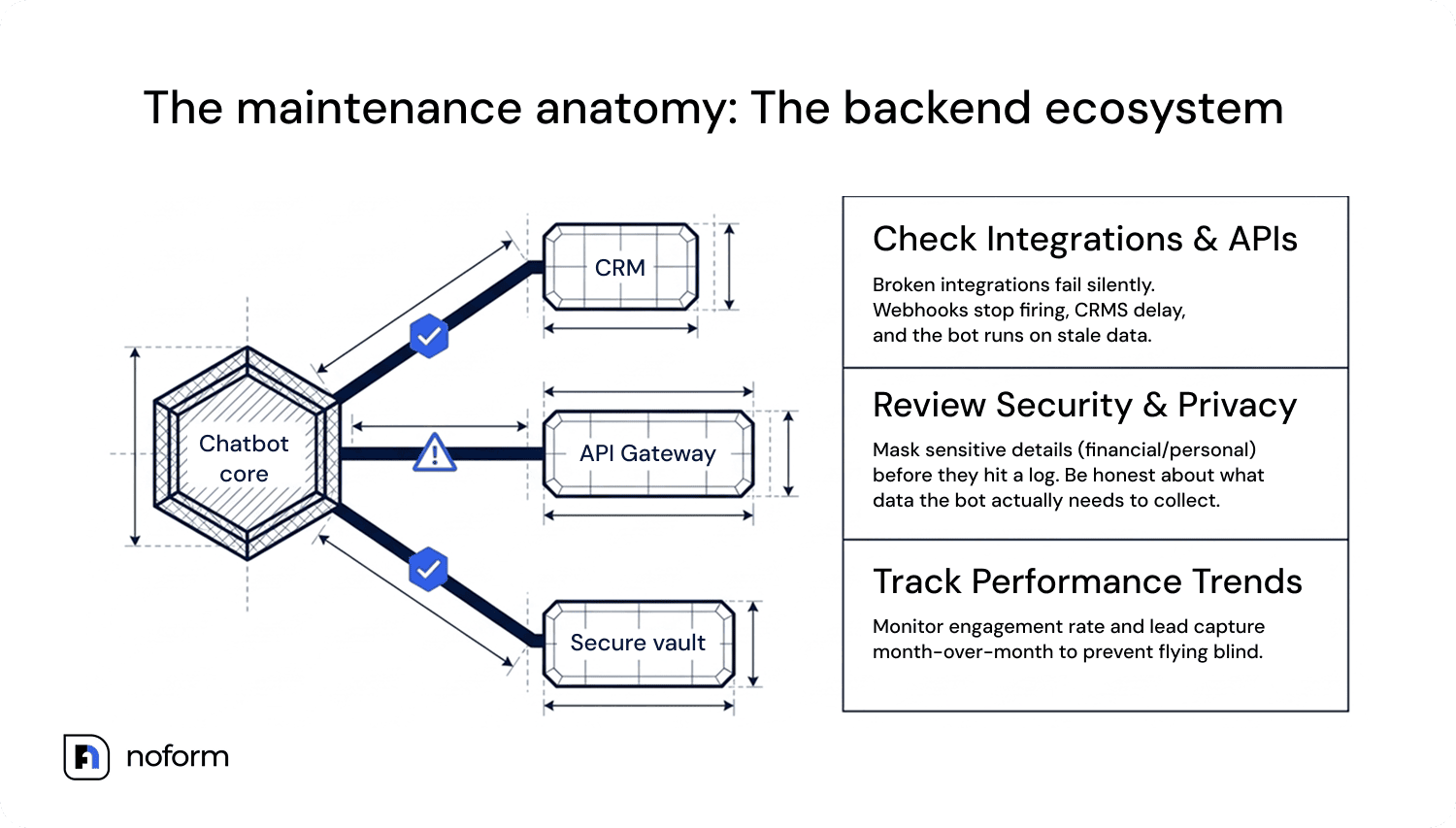
This one bites people because broken integrations often fail silently. A webhook stops firing, a CRM sync gets delayed, a calendar connection drops, and the chatbot keeps running, just with stale or missing data underneath. Add a quick integration health check to every maintenance cycle so you don’t find out about failures from a confused user.
Track chatbot performance over time
Pull your metrics and actually look at them in context. Engagement rate dropping? Lead capture down month-over-month? Those trends are telling you something. Without tracking this over time, you’re essentially flying blind.
Review security, privacy, and compliance
Go through your data collection settings and be honest about what the bot actually needs versus what it’s gathering out of habit. Sensitive details – anything that could identify a person or expose financial information – should be masked before it ever hits a log.
Monitor multilingual performance
Make sure manually configured localized content stays accurate after updates. For platforms such as NoForm AI, which auto-detect the language of user queries, this is particularly relevant to localized welcome messages and conversation starters.
Review citations and sources
Spot-check where your bot’s answers come from. In a RAG-based system, old documents don’t disappear on their own; they sit in the retrieval index and quietly compete with your current ones. An answer sourced from a policy doc you replaced eight months ago can look perfectly normal until someone notices the information is wrong.
The steps themselves aren’t hard. What’s hard is remembering to do them when nothing is visibly on fire. But that’s exactly the point: by the time something breaks loudly enough to get everyone’s attention, you’ve already lost users who never complained; they’ll have simply left.
8 chatbot maintenance mistakes (and how to fix them)
| Mistake | Why it happens | Business impact | How to fix it |
| Treating deployment as the finish line | Lack of a dedicated AI strategy. | Bot quickly becomes outdated and frustrates users. | Assign an AI owner and set a monthly review schedule. |
| Updating the business but not the bot | Siloed departments (marketing vs. support). | Customers receive wrong pricing or outdated features. | Tie chatbot updates to the standard product launch checklist. |
| Ignoring failed conversations | Over-reliance on vanity metrics (total chats). | Repeated poor experiences drive customers to competitors. | Dedicate 2 hours monthly to reading transcripts of failed chats. |
| Never reviewing prompts | Assuming the LLM is “smart enough.” | AI hallucinations increase over time. | Implement version control and continuous prompt engineering. |
| No testing after integration changes | IT updates systems without notifying CX. | APIs break, causing the bot to fail mid-conversation. | Run automated ping tests on all API endpoints on a regular schedule |
| Over-automating without human escalation | Trying to cut support costs too aggressively. | High customer churn due to trapped, angry users. | Build a seamless, structured handoff to human agents. |
| Never assigning a responsible owner for upkeep | Maintenance is assumed to be “everyone’s job,” so it becomes no one’s | Issues pile up until they become customer-facing failures | Name one owner (or a rotating one) accountable for the review schedule |
| Collecting more user data than the chatbot actually needs | Broad data capture set up during initial build and never revisited | Unnecessary compliance exposure and user distrust | Audit collected fields against actual qualification/support needs each quarter |
| Ignoring user feedback and past interactions | No process for turning thumbs-down ratings into action | Recurring complaints never get fixed, satisfaction plateaus | Route flagged feedback into the monthly knowledge-base review |
How modern AI platforms reduce chatbot maintenance
Manual maintenance can become difficult for small and mid-sized teams to sustain. Modern AI platforms reduce that workload through automatic website retraining, built-in testing environments, analytics, and conversation review. These capabilities make it easier to run consistently.
NoForm AI is one example: it automates website retraining, centralizes knowledge management, and provides conversation review tools that help teams identify issues without manually reviewing every transcript.
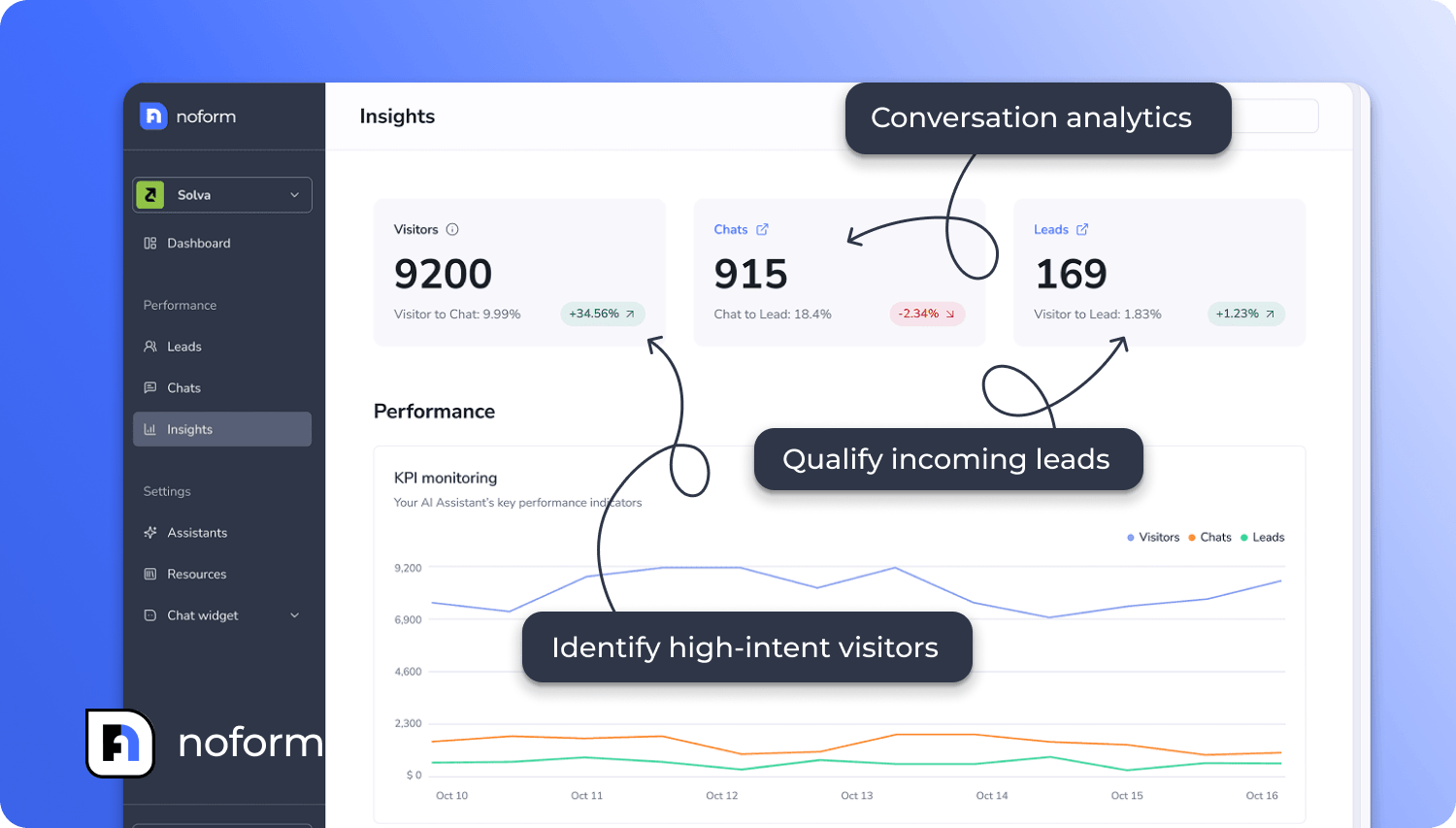
The outcomes are real: one NoForm AI customer saw a 37% lift in visitor-to-lead conversion after using an AI chatbot for lead generation. And with 84.8% of roofing websites having no chat at all, and only 3.7% running real AI chat, even getting the basics right puts most businesses well ahead of their competitors.
Quick-reference maintenance checklist
- Review conversations
- Update outdated knowledge base content
- Add missing intents
- Test key user journeys across digital channels
- Check integrations
- Improve fallback responses
- Validate security and privacy settings
- Collect and analyze user feedback
- Document changes and plan the next review
Keep your chatbot working, or watch it fall behind
Maintenance isn’t glamorous work. Nobody’s going to celebrate updating your refund policy in the knowledge base or cleaning up a broken flow on a Tuesday afternoon. But that’s what separates a chatbot that actually earns its keep from one that slowly becomes a liability.
Fortunately, NoForm AI takes most of that manual maintenance off your plate.
Ready to get started? Try NoForm AI to build an AI assistant today, or book a quick demo call—fifteen minutes is all it takes to see if it’s the right fit for your team.
Frequently Asked Questions
What is chatbot maintenance?
AI chatbots require continuous optimization to stay accurate and useful. Chatbot maintenance is the ongoing process of keeping your website assistant in sync with how your business runs today. Unlike static software, LLM-based tools need regular tuning of user intent recognition, prompt refinement, and knowledge base updates. If you want your chatbot to deliver reliable, round-the-clock support, you must define maintenance as an ongoing task. Done right, this workflow helps your team save time and allows your business to scale and grow.
Why is chatbot maintenance important?
Proper maintenance prevents outdated information—such as old pricing, changed return policies, or discontinued products—from spreading and damaging the user experience. When teams maintain their conversational assistants properly, they reduce support tickets and support primary business goals. Skipping maintenance creates a major operational challenge, as inaccurate or hallucinated answers quickly alienate customers.
How often should chatbot maintenance be done?
At a minimum, chatbot maintenance should occur on a monthly basis. However, for dynamic companies where pricing, policies, or product features shift frequently, careful planning for weekly reviews is recommended.
How do you maintain a chatbot after launch?
Maintaining an assistant after launch relies on a structured 7-step lifecycle:
- Monitor & Analyze: Track real-time conversations to observe how the assistant responds to queries and pinpoint where interaction failures occur.
- Prioritize & Update: Focus on critical knowledge gaps and apply continuous learning from transcript logs to update prompt logic and internal sources.
- Test, Deploy & Measure: Verify fixes end-to-end, deploy changes safely, and measure results to ensure you achieve performance targets.
When you build a chatbot, launch is only the starting point; ongoing success depends on continually meeting evolving chatbot needs.
What is included in chatbot maintenance?
The overall scope of chatbot maintenance covers a wide range of technical and operational workflows:
- Knowledge & content management: Updating knowledge bases, clearing stale documents, checking RAG citations, and monitoring localized content.
- Technical health: Verifying API connections to integrate third-party tools (like CRMs or scheduling apps) and maintaining system automation.
- User experience & features: Testing end-to-end conversation flows, introducing new features, optimizing handoffs to human agents, and auditing data privacy and security.
Can AI chatbots maintain themselves?
There is a limit to self-maintenance, though modern technology platforms like NoForm AI drastically reduce the manual workload. They achieve this through automatic website retraining, centralized knowledge management, and built-in analytics. However, human oversight remains a critical resource, which is why 67% of companies implement human-in-the-loop oversight after deployment.
What’s the difference between chatbot maintenance and chatbot optimization?
- Chatbot maintenance: Focuses on keeping existing system functions intact—fixing broken flows, updating knowledge bases, auditing backend code or configuration settings, and ensuring integrations run smoothly.
- Chatbot optimization: Focuses on enhancing and expanding capabilities, enabling the chatbot to deliver higher conversion rates, smoother user journeys, and better customer outcomes over time.
How do you prevent chatbot hallucinations?
Preventing LLM hallucinations requires active maintenance of your retrieval system:
- Maintain retrieval cleanliness: Audit data sources regularly to remove duplicate, stale, or conflicting documents so old policies don’t compete with current information.
- Audit citations & prompts: Spot-check response citations to ensure the bot pulls answers strictly from verified sources and refine system prompts whenever inaccurate outputs surface.