Captured leads often arrive with little or no context.
An email address or phone number tells sales teams who reached out, but not why.
As a result, critical qualification questions remain unanswered:
- Why did the visitor reach out?
- What problem are they trying to solve?
- Where are they in the buying process?
To move forward, sales teams are forced to re-qualify leads manually—reading full chat transcripts, asking follow-up questions, or starting outreach with generic messages. This slows response times, weakens personalization, and wastes valuable sales effort.
The missing layer isn’t more data. It’s explanation.
NoForm AI already solves the “form friction” problem by capturing and qualifying leads through natural conversations instead of static forms.
But it doesn’t just capture leads — it explains them.
Through AI-generated chat summaries, NoForm AI turns raw conversations into clear, actionable lead context that sales teams can understand in seconds.
What is a chat summary in NoForm AI?
A chat summary in NoForm AI is an AI-generated overview of a conversation, automatically created as soon as a visitor starts chatting.
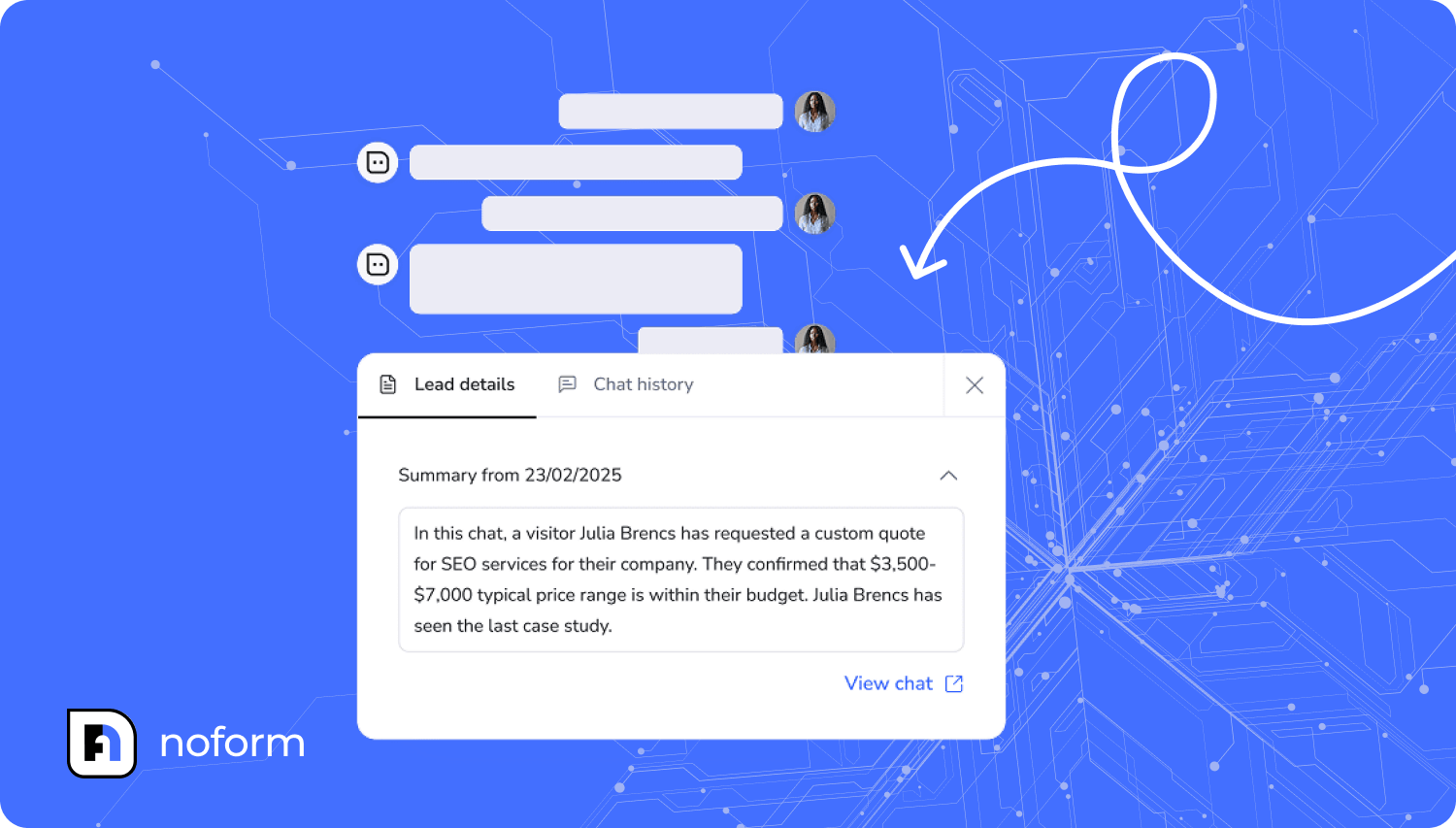
Instead of presenting long transcripts, NoForm AI distills the conversation into a concise 2–4 sentence summary that captures the most important qualification signals and context.
NoForm AI creates these summaries by analyzing the full conversation and extracting signals to help you quickly qualify leads.
Here’s what it does technically:
- Analyzes the full conversation as soon as a visitor engages with your AI assistant
- Extracts key information: visitor intent, questions asked, pain points mentioned, qualification details, and next steps
- Condenses everything into 2-4 sentences that focus on what matters for sales qualification
- Generates automatically—no manual work required
- They appear immediately in your dashboard, in email notifications, and they can be synced to your CRM
The summary is not a replacement for the full transcript. It’s an abstraction layer—a way to understand the conversation’s purpose and outcome without reading every message.
The complete chat history is always preserved and accessible; the summary just compresses it into something a sales rep can consume at a glance.
What information is included in a NoForm AI chat summary
Each chat summary is designed to give sales teams immediate clarity. While summaries vary depending on the conversation, they typically include:
- Visitor intent (for example: pricing evaluation, demo request, feature comparison)
- Primary need or problem they are trying to solve
- Products or services discussed during the chat
- Key pain points or requirements mentioned
- Qualification details collected conversationally (email, phone, company, size)
- Specific features, integrations, or technical constraints referenced
- Any expressed timeline, urgency, or decision criteria
- Requests for next steps (for example: follow-up call, demo, or pricing details)
This allows sales teams to understand both what the lead wants and how serious they are, without reading the entire conversation.
How to access and use chat summaries in NoForm AI
NoForm AI treats summaries as core context, not an optional add-on, so they show up wherever your team interacts with leads and chats.
Chat summaries are available in:
- Email notifications sent when a lead is captured
- Dashboard views in both the Chats and Leads tabs
- CRM workflows via integrations like Zapier, Make, and webhooks
This means your sales team doesn’t need to log into NoForm AI to get context. Summaries travel with the lead into your existing workflows. Check your email, open your CRM, or review your NoForm AI dashboard—the summary is there, ready to inform your next action.
Accessing summaries for leads
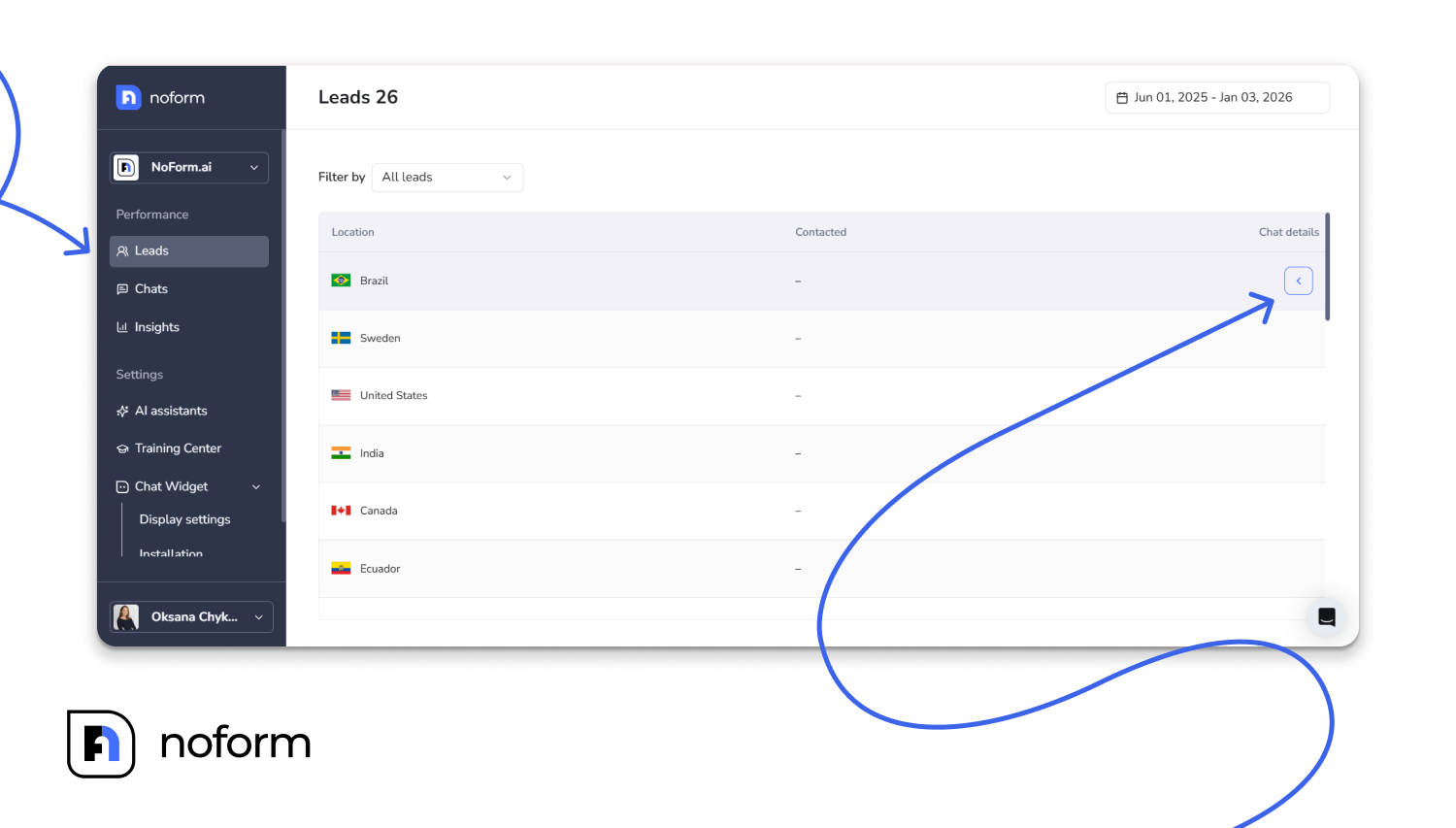
When a visitor provides contact information and becomes a qualified lead, their summary appears in the Leads tab:
- Navigate to the Leads tab
- Click the Chat details button for a lead

- Open the Lead details tab
- In the Lead details view, the Summary section appears below the contact information and core attributes
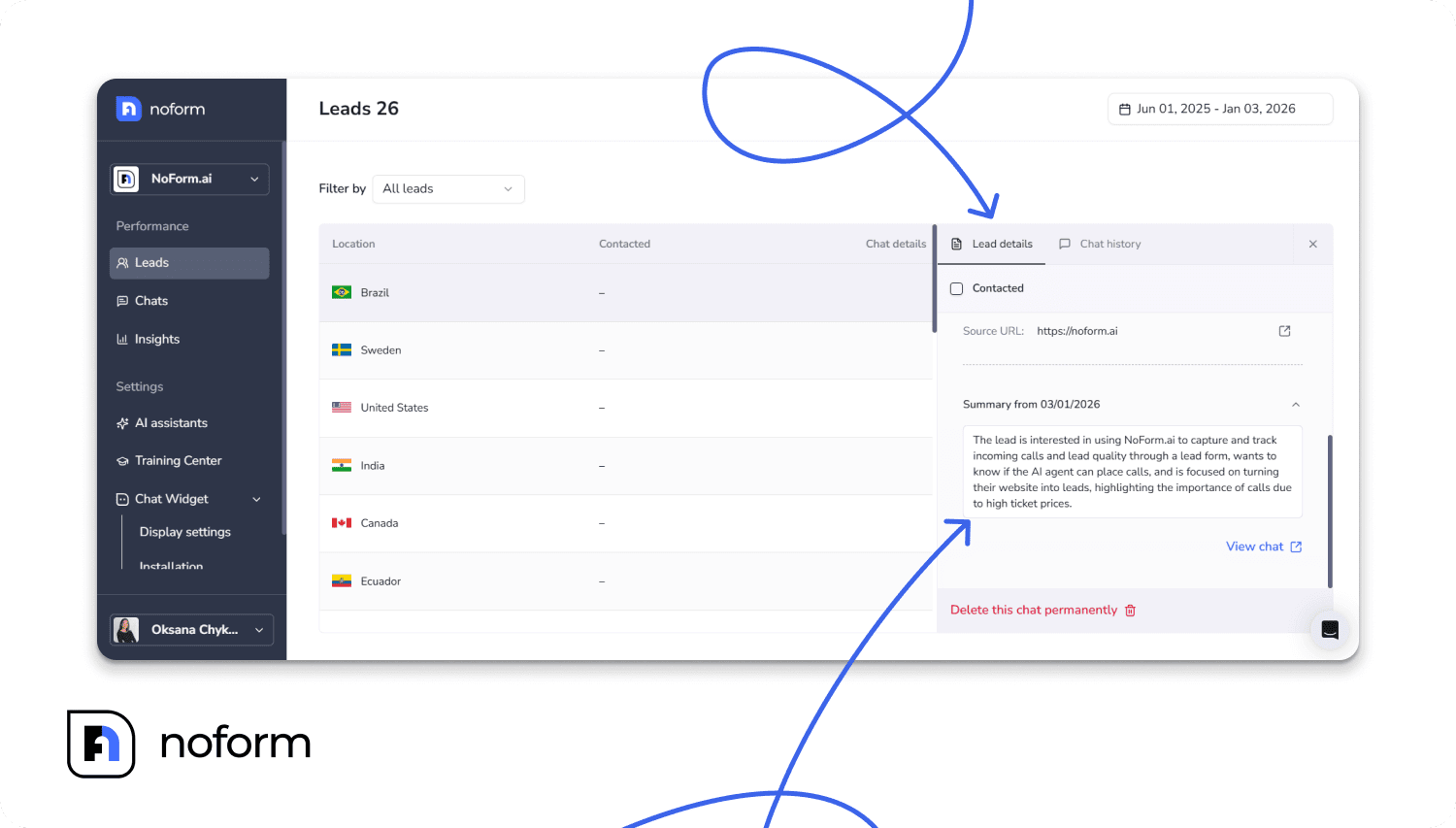
From there, sales reps can glance at the summary, then open the full transcript if they need exact wording or deeper context.
Accessing summaries for all chats
Not every conversation becomes a qualified lead, but all chats still have a transcript and associated context. This is useful for analyzing engagement patterns and training your AI.
To view summaries at the chat level:
- Navigate to the Chats tab
- Click on any conversation
- Open the Chat details tab
- Find the Summary section
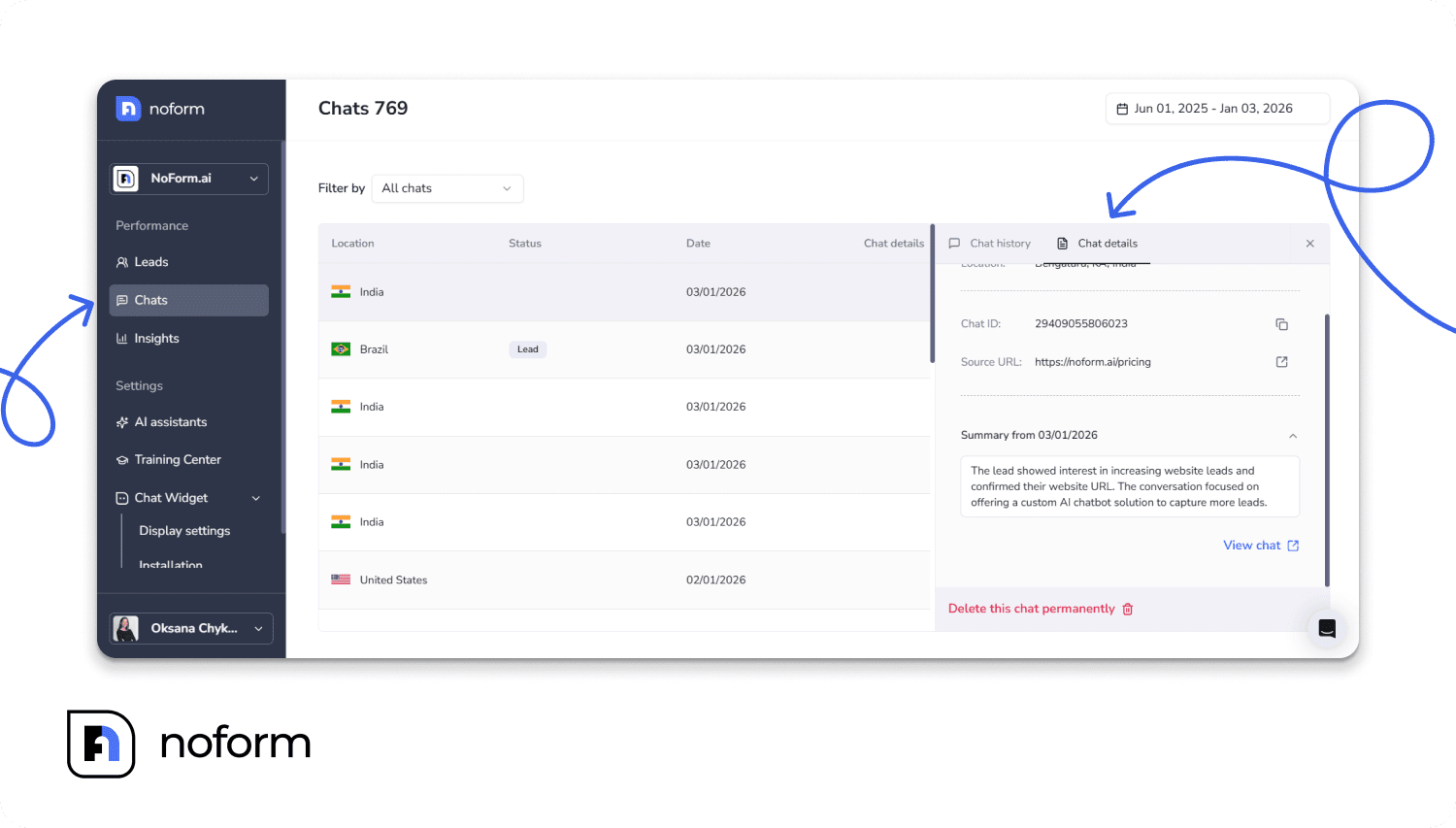
The full transcript is always available in the adjacent Chat History tab, so you can verify details or read the complete conversation whenever needed.
Summaries in Email Notifications
When NoForm AI captures a lead, your sales team receives an automatic email notification. The summary is included directly in the email, along with location information and contact details.
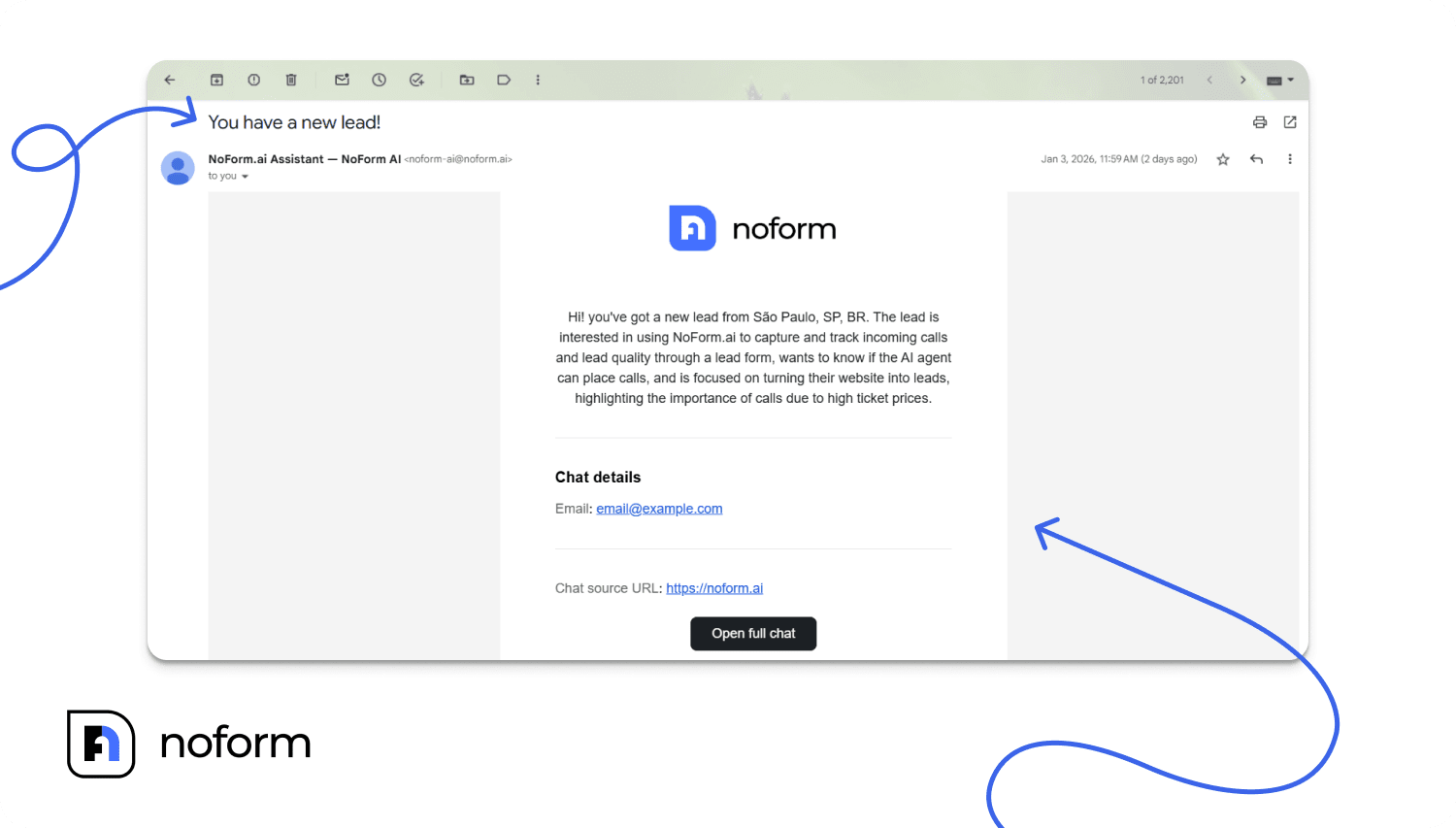
This means your team can assess lead quality and prioritize their response without opening the dashboard. Everything they need to craft a personalized follow-up is in the email itself.
Summaries in CRM Integrations
If you’ve connected NoForm AI to your CRM through webhooks, Zapier, or Make, chat summaries sync automatically with each lead record. You can map the summary field to your CRM’s notes section, a custom field, or wherever you track lead intelligence.
The result: your sales team works entirely within their existing CRM while still benefiting from the conversational context NoForm AI captures. No platform-switching, no manual copying—just seamless intelligence flowing into the tools your team already uses.
How chat summaries accelerate lead qualification
Effective sales qualification depends on understanding intent, urgency, fit, and context. Raw chat transcripts contain this information, but it’s often buried under dozens of messages.
Summaries surface these signals in a format that can be reviewed in seconds.
This turns qualification from an investigative process into a decision shortcut. Summaries don’t replace human judgment—they accelerate it by eliminating the noise and presenting the facts that drive prioritization.
Instant context at a glance
A 30-message conversation can be reduced to a few clear sentences.
Sales reps understand the lead’s intent in seconds rather than minutes, without scrolling through full transcripts just to grasp the basics.
Sales reps can:
- Understand what the visitor wanted and why they reached out
- See whether they were evaluating pricing, comparing vendors, or asking support questions
- Spot any objections or blockers raised in the conversation
No scrolling. No guessing. The summary delivers instant comprehension, freeing your team to focus on response strategy instead of transcript archaeology.
Faster prioritization
Because summaries highlight buying signals, sales teams can quickly distinguish high-intent from low-intent conversations.
Summaries make it easy to scan for buying signals:
- Mentions of budget, team size, or deployment timelines
- Indications of decision authority or key stakeholders
- Requests for demos, quotes, or enterprise plans
Combined with NoForm AI’s structured lead attributes (like emails, phones, company size, industry, or other custom fields), you can instantly decide who to call first and which leads need nurturing instead.
This is the difference between calling 20 leads in random order and calling the 5 most qualified leads first. Summaries let you optimize for conversion, not just activity.
Personalized follow-up from day one
Generic outreach kills conversion.
When your sales rep opens with “Hi, I see you filled out a form on our website,” the visitor hears: “I didn’t read what you told us, so now you have to repeat yourself.”
Chat summaries enable personalized outreach from the first touchpoint.
Instead of generic outreach that re-asks questions, sales team can:
- Reference the exact product, plan, or integration the visitor cared about
- Acknowledge their team size, use case, or constraints
- Address specific objections or worries the visitor raised
Thus, with clear context, outreach becomes specific and relevant.
Now, instead of traditional form follow-up, a sales rep can confidently open with something like:
“Hi John, I saw you were exploring our Pro plan and asking about Salesforce integration for your 50-person team…”—because those details are already distilled in the summary and lead profile.
By referencing the visitor’s actual questions and concerns, sales reps demonstrate understanding, build trust faster, and avoid restarting the conversation from zero.
This isn’t just better for conversion—it’s respectful of your visitor’s time and demonstrates that your company pays attention.
Chat summaries vs. full transcripts: when to use each
Chat summaries and full transcripts serve different purposes. Summaries are best for speed and triage; full transcripts are best for depth and precision. Using each at the right moment avoids both over-reliance on AI and wasted time.
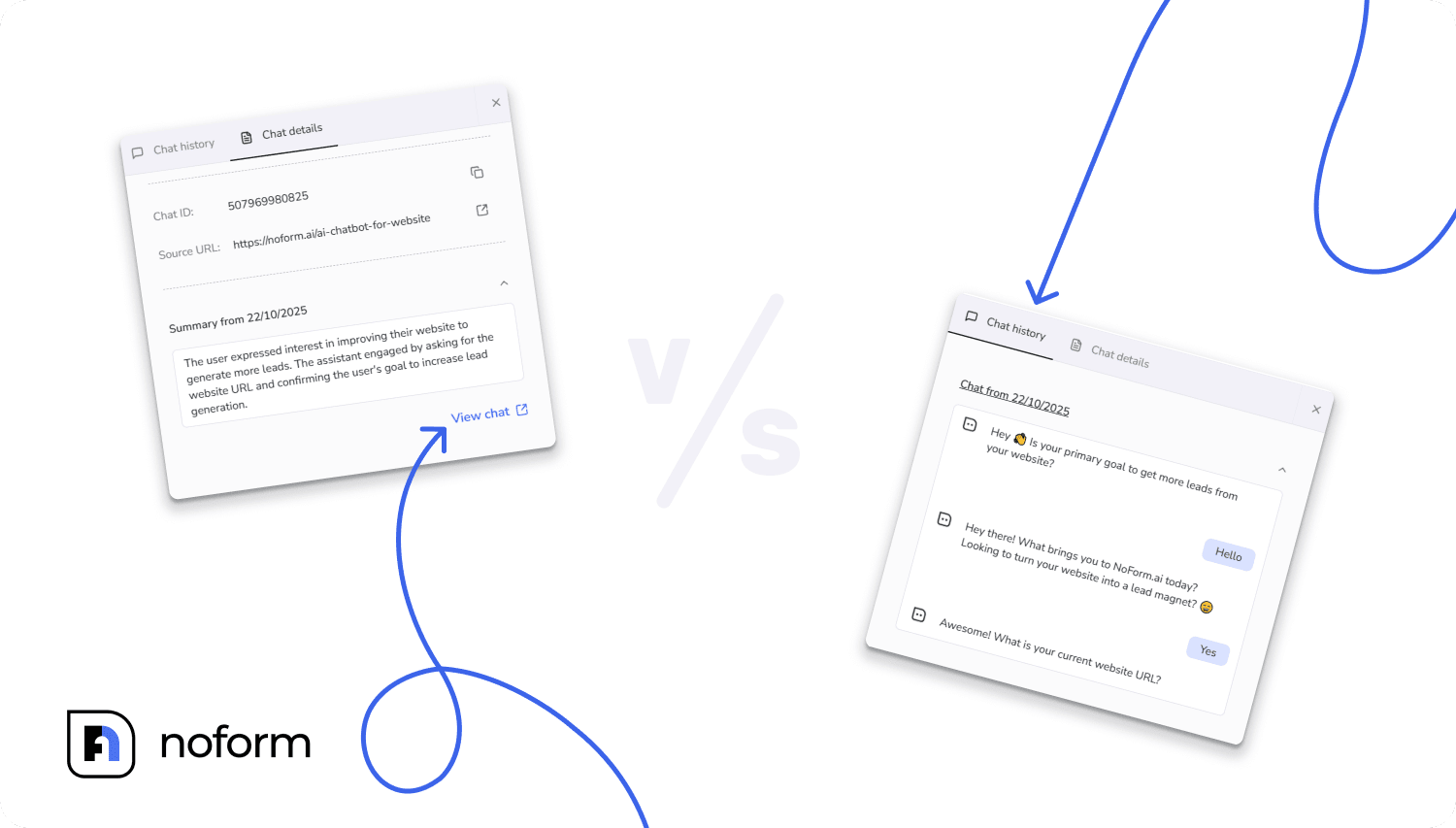
Use chat summaries for:
- First-response context for a new lead
- Deciding which leads to call or email first
- Internal handoffs between SDRs, AEs, and support
- High-level notes for CRM records
Use full transcripts for:
- Preparing for a deep-dive sales call or demo
- Verifying exact phrasing of commitments, quotes, or promises
- Understanding complex technical questions or edge cases
- Analyzing conversation patterns for training and optimization
- Reviewing conversations for compliance or dispute resolution
Summaries make humans faster and more focused, but transcripts stay as the source of truth.
Best practices for using chat summaries
To get the most value from summaries, pair them intentionally with your existing processes.
Start with the summary, then zoom in
For any new lead or chat:
- Read the summary first to understand intent, needs, and urgency
- Open the full transcript only if you need specific quotes, technical details, or clarification
This alone can save several minutes per lead, especially for long conversations.
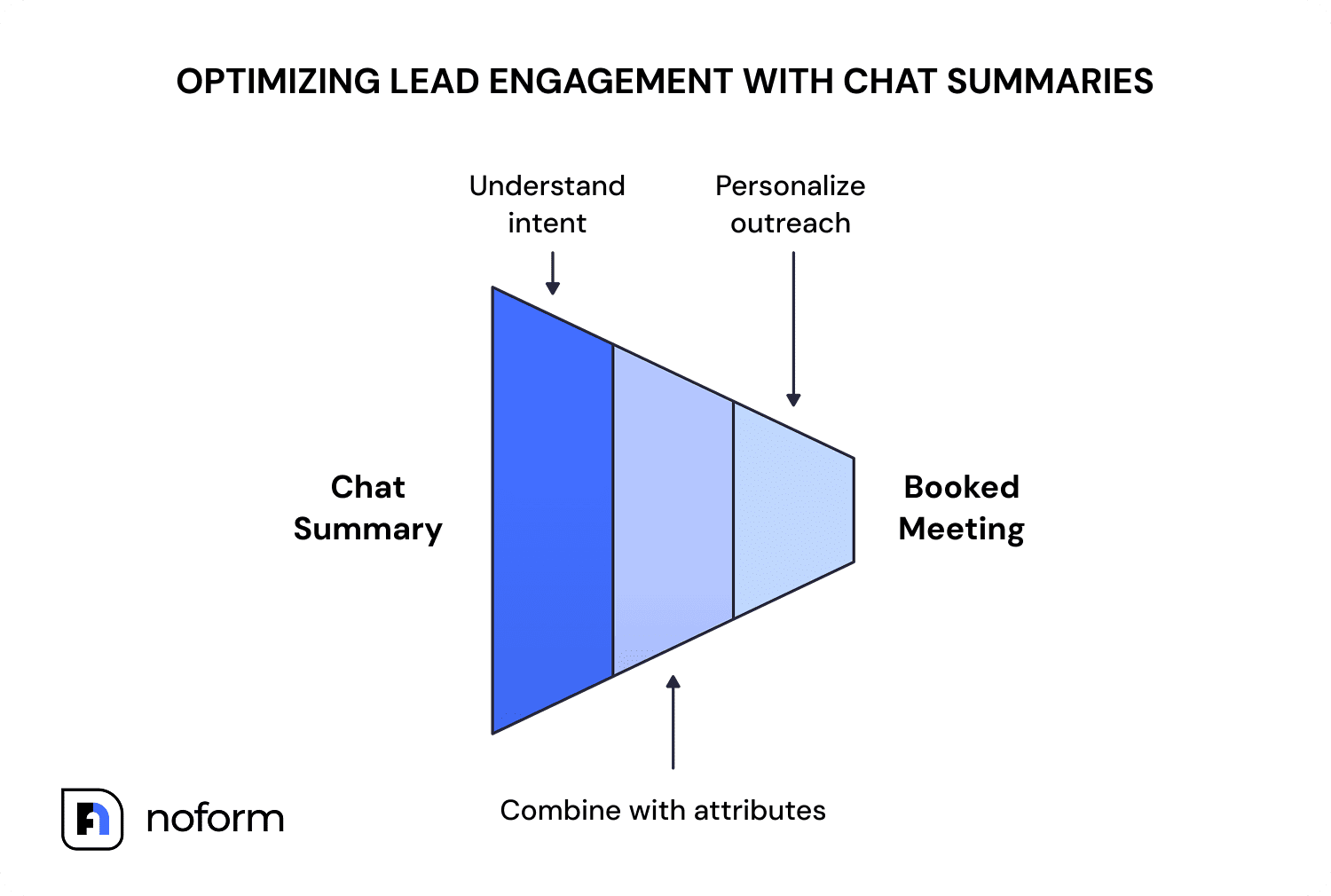
Combine summaries with structured lead attributes
NoForm AI assistants capture both conversational context and structured qualification data (email, phone, custom attributes). Together with summaries, this gives a complete picture of lead quality:
- Summary = narrative: story, pain points, intent
- Attributes = structure: hard fields for routing, scoring, segmentation
Sales and marketing teams can then route leads differently based on both context (what they asked) and profile (who they are).
Use summaries directly in outreach
Summaries are a ready-made prompt for personalized outreach.
When crafting your first email or preparing for your first call:
- Reference specific questions from the summary: “I saw you were asking about our API documentation and webhook capabilities…”
- Address stated concerns: “You mentioned you’re currently using [competitor]—I’d love to show you how we handle [specific feature] differently…”
- Acknowledge their context: “Since you’re working with a 50-person sales team, I think you’ll find our bulk user management and role-based permissions especially useful…”
This is about using the intelligence in the summary to craft outreach that feels specific, relevant, and informed.
This approach builds trust quickly and shortens the path from first reply to booked meeting.
Generic templates kill conversion. Personalized outreach—powered by summary insights—wins deals.
Common mistakes to avoid
AI summaries are powerful, but like any abstraction, they can be misused.
Relying only on summaries
Summaries are powerful, but they’re overviews, not replacements for complete information.
For major pricing commitments, complex edge cases, sensitive topics, or situations where exact wording matters, sales reps should always verify details in the full transcript before making commitments and promises.
Use summaries for speed and prioritization. Use transcripts for precision and verification.
Ignoring low-intent summaries
Not every visitor is ready to book a demo today, but summaries can reveal early-stage interest that is perfect for nurture campaigns or educational follow-up.
Track such leads as future pipeline instead of discarding them as failures.
Used correctly, summaries become a trusted shortcut, not a risky black box.
Conclusion: From conversations to clarity
Chat summaries turn unstructured conversations into actionable intelligence—giving your sales team the clarity, context, and confidence they need to qualify faster and close more deals.
NoForm AI doesn’t just capture leads — it explains them.
Every conversation becomes a clear story your team can act on immediately.
Ready to turn conversations into clarity? Log in to your NoForm AI dashboard or book a demo to see chat summaries in action.
Frequently Asked Questions (FAQ)
What is an AI chat summary in NoForm AI?
An AI chat summary is an automated, 2–4 sentence overview of a visitor conversation that extracts key qualification signals instantly. Instead of forcing sales reps to read long transcripts, NoForm AI analyzes the chat to highlight the visitor’s intent, pain points, and urgency, allowing for immediate understanding of the lead’s needs.
How do chat summaries accelerate lead qualification?
Chat summaries accelerate lead qualification by stripping away the ‘noise’ of a conversation and presenting only the actionable facts needed to prioritize leads. By delivering instant context—such as budget, timeline, and decision power—sales teams can identify high-quality prospects in seconds without performing ‘transcript archaeology.’
What information is included in a lead summary?
A standard chat summary captures the core elements required for sales context, including:
- Visitor intent: Why they reached out (e.g., pricing, demo request).
- Pain points: The specific problem they are trying to solve.
- Qualification data: Company size, budget, or specific feature requirements.
- Next steps: Any request for a follow-up call or quote.
Can I sync chat summaries to my CRM?
Yes, NoForm AI allows you to sync chat summaries directly to your CRM via integrations like Zapier, Make, and webhooks.
This ensures that the AI-generated context travels with the lead record, allowing sales reps to view the summary within tools like Salesforce or HubSpot without switching platforms.
Should I use the summary or the full transcript?
You should use the chat summary for speed, triage, and initial outreach, and the full transcript for deep-dive preparation and verification. The summary provides the ‘why’ and ‘what’ for quick decision-making, while the full transcript serves as the source of truth for verifying specific technical details or exact phrasing before a demo.
Where can I view chat summaries?
Chat summaries are accessible across three main touchpoints:
- Email notifications: Sent immediately when a lead is captured.
- NoForm AI dashboard: Located in the ‘Leads’ and ‘Chats’ tabs.
- CRM records: Automatically populated via integration workflows.